Unique way To Get More Friends and Requests on Facebook

Do you have a dream to promote your business or website using the social networking site like Facebook? Definitely you may have! To do so, you must have good amount of Friends, Community and Groups. If you are willing to add more friends and get more friends request, this unique trick will help you a lot.


You can get lots of new friends and the new friends request within 5 minutes! Before getting started let me show you one amazing example,
look at the following image:
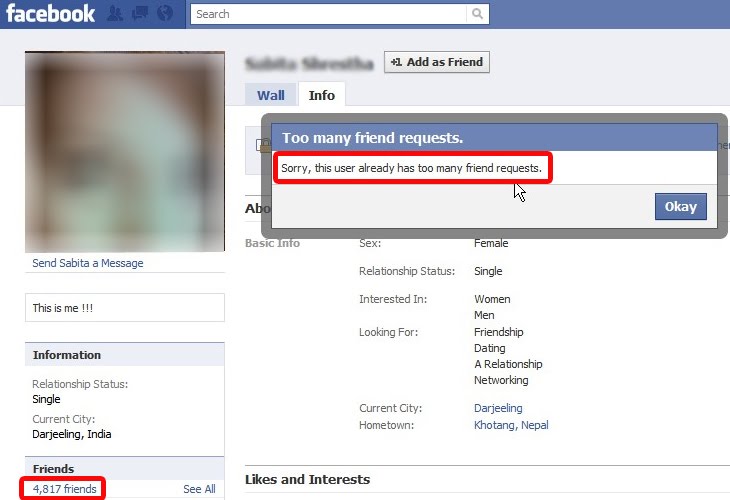


The image is blurred because I don’t want to violet Facebook’s policy but I can tell one thing that, this picture consists of one beautiful girl. Look at the highlighted areas, she has more than 4000 friends. I also tried to add her with my Facebook account but I got the message something like this, “Sorry, this user already has too many friend request“. Amazing! She has so many other friend request even she have already more than 4000 friends!

Now, you must know what is the secret!

Does it matter weather that is her own photo? Of course no! So, Change your picture which is more attractive ever. Definitely all of the people may looks for outlooks. You’ll get huge friend request more than you expected. You do not have to search for the friends that are interested in your niche. At least, you can get friend request without wasting the time.

You must consider your name as well. People view your personal identity and they think to add you or not. Let’s hope this trick is helpful to you.
Enjoy Guys! and don’t forget to post your comments. � MyTricksTime.com

Tricks To Reset Memory card Password In Nokia

If you have a symbian phone and you have forgotten your memory card then you can easily get your password by using this simple trick.This trick works only on nokia symbian phones not on the java phones.Before starting the tutorial on �Tricks To Reset Memory card Password In Nokia� Here are the the requirements
  • X-plore application (You can easily find its trial version for Free)
  • Nokia symbian mobile phone.
The X-plore application is used to view the data files of the phone.
Here Is the step by step tutorial For resetting the password.
1.       Install the X-plore application in your nokia phone.
2.       Now start your X-plore application and press 0(zero) button and select � show the system files �.This will make the X-plore application to show your system files.
3.       After completing the above step goto C:/Sys/Data/MmcStore

By- www.hack-room.blogspot.com

4.       Now press 3 button from your keypad and you will see options.Now click on the Hex-viewer option.This will make your phone to show files in hexadecimal.
5.       Look at the 3rd Column On the screen you will see a code like ! TMSD02G (c??�?x???6?2?6?2?6)  .Note down the numbers present between the ?.This is your memory card password.Like in this example the password is 62626.

By- www.hack-room.blogspot.com

6.       Now you can enter the password and view your memory card files or you can reset  your memory card password to a more memorable password.

Remember you can gain access to C:/Sys/Data/ if and only if you have set a password on your memory card,

How to speed up Samsung Galaxy Ace android phone

Using galaxy ace android phone is a pleasure to all because of its lovable user interface and smoothness. But when your galaxy is flooded with apps, high end games , things become laggy. The fact is that many apps left a background process for its working. This consumes a fair amount of RAM. Here’s some tips that i often use to save RAM usage thereby speeding up the device.  These tips are applicable to almost all android phones other than galaxy ace. 

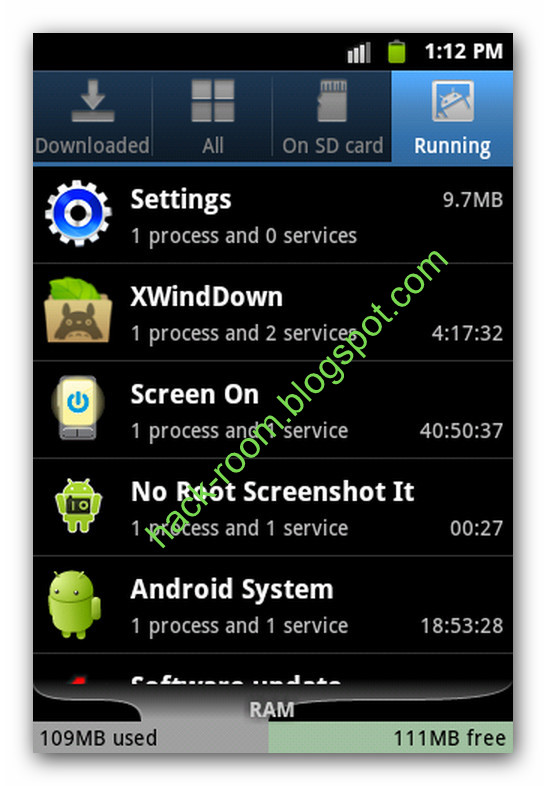
  • Uninstall unwanted applications from your galaxy ace. Many of us install apps from market to test it out but always forget to uninstall unwanted apps. Not all apps run background processes but you can identify them by checking out running applications. It can be accessed from Settings > Applications > Running services. It shows the running process so you can identify apps which are useless running background tasks to consume RAM. 


  • Use Advanced Task Killer to kill unwanted process. Goto android market and search for an android application named  Advanced Task Killer and download it to your phoneThis application let you find all tasks running on your android and kill them by selecting each one or kills all. I use this app whenever i feel the phone lags.


  • Get the latest version of android 2.3.4 for ace. The official gingerbread update is available for galaxy ace. Install kies on your pc and upgrade your phone. Read how to upgrade your galaxy ace to gingerbread using Kies. This update include fix to some bugs that were present in the factory version of android froyo. Also it speeds up the games. 

  • Avoid using heavy Live wallpapers. I too a fan of live wallpapers, but sadly this is one of the causes of your phone to slow down. 
Try these tips to speed up you Samsung galaxy ace. If you have other tricks, please share them under comments section.

Free TV Channels For Airtel And Docomo

Free TV Channels For Airtel And Docomo

hey friends i m back with new free tv chaneels for airtel and docomo users, you can use free channel with your mobile now.
i m sharing all popular channels list for you friends
Real Player Users Setting: [+] In Default ACCESS POINT  Select Working gprs/edge CONNECTION Setting
Few Are listed below :
[1] Airtel � MOBILE OFFICE (airtelgprs.com)
[2] DoCoMo � TATA.DOCOMO.INTERNET
In Online time select �UNLIMITED�
[+] Next Options :
[1] Lowest UDP Port : 6970 or 06970
[2] Higest UDP Port : 32000
Then select Advanced Setting from options and set as below.
[3] GPRS Bandwidth � 37.52kbps/40.2kbps/53.6kbps
[4] Egprs Bandwidth � 84.42kbps/125.16kbps/178kbps


and NOKIA S40 users setting 

� Nokia S40 Users :
GoTo � Setting � CONFIGURATION � Add New � Streaming
Now In Access Point/APN Setting Enter your working access point/APN address.
� Airtel � airtelgprs.com
� Idea � imis or internet
� DoCoMo � TATA.DOCOMO.INTERNET
�  RELIANCE rcomwap
And At last in
Lowest UDP Port : 6970 or 06970
Higest UDP Port : 32000
Now come press back 2-3 times, press option and active this setting


now time to share channels list here it is:

Popular TV channels for Airtel and Docomo

Sony tv:
SONY DOCOMO 3G
SONY DOCOMO 2G
SONY AIRTEL 2G
SONY AIRTEL 3G 
������-
STAR PLUS:
STARPLUS DOCOMO2G
STARPLUS DOCOMO3G
STAR PLUS AIRTEL2G
STAR PLUS AIRTEL3G
������-
SAB TV:
SABTV DOCOMO2G:rtsp://10.124.70.86:554/2G/LIVE/SABTV_QCIF.sdp
SABTV DOCOMO3G:rtsp://10.124.70.86:554/SABTV_QVGA.sdp
SABTV AIRTEL2G:rtsp://10.2.216.228:554/2G/LIVE/SABTV_QCIF.sdp
SABTV AIRTEL3G:rtsp://10.2.216.228:554/SABTV_QVGA.sdp
������-
STAR ONE:
STARONE DOCOMO2G:rtsp://10.124.70.86:554/2G/LIVE/STARONE_QCIF.sdp
STARONE DOCOMO3G:rtsp://10.124.70.86:554/STARONE_QVGA.sdp
STARONE AIRTEL2G:rtsp://10.2.216.228:554/2G/LIVE/STARONE_QCIF.sdp
STARONE AIRTEL3G:rtsp://10.2.216.228:554/STARONE_QVGA.sdp
������-
UTV MOVIES:
UTVMOVIES DOCOMO2G:rtsp://10.124.70.86:554/2G/LIVE/UTVMOVIES_QCIF.sdp
UTVMOVIES DOCOMO3G:rtsp://10.124.70.86:554/UTVMOVIES_QVGA.sdp
UTVMOVIES AIRTEL2G:rtsp://10.2.216.228:554/2G/LIVE/UTVBINDASS_QCIF.sdp
UTVMOVIES AIRTEL3G:rtsp://10.2.216.228:554/UTVBINDASS_QVGA.sdp
������-
UTV BINDASS:
UTVBINDASS DOCOMO2G:rtsp://10.124.70.86:554/2G/LIVE/UTVBINDASS_QCIF.sdp
UTVBINDASS DOCOMO3G:rtsp://10.124.70.86:554/UTVBINDASS_QVGA.sdp
UTVBINDASS AIRTEL2G:rtsp://10.2.216.228:554/2G/LIVE/UTVBINDASS_QCIF.sdp
UTVBINDASS AIRTEL3G:rtsp://10.2.216.228:554/UTVBINDASS_QVGA.sdp
������-
DISCOVERY:
DISCOVERY DOCOMO2G:rtsp://10.124.70.86:554/2G/LIVE/DISCOVERYCHANNEL_QCIF.sdp
DISCOVERY DOCOMO3G:rtsp://10.124.70.86:554/DISCOVERYCHANNEL_QVGA.sdp
DISCOVERY AIRTEL2G:rtsp://10.2.216.228:554/2G/LIVE/DISCOVERYCHANNEL_QCIF.sdp
DISCOVERY AIRTEL3G:rtsp://10.2.216.228:554/DISCOVERYCHANNEL_QVGA.sdp
������-
ZOOM:
ZOOM DOCOMO2G:rtsp://10.124.70.86:554/2G/LIVE/ZOOM_QCIF.sdp
ZOOM DOCOMO3G:rtsp://10.124.70.86:554/ZOOM_QVGA.sdp
ZOOM AIRTEL2G:rtsp://10.2.216.228:554/2G/LIVE/ZOOM_QCIF.sdp
ZOOM AIRTEL3G:rtsp://10.2.216.228:554/ZOOM_QVGA.sdp
������
STAR NEWS:
STARNEWS DOCOMO2G:rtsp://10.124.70.86:554/2G/LIVE/STARNEWS_QCIF.sdp
STARNEWS DOCOMO3G:rtsp://10.124.70.86:554/STARNEWS_QVGA.sdp
STARNEWS AIRTEL2G:rtsp://10.2.216.228:554/2G/LIVE/STARNEWS_QCIF.sdp
STARNEWS AIRTEL3G:rtsp://10.2.216.228:554/STARNEWS_QVGA.sdp
������
AAJ TAK:
AAJTAK DOCOMO2G:rtsp://10.124.70.86:554/2G/LIVE/AAJTAK_QCIF.sdp
AAJTAK DOCOMO3G:rtsp://10.124.70.86:554/AAJTAK_QVGA.sdp
AAJTAK AIRTEL2G:rtsp://10.2.216.228:554/2G/LIVE/AAJTAK_QCIF.sdp
AAJTAK AIRTEL3G:rtsp://10.2.216.228:554/AAJTAK_QVGA.sdp
������

ANIMAL PLANET:ANIMAL PLANET DOCOMO2G:rtsp://10.124.70.86:554/2G/LIVE/ANIMALPLANET_QCIF.sdp
ANIMALPLANET DOCOMO3G:rtsp://10.124.70.86:554/ANIMALPLANET_QVGA.sdp
ANIMALPLANET AIRTEL2G:rtsp://10.2.216.228:554/2G/LIVE/ANIMALPLANET_QCIF.sdp
ANIMALPLANET AIRTEL3G:rtsp://10.2.216.228:554/ANIMALPLANET_QVGA.sdp
������
BLOOMBERG UTV:
BLOOMBERGUTV DOCOMO2G:rtsp://10.124.70.86:554/2G/LIVE/BLOOMBERGUTV_QCIF.sdp
BLOOMBERGUTV DOCOMO3G:rtsp://10.124.70.86:554/BLOOMBERGUTV_QVGA.sdp
BLOOMBERGUTV AIRTEL2G:rtsp://10.2.216.228:554/2G/LIVE/BLOOMBERGUTV_QCIF.sdp
BLOOMBERGUTV AIRTEL3G:rtsp://10.2.216.228:554/BLOOMBERGUTV_QVGA.sdp
������ 
CARTOON NETWORK:CARTOON NETWORK DOCOMO2G:rtsp://10.124.70.86:554/2G/LIVE/CARTOONNETWORK_QCIF.sdp
CARTOONNETWORK DOCOMO3G:rtsp://10.124.70.86:554/CARTOONNETWORK_QVGA.sdp
CARTOONNETWORKAIRTEL2G:rtsp://10.2.216.228:554/2G/LIVE/CARTOONNETWORK_QCIF.sdp
CARTOONNETWORK AIRTEL3G:rtsp://10.2.216.228:554/CARTOONNETWORK_QVGA.sdp
������
DD:
DD DOCOMO2G:rtsp://10.124.70.86:554/2G/LIVE/DD_QCIF.sdp
DD DOCOMO3G:rtsp://10.124.70.86:554/DD_QVGA.sdp
DD AIRTEL2G:rtsp://10.2.216.228:554/2G/LIVE/DD_QCIF.sdp
DD AIRTEL3G:rtsp://10.2.216.228:554/DD_QVGA.sdp


Enjoy Guys! and don’t forget to post your comments. � MyTricksTime.com

How to Delete / Remove Friends on Facebook?

Facebook is one of the top social networking sites in United States. Many people join it for finding new friends, old childhood friends, business partners etc. After creating account in face book you may get friend request from people you don�t know. If you add them, later on after some chats you may think that certain person is not type of friend you are seeking. Now the question arises �how to delete this annoying person from my friend list?� There are two ways by which you can delete the unwanted friend from your face book friend list: Solution 1: 1. Go to person�s face book profile

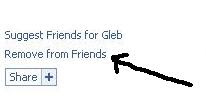
 2. On left hand side there is one link named �Remove from Friends�

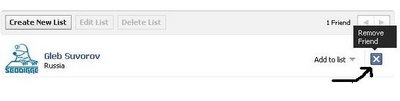
3. Click on the link. You will get confirmation box 4. Click on �Remove from Friends� option on that confirmation box 5. You are done. The person is permanently removed from your friend list Solution 2: 1. Go to top of the page and look for �Friends� link which is just right to your profile page link 2. Click on �All Friends� option under Friends link 3. Look for the person you want to delete from your friend list 4. On the right side, click on delete option as shown in picture.

Enjoy Guys! and don’t forget to post your comments.� MyTricksTime.com