
how to Change facebook login page

Hey Friends,
after a long time I am back in MyTricksTime. As I am so busy with my JOB it’s hard to search new tricks everyday. 2day I’m posting a Unique Trick for Facebook..

i know from this you will be happy then you’ll post comments for this one
its good luck for me.


Here I am providing you a quick trick to get 
customizable Facebook log-in screen. It’s cool, interesting & different.

CAUTION : THIS ONLY WORKS WITH GOOGLE CHROME BROWSER


1. Open https://chrome.google.com/webstore/detail/bdlfdaajmclngiomogmleihllaejcnni 
    in Google Chrome
2. Install this Extension
3. Log-out from Facebook if you already logged in
5. You can see a new type log-in page. You can change the background photo with any photo you want by clicking the Setting icon above the blue Log In button.


Enjoy Guys! and don’t forget to post your comments. � MyTricksTime.com
Airtel 3G Free GPRS Trick August 2012

Hi Friend�s,
Good Morning.
New Airtel 3G Free GPRS Trick With Youtube Video Download Support.
Create Below Proxy Settings And Use Free GPRS.

  • Apn:- airtelgprs.com
  • Proxy:- vuclip.com
  • Port:- 80
  • Homepage:- 203.115.112.5 OR 122.170.122.214 Or working In Your Area.

Friend�s    Don�t    Forget    To    Like    Us    On    Facebook.

Enjoy Guys! and don’t forget to post your comments. � MyTricksTime.com
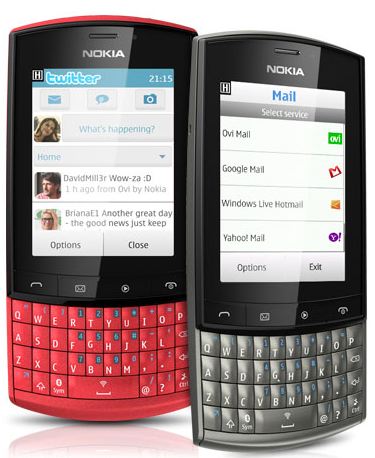
Review of Nokia Asha 303 Main Specs Low Cost Phones

NETWORK CONNECTIVITY

2G : GSM 850 / 900 / 1800 / 1900
3G : HSDPA 850 / 900 / 1700 / 1900 / 2100

BODY

Dimensions  : 116.5 x 55.7 x 13.9 mm, 72 cc
Weight : 99 g
Keyboard : Qwerty.

SOUND

Loudspeaker : Yes
3.5mm Headphone jack : yes
Ringtones : Polyphonic, MP3, WAV

BATTERY

Li � Ion 1300 mAh standard battery.
Standby [ 2G ] : upto 720 hours
Standby [ 3G ] : 840 hours

CAMERA

Front Camera : 3.2 MP
Resolution : 2048 x 1536 pixels.
Fixed Focus : Yes
Secondary camera : No

CPU : 1 GHz.

MESSAGING

SMS
MMS
E-mail
IM
Push E-mail

CONNECTIVITY

GPRS : Class 33
EDGE : class 32
Speed : HSDPA, 10.2 Mbps; HSUPA, 2 Mbps
WLAN : Wi-Fi 802.11 b/g/n
Bluetooth : v2.1 with A2DP, EDR
USB : microUSB v2.0, USB On-the-go support


RADIO : Sterio FM with RDS

GPS : NO
JAVA : MIDP 2.1

In Built SOFTWARE’S

SNS Integration, MP4/H.264/H.263/WMV player, MP3/WAV/WMA/AAC player, Organizer, Voice memo and Predictive text input.
Enjoy Guys! and don’t forget to post your comments. � MyTricksTime.com

BSNL 3G Speed On 2G Connection


Hello Friends,

Now i am again here to take a Latest BSNL Internet Trick for you.

it is only a simple trick. I don’t know how this works. But this trick had worked to me.

First of all your cell phone must be a 3G enabled smartphone.

You have to do the following steps :

  1. Activate GPRS 13 booster [ for 2G ]. It has a validity of 3 days and size of 200 mb.

  1. Now You have to enable any 3G pack (which you want) on the day when the 3G pack expires.
  2. You have to enable a 2G pack [within 2 days after the expiry of 3G pack ].
  3. Now, you have 3G speed in 2G connection.


This happens because our mobile phone starts acquiring 3G signals when we enable a 3G pack on our cell phone. After that, we will get 3g signals on our phone if we are enabling a 2G pack.

It really worked in My Cell Phone. If it doesn’t works on your phone, please let me know…
Enjoy Guys! and don’t forget to post your comments. � MyTricksTime.com
Protect Your Android From Virus

Android is very amazing, billion apps can be downloaded for free in android market. Anyone can publish their apps on android market. Android market is free market less supervision, so many apps contain malware or trojan-horse. Virus is likely to steal important data from your android gadget. For avoiding virus on your android gadgetfollow this tips.
Avoiding virus on android gadget tips :
1. Install Antivirus on your android gadget
You can use lookout, i think this is very usefully for avoiding virus on your android gadget. Or you can use another antivirus which you buy in android market, but be carefully if you choose antivirus on android market, maybe that app containing viruses. Buy anti-viruses which have a lot of ratings.
2. Before download app, read the Review
Before you download app on your android gadget in android market you must read the review, be careful with fake review, you have to track it down. Note that there are complaints in the review.
3. Note the permission before download app
Before thee app installed on your android gadget you must request permission list. If your app want to access without a clear connection you must be careful. avoiding access to contact, and history on your browser. Delete your application if sending automatic SMS.
4. trace of awkwardness when it
If you thing that your apps have many problem you can search it on google with keyword “(app name) malware?” if you find that app have many problem you can use another apps, android market have a lot of stock.
5. Be careful with fake name
Maybe criminal person using the same name with popular app, you can use appstore for android from amazon which must need permission process for app for get away.
okay i hope this 5 tips can helps you protect your android from virus.