
How to clean your laptop’s cooling fans -� Is your Laptop is over heating? There are may possible reason due to your laptop is over heating. Most common reason is your laptop cooling fan is not clean. So if your laptop is over heating you should first you should checkout this thing before visit to any service center to repair your laptop. In this article we are sharing how to clean your laptop’s cooling fans.
 Rahul Gaur
How to Recover Deleted SMS from SIM or Phone
 |
| Recover Deleted SMS from SIM or Phone |
Have you deleted SMS messages that you wish had not gotten deleted?
You will be happy to know there are a number of different software that can help you recover the messages you need and want, but not all of them are free and you need to purchase the software. However, if you own a Nokia phone you might be in luck, as there are very good chances of message recovery from your cellphone without need of any specialized data recovery software for free. In this tutorial I will explain, what are the steps to be followed in order to recover deleted SMS from a SIM card or phone memory.
STEPS INVOLVED:
1. First of all download and install FExplorer, excellent file manager and also sends files via Bluetooth.

DOWNLOAD: click here
2. Launch FExplorer and navigate to C: if you use Phone Memory to store your messages (default) and D: if you use Storage Card as your SMS storage location.
3. Now navigate to and open “system” folder.
4. Now open the “mail” folder.
5. This folder should contain many folders named similar to 0010001_s etc. with files named similar to 00100000 etc. These files are the actual deleted messages. Simply, use the FExplorer inbuild text viewer to view these files. You will need to browse through every folder and open all files inside them until you get the required SMS.
This tool includes more great fetures like:
- Cut, copy & paste files
- Check date modified & size
- Display free space available
- View file with inbuilt text viewer
- Cut, copy, create & paste directories
- File find. (although this only works within a directory)
- Take screenshots
- Set your backlight to be permanently on
- Send files via bluetooth. (may be necessary to rename .sis to .sis_)
- Compress memory – increasing available free memory …and much more.
All of all FExplorer is a handy File Explorer application for your Series 60 phone. With a wide range of features, tips and tricks, FExplorer will become one of your favorite mobile applications!
Enjoy Guys! and don’t forget to post your comments. � MyTricksTime.com
How To Create Custom Patterns In Photoshop
Most of the time, default Adobe Photoshop�s patterns just could not satisfied designers needs. Minutes later you will be creating your own custom pattern for buttons, interfaces, photo scan-lines, etc.
Download this sample
1. Create A Pattern Image
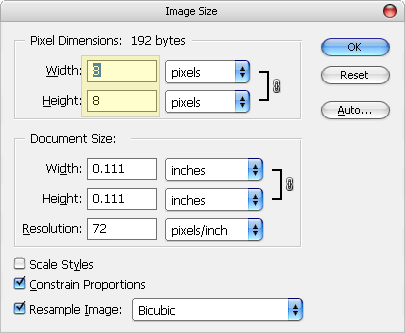
Fire up a new canvas. It should be small (in terms of height x width). Image you are creating here will duplicate itself to form your pattern in the later stage. For this example, I�ll be using 8�8 pixel canvas, zoomed them up and create a small pattern like this.Enjoy Guys! and don’t forget to post your comments. � MyTricksTime.com


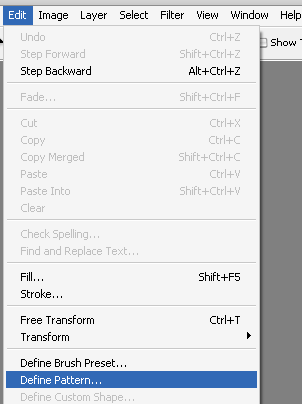
Let�s define it as pattern so it can be used at anytime. Select Edit ->Define Pattern
 Rename it to something you can remember (especially useful when you have a lot of custom patterns in future). I�ll call it Stripe5x because it will give me a stripe effect and 5px is how thick each stripes are. Click OK and you�ve just have your custom pattern defined.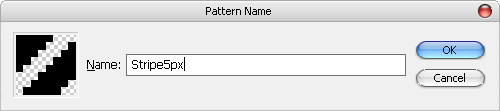
3. Using Custom Pattern
Create a new canvas to try out the custom pattern. With your new canvas selected, Select Edit -> Fill.

In the Fill dialog box, select Pattern from the dropdown, find the pattern you�ve just created in Custom Pattern and click OK.

The canvas will now be filled with pattern you�ve just created. Tweak the colors and it should look fine.

Misc: Alternative Way To Call Custom Pattern
Another way to call up the custom pattern. (Right Click) layer name -> Blending Options

Check Pattern Overlay, select your pattern

Misc � Delete Custom Pattern
Anywhere in the pattern selection box, (Right Click), choose Delete.
Cheap, Yet Effective Advertising Methods

The growth and success of your company depends largely on your customers. In fact, there is no business unless there�s someone to buy your products or use your service. Advertising is the most effective way to create a buzz around your company and generate business. But if you�re working with a shoestring budget, you may not be able to afford the most effective advertising methods, such as direct mail, radio or television. Fortunately, there are plenty of cheap, but effective ways to advertise through your employees, the Internet and the public.
1. Company logos on shirts.
Purchase a few inexpensive shirts and screen print your company�s logo onto these shirts. You can also place your logo on baseball caps, ink pens and stickers. Put your employees to work and ask them to wear the company shirt during business hours or while running errands. Additionally, ask them to pass promotional items to family, friends or any other person that might benefit from your product. Be sure to include your companies name, phone number and Internet address on stickers and promotional pens.
2. Print your own coupons.
Give customers a percentage off their purchase or offer a buy-one-get-one free deal. Use existing customers to spread the word about your company. As customers check out, hand them a few business cards that feature printed coupons. They can use the coupon on their next visit and share them with their friends. This encourages repeat business, as well as new business.
3. Pass out flyers in neighboring communities.
A direct mail campaign can cost thousands of dollars. If you don�t have this type of budget, design and print your own flyers. With the help of your employees, spend a day passing out flyers in different neighborhoods. As an incentive, include a coupon or offer on the flyers.
4. Use social media to create a buzz.
Create a Facebook page for your business and advertise for free. Building an online presence is one of the cheapest forms of advertising, but a highly effective method. Several big and small businesses use Facebook and other social media outlets to promote their deals. You can expand your reach and advertise 24 hours a day, seven days a week. Post about upcoming deals and promotions, and customers who follow your page will see your advertisement. For information on how to profit the most from Internet advertising, explore the benefits of reputation management by Reputation.com.
Experimenting with inexpensive and free advertising methods can jump start your business and build your customer base. As your business grows and generates higher profits, you can then move into other forms of advertising, such as direct mail, print and television.
Enjoy Guys! and don’t forget to post your comments. � MyTricksTime.com
Share Your Blog Posts To 101 Social Networks

MyTricksTime is take new and updated tricks for you dear readers,Now Get huge Traffic By Social networks.Sharing your blog and blog�s posts to different social networks is a nice way to drive traffic to your site. Bloggers do this trick to get publicize their blog and blog�s content. If you share your content to many social networks this will creates more chances to get traffic. But sharing a blog or blog�s content to more than 5 social networks is very difficult.
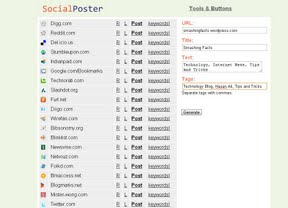
But don�t I have a nice way from which you an share your blog content to 130 social networks only with one click. YES !!! can�t believe me check out Social Poster. Just enter your post URL, Title, Some Description and related tags and click Post at the front of Social Network.
Click Here To Visit Social Poster
Enjoy Guys! and don’t forget to post your comments. � MyTricksTime.com