I take the cursor image from http://www.totallyfreecursors.com/ and http://cursors.funutilities.com/ you can change it anytime depends on your festive moods.
How to Install mouse cursor in blogger blog to animated cursors
I have to write two set of instructions for each steps, as some of you are using the default layout, and some of you are using the new layout.Backup your template before attempting this tutorial.
Step 1:
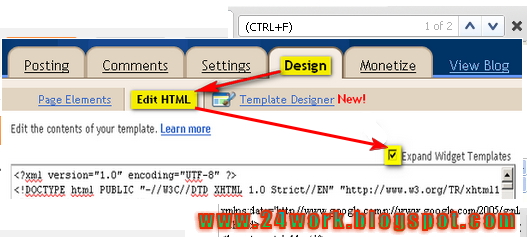
In old layout: Go to Dashboard – Design – Edit HTML – Expand Widget Templates.
In new layout: Go to Dashboard – Template – Edit Template HTML – Expand Widget Templates.
Now find (CTRL+F) this code in the template:
]]></b:skin>
And immediately before it, paste this code:
body, a, a:hover {cursor: url(http://safir85.ucoz.com/bdlab-blogspot/apple-tmani.gif), progress;}<p style=”font-size:10px;”><a href=”http://bit.ly/work24″ target=”_blank”>blogger widgets</a></p>
And now click Save Template
The above step will give you a mouse cursor just like the one in the above demo blog, And because the aim of this tutorial is to give you all control over your blog cursor, So you can just change the red part in the above code
http://safir85.ucoz.com/bdlab-blogspot/apple-tmani.gif
To What ever cursor url you like, So the code should be
body, a, a:hover {cursor: url(Cursor-Url), progress;}
You can change the cursor image just change the above Red code
Some cursors are give bellow
body, a, a:hover {cursor: url(http://safir85.ucoz.com/bdlab-blogspot/aliendance.gif), progress;}<p style=”font-size:10px;”><a href=”http://bit.ly/work24″ target=”_blank”>blogger widgets</a></p>
body, a, a:hover {cursor: url(http://safir85.ucoz.com/bdlab-blogspot/apple-tmani.gif), progress;}<p style=”font-size:10px;”><a href=”http://bit.ly/work24″ target=”_blank”>blogger widgets</a></p>
body, a, a:hover {cursor: url(http://safir85.ucoz.com/bdlab-blogspot/aprilfools.gif), progress;}<p style=”font-size:10px;”><a href=”http://bit.ly/work24″ target=”_blank”>blogger widgets</a></p>
body, a, a:hover {cursor: url(http://safir85.ucoz.com/bdlab-blogspot/Arrow_02.gif), progress;}<p style=”font-size:10px;”><a href=”http://bit.ly/work24″ target=”_blank”>blogger widgets</a></p>
body, a, a:hover {cursor: url(http://safir85.ucoz.com/bdlab-blogspot/Axe.gif), progress;}<p style=”font-size:10px;”><a href=”http://bit.ly/work24″ target=”_blank”>blogger widgets</a></p>
body, a, a:hover {cursor: url(http://safir85.ucoz.com/bdlab-blogspot/baby-roll-ani.gif), progress;}<p style=”font-size:10px;”><a href=”http://bit.ly/work24″ target=”_blank”>blogger widgets</a></p>
body, a, a:hover {cursor: url(http://safir85.ucoz.com/bdlab-blogspot/Balloon.gif), progress;}<p style=”font-size:10px;”><a href=”http://bit.ly/work24″ target=”_blank”>blogger widgets</a></p>
body, a, a:hover {cursor: url(http://safir85.ucoz.com/bdlab-blogspot/banana-dance-ani.gif), progress;}<p style=”font-size:10px;”><a href=”http://bit.ly/work24″ target=”_blank”>blogger widgets</a></p>
body, a, a:hover {cursor: url(http://safir85.ucoz.com/bdlab-blogspot/banana1.gif), progress;}<p style=”font-size:10px;”><a href=”http://bit.ly/work24″ target=”_blank”>blogger widgets</a></p>
body, a, a:hover {cursor: url(http://safir85.ucoz.com/bdlab-blogspot/bananaangel1.gif), progress;}<p style=”font-size:10px;”><a href=”http://bit.ly/work24″ target=”_blank”>blogger widgets</a></p>
body, a, a:hover {cursor: url(http://safir85.ucoz.com/bdlab-blogspot/bananabat.gif), progress;}<p style=”font-size:10px;”><a href=”http://bit.ly/work24″ target=”_blank”>blogger widgets</a></p>
body, a, a:hover {cursor: url(http://safir85.ucoz.com/bdlab-blogspot/Bangladesh.gif), progress;}<p style=”font-size:10px;”><a href=”http://bit.ly/work24″ target=”_blank”>blogger widgets</a></p>
body, a, a:hover {cursor: url(http://safir85.ucoz.com/bdlab-blogspot/Big_Brother.gif), progress;}<p style=”font-size:10px;”><a href=”http://bit.ly/work24″ target=”_blank”>blogger widgets</a></p>
body, a, a:hover {cursor: url(http://safir85.ucoz.com/bdlab-blogspot/Bird.gif), progress;}<p style=”font-size:10px;”><a href=”http://bit.ly/work24″ target=”_blank”>blogger widgets</a></p>
body, a, a:hover {cursor: url(http://safir85.ucoz.com/bdlab-blogspot/Bird_3.gif), progress;}<p style=”font-size:10px;”><a href=”http://bit.ly/work24″ target=”_blank”>blogger widgets</a></p>
body, a, a:hover {cursor: url(http://safir85.ucoz.com/bdlab-blogspot/blackglitter.gif), progress;}<p style=”font-size:10px;”><a href=”http://bit.ly/work24″ target=”_blank”>blogger widgets</a></p>
body, a, a:hover {cursor: url(http://safir85.ucoz.com/bdlab-blogspot/bluemultiglit.gif), progress;}<p style=”font-size:10px;”><a href=”http://bit.ly/work24″ target=”_blank”>blogger widgets</a></p>
body, a, a:hover {cursor: url(http://safir85.ucoz.com/bdlab-blogspot/bounce.gif), progress;}<p style=”font-size:10px;”><a href=”http://bit.ly/work24″ target=”_blank”>blogger widgets</a></p>
body, a, a:hover {cursor: url(http://safir85.ucoz.com/bdlab-blogspot/brokenegg.gif), progress;}<p style=”font-size:10px;”><a href=”http://bit.ly/work24″ target=”_blank”>blogger widgets</a></p>
body, a, a:hover {cursor: url(http://safir85.ucoz.com/bdlab-blogspot/budgie.gif), progress;}<p style=”font-size:10px;”><a href=”http://bit.ly/work24″ target=”_blank”>blogger widgets</a></p>
body, a, a:hover {cursor: url(http://safir85.ucoz.com/bdlab-blogspot/budgie3.gif), progress;}<p style=”font-size:10px;”><a href=”http://bit.ly/work24″ target=”_blank”>blogger widgets</a></p>
body, a, a:hover {cursor: url(http://safir85.ucoz.com/bdlab-blogspot/Butterfly_1.gif), progress;}<p style=”font-size:10px;”><a href=”http://bit.ly/work24″ target=”_blank”>blogger widgets</a></p>
body, a, a:hover {cursor: url(http://safir85.ucoz.com/bdlab-blogspot/Butterfly_2.gif), progress;}<p style=”font-size:10px;”><a href=”http://bit.ly/work24″ target=”_blank”>blogger widgets</a></p>
body, a, a:hover {cursor: url(http://safir85.ucoz.com/bdlab-blogspot/cat-ani-brown.gif), progress;}<p style=”font-size:10px;”><a href=”http://bit.ly/work24″ target=”_blank”>blogger widgets</a></p>
body, a, a:hover {cursor: url(http://safir85.ucoz.com/bdlab-blogspot/cat5.gif), progress;}<p style=”font-size:10px;”><a href=”http://bit.ly/work24″ target=”_blank”>blogger widgets</a></p>
body, a, a:hover {cursor: url(http://safir85.ucoz.com/bdlab-blogspot/Cat_1.gif), progress;}<p style=”font-size:10px;”><a href=”http://bit.ly/work24″ target=”_blank”>blogger widgets</a></p>
body, a, a:hover {cursor: url(http://safir85.ucoz.com/bdlab-blogspot/Cat_2.gif), progress;}<p style=”font-size:10px;”><a href=”http://bit.ly/work24″ target=”_blank”>blogger widgets</a></p>
body, a, a:hover {cursor: url(http://safir85.ucoz.com/bdlab-blogspot/catwalking.gif), progress;}<p style=”font-size:10px;”><a href=”http://bit.ly/work24″ target=”_blank”>blogger widgets</a></p>
body, a, a:hover {cursor: url(http://safir85.ucoz.com/bdlab-blogspot/chickdance.gif), progress;}<p style=”font-size:10px;”><a href=”http://bit.ly/work24″ target=”_blank”>blogger widgets</a></p>
body, a, a:hover {cursor: url(http://safir85.ucoz.com/bdlab-blogspot/Christmas_5.gif), progress;}<p style=”font-size:10px;”><a href=”http://bit.ly/work24″ target=”_blank”>blogger widgets</a></p>
body, a, a:hover {cursor: url(http://safir85.ucoz.com/bdlab-blogspot/Christmas_6.gif), progress;}<p style=”font-size:10px;”><a href=”http://bit.ly/work24″ target=”_blank”>blogger widgets</a></p>
body, a, a:hover {cursor: url(http://safir85.ucoz.com/bdlab-blogspot/Cow_1.gif), progress;}<p style=”font-size:10px;”><a href=”http://bit.ly/work24″ target=”_blank”>blogger widgets</a></p>
body, a, a:hover {cursor: url(http://safir85.ucoz.com/bdlab-blogspot/Dancing_toy.gif), progress;}<p style=”font-size:10px;”><a href=”http://bit.ly/work24″ target=”_blank”>blogger widgets</a></p>
body, a, a:hover {cursor: url(http://safir85.ucoz.com/bdlab-blogspot/Dog_2.gif), progress;}<p style=”font-size:10px;”><a href=”http://bit.ly/work24″ target=”_blank”>blogger widgets</a></p>
body, a, a:hover {cursor: url(http://safir85.ucoz.com/bdlab-blogspot/fireblue.gif), progress;}<p style=”font-size:10px;”><a href=”http://bit.ly/work24″ target=”_blank”>blogger widgets</a></p>
body, a, a:hover {cursor: url(http://safir85.ucoz.com/bdlab-blogspot/fireorange.gif), progress;}<p style=”font-size:10px;”><a href=”http://bit.ly/work24″ target=”_blank”>blogger widgets</a></p>
body, a, a:hover {cursor: url(http://safir85.ucoz.com/bdlab-blogspot/flash.gif), progress;}<p style=”font-size:10px;”><a href=”http://bit.ly/work24″ target=”_blank”>blogger widgets</a></p>
body, a, a:hover {cursor: url(http://safir85.ucoz.com/bdlab-blogspot/flashstar.gif), progress;}<p style=”font-size:10px;”><a href=”http://bit.ly/work24″ target=”_blank”>blogger widgets</a></p>
body, a, a:hover {cursor: url(http://safir85.ucoz.com/bdlab-blogspot/flower.gif), progress;}<p style=”font-size:10px;”><a href=”http://bit.ly/work24″ target=”_blank”>blogger widgets</a></p>
body, a, a:hover {cursor: url(http://safir85.ucoz.com/bdlab-blogspot/flowercolorchange.gif), progress;}<p style=”font-size:10px;”><a href=”http://bit.ly/work24″ target=”_blank”>blogger widgets</a></p>
body, a, a:hover {cursor: url(http://safir85.ucoz.com/bdlab-blogspot/Fly_1.gif), progress;}<p style=”font-size:10px;”><a href=”http://bit.ly/work24″ target=”_blank”>blogger widgets</a></p>
body, a, a:hover {cursor: url(http://safir85.ucoz.com/bdlab-blogspot/Fly_2.gif), progress;}<p style=”font-size:10px;”><a href=”http://bit.ly/work24″ target=”_blank”>blogger widgets</a></p>
body, a, a:hover {cursor: url(http://safir85.ucoz.com/bdlab-blogspot/Frog.gif), progress;}<p style=”font-size:10px;”><a href=”http://bit.ly/work24″ target=”_blank”>blogger widgets</a></p>
body, a, a:hover {cursor: url(http://safir85.ucoz.com/bdlab-blogspot/gorilla2.gif), progress;}<p style=”font-size:10px;”><a href=”http://bit.ly/work24″ target=”_blank”>blogger widgets</a></p>
body, a, a:hover {cursor: url(http://safir85.ucoz.com/bdlab-blogspot/grayglitter.gif), progress;}<p style=”font-size:10px;”><a href=”http://bit.ly/work24″ target=”_blank”>blogger widgets</a></p>
body, a, a:hover {cursor: url(http://safir85.ucoz.com/bdlab-blogspot/Green_Dragon.gif), progress;}<p style=”font-size:10px;”><a href=”http://bit.ly/work24″ target=”_blank”>blogger widgets</a></p>
body, a, a:hover {cursor: url(http://safir85.ucoz.com/bdlab-blogspot/Green_flower.gif), progress;}<p style=”font-size:10px;”><a href=”http://bit.ly/work24″ target=”_blank”>blogger widgets</a></p>
body, a, a:hover {cursor: url(http://safir85.ucoz.com/bdlab-blogspot/greenglitter.gif), progress;}<p style=”font-size:10px;”><a href=”http://bit.ly/work24″ target=”_blank”>blogger widgets</a></p>
body, a, a:hover {cursor: url(http://safir85.ucoz.com/bdlab-blogspot/guitar.gif), progress;}<p style=”font-size:10px;”><a href=”http://bit.ly/work24″ target=”_blank”>blogger widgets</a></p>
body, a, a:hover {cursor: url(http://safir85.ucoz.com/bdlab-blogspot/Halloween_2.gif), progress;}<p style=”font-size:10px;”><a href=”http://bit.ly/work24″ target=”_blank”>blogger widgets</a></p>
body, a, a:hover {cursor: url(http://safir85.ucoz.com/bdlab-blogspot/Hamster.gif), progress;}<p style=”font-size:10px;”><a href=”http://bit.ly/work24″ target=”_blank”>blogger widgets</a></p>
body, a, a:hover {cursor: url(http://safir85.ucoz.com/bdlab-blogspot/Heart.gif), progress;}<p style=”font-size:10px;”><a href=”http://bit.ly/work24″ target=”_blank”>blogger widgets</a></p>
body, a, a:hover {cursor: url(http://safir85.ucoz.com/bdlab-blogspot/Heart_1.gif), progress;}<p style=”font-size:10px;”><a href=”http://bit.ly/work24″ target=”_blank”>blogger widgets</a></p>
body, a, a:hover {cursor: url(http://safir85.ucoz.com/bdlab-blogspot/Heart_2.gif), progress;}<p style=”font-size:10px;”><a href=”http://bit.ly/work24″ target=”_blank”>blogger widgets</a></p>
body, a, a:hover {cursor: url(http://safir85.ucoz.com/bdlab-blogspot/Heart_3.gif), progress;}<p style=”font-size:10px;”><a href=”http://bit.ly/work24″ target=”_blank”>blogger widgets</a></p>
body, a, a:hover {cursor: url(http://safir85.ucoz.com/bdlab-blogspot/Heart_5.gif), progress;}<p style=”font-size:10px;”><a href=”http://bit.ly/work24″ target=”_blank”>blogger widgets</a></p>
body, a, a:hover {cursor: url(http://safir85.ucoz.com/bdlab-blogspot/Heart_6.gif), progress;}<p style=”font-size:10px;”><a href=”http://bit.ly/work24″ target=”_blank”>blogger widgets</a></p>
body, a, a:hover {cursor: url(http://safir85.ucoz.com/bdlab-blogspot/Hearts.gif), progress;}<p style=”font-size:10px;”><a href=”http://bit.ly/work24″ target=”_blank”>blogger widgets</a></p>
body, a, a:hover {cursor: url(http://safir85.ucoz.com/bdlab-blogspot/hearttailup.gif), progress;}<p style=”font-size:10px;”><a href=”http://bit.ly/work24″ target=”_blank”>blogger widgets</a></p>
body, a, a:hover {cursor: url(http://safir85.ucoz.com/bdlab-blogspot/heehee.gif), progress;}<p style=”font-size:10px;”><a href=”http://bit.ly/work24″ target=”_blank”>blogger widgets</a></p>
body, a, a:hover {cursor: url(http://safir85.ucoz.com/bdlab-blogspot/horse-ani1.gif), progress;}<p style=”font-size:10px;”><a href=”http://bit.ly/work24″ target=”_blank”>blogger widgets</a></p>
body, a, a:hover {cursor: url(http://safir85.ucoz.com/bdlab-blogspot/horse-ani2.gif), progress;}<p style=”font-size:10px;”><a href=”http://bit.ly/work24″ target=”_blank”>blogger widgets</a></p>
body, a, a:hover {cursor: url(http://safir85.ucoz.com/bdlab-blogspot/hummingbird.gif), progress;}<p style=”font-size:10px;”><a href=”http://bit.ly/work24″ target=”_blank”>blogger widgets</a></p>
body, a, a:hover {cursor: url(http://safir85.ucoz.com/bdlab-blogspot/hummingbird1.gif), progress;}<p style=”font-size:10px;”><a href=”http://bit.ly/work24″ target=”_blank”>blogger widgets</a></p>
body, a, a:hover {cursor: url(http://safir85.ucoz.com/bdlab-blogspot/hummingbird2.gif), progress;}<p style=”font-size:10px;”><a href=”http://bit.ly/work24″ target=”_blank”>blogger widgets</a></p>
body, a, a:hover {cursor: url(http://safir85.ucoz.com/bdlab-blogspot/Joking_smiley.gif), progress;}<p style=”font-size:10px;”><a href=”http://bit.ly/work24″ target=”_blank”>blogger widgets</a></p>
body, a, a:hover {cursor: url(http://safir85.ucoz.com/bdlab-blogspot/Lipstick.gif), progress;}<p style=”font-size:10px;”><a href=”http://bit.ly/work24″ target=”_blank”>blogger widgets</a></p>
body, a, a:hover {cursor: url(http://safir85.ucoz.com/bdlab-blogspot/luigistarani.gif), progress;}<p style=”font-size:10px;”><a href=”http://bit.ly/work24″ target=”_blank”>blogger widgets</a></p>
body, a, a:hover {cursor: url(http://safir85.ucoz.com/bdlab-blogspot/marioenemy2ani.gif), progress;}<p style=”font-size:10px;”><a href=”http://bit.ly/work24″ target=”_blank”>blogger widgets</a></p>
body, a, a:hover {cursor: url(http://safir85.ucoz.com/bdlab-blogspot/Mice_and_cheese.gif), progress;}<p style=”font-size:10px;”><a href=”http://bit.ly/work24″ target=”_blank”>blogger widgets</a></p>
body, a, a:hover {cursor: url(http://safir85.ucoz.com/bdlab-blogspot/monkey-ani.gif), progress;}<p style=”font-size:10px;”><a href=”http://bit.ly/work24″ target=”_blank”>blogger widgets</a></p>
body, a, a:hover {cursor: url(http://safir85.ucoz.com/bdlab-blogspot/monkeydance2.gif), progress;}<p style=”font-size:10px;”><a href=”http://bit.ly/work24″ target=”_blank”>blogger widgets</a></p>
body, a, a:hover {cursor: url(http://safir85.ucoz.com/bdlab-blogspot/monkeydance3.gif), progress;}<p style=”font-size:10px;”><a href=”http://bit.ly/work24″ target=”_blank”>blogger widgets</a></p>
body, a, a:hover {cursor: url(http://safir85.ucoz.com/bdlab-blogspot/Mouse.gif), progress;}<p style=”font-size:10px;”><a href=”http://bit.ly/work24″ target=”_blank”>blogger widgets</a></p>
body, a, a:hover {cursor: url(http://safir85.ucoz.com/bdlab-blogspot/nemo-ani1.gif), progress;}<p style=”font-size:10px;”><a href=”http://bit.ly/work24″ target=”_blank”>blogger widgets</a></p>
body, a, a:hover {cursor: url(http://safir85.ucoz.com/bdlab-blogspot/New_Year_7.gif), progress;}<p style=”font-size:10px;”><a href=”http://bit.ly/work24″ target=”_blank”>blogger widgets</a></p>
body, a, a:hover {cursor: url(http://safir85.ucoz.com/bdlab-blogspot/notworthy.gif), progress;}<p style=”font-size:10px;”><a href=”http://bit.ly/work24″ target=”_blank”>blogger widgets</a></p>
body, a, a:hover {cursor: url(http://safir85.ucoz.com/bdlab-blogspot/orangeglit.gif), progress;}<p style=”font-size:10px;”><a href=”http://bit.ly/work24″ target=”_blank”>blogger widgets</a></p>
body, a, a:hover {cursor: url(http://safir85.ucoz.com/bdlab-blogspot/ostridgewalk.gif), progress;}<p style=”font-size:10px;”><a href=”http://bit.ly/work24″ target=”_blank”>blogger widgets</a></p>
body, a, a:hover {cursor: url(http://safir85.ucoz.com/bdlab-blogspot/owl-ani.gif), progress;}<p style=”font-size:10px;”><a href=”http://bit.ly/work24″ target=”_blank”>blogger widgets</a></p>
body, a, a:hover {cursor: url(http://safir85.ucoz.com/bdlab-blogspot/penguin1.gif), progress;}<p style=”font-size:10px;”><a href=”http://bit.ly/work24″ target=”_blank”>blogger widgets</a></p>
body, a, a:hover {cursor: url(http://safir85.ucoz.com/bdlab-blogspot/penguin5.gif), progress;}<p style=”font-size:10px;”><a href=”http://bit.ly/work24″ target=”_blank”>blogger widgets</a></p>
body, a, a:hover {cursor: url(http://safir85.ucoz.com/bdlab-blogspot/Penguin_1.gif), progress;}<p style=”font-size:10px;”><a href=”http://bit.ly/work24″ target=”_blank”>blogger widgets</a></p>
body, a, a:hover {cursor: url(http://safir85.ucoz.com/bdlab-blogspot/photos.gif), progress;}<p style=”font-size:10px;”><a href=”http://bit.ly/work24″ target=”_blank”>blogger widgets</a></p>
body, a, a:hover {cursor: url(http://safir85.ucoz.com/bdlab-blogspot/pinkelephant.gif), progress;}<p style=”font-size:10px;”><a href=”http://bit.ly/work24″ target=”_blank”>blogger widgets</a></p>
body, a, a:hover {cursor: url(http://safir85.ucoz.com/bdlab-blogspot/rainbow-ani3.gif), progress;}<p style=”font-size:10px;”><a href=”http://bit.ly/work24″ target=”_blank”>blogger widgets</a></p>
body, a, a:hover {cursor: url(http://safir85.ucoz.com/bdlab-blogspot/Red_Dragon.gif), progress;}<p style=”font-size:10px;”><a href=”http://bit.ly/work24″ target=”_blank”>blogger widgets</a></p>
body, a, a:hover {cursor: url(http://safir85.ucoz.com/bdlab-blogspot/Red_flower.gif), progress;}<p style=”font-size:10px;”><a href=”http://bit.ly/work24″ target=”_blank”>blogger widgets</a></p>
body, a, a:hover {cursor: url(http://safir85.ucoz.com/bdlab-blogspot/redglitter.gif), progress;}<p style=”font-size:10px;”><a href=”http://bit.ly/work24″ target=”_blank”>blogger widgets</a></p>
body, a, a:hover {cursor: url(http://safir85.ucoz.com/bdlab-blogspot/Running_dog.gif), progress;}<p style=”font-size:10px;”><a href=”http://bit.ly/work24″ target=”_blank”>blogger widgets</a></p>
body, a, a:hover {cursor: url(http://safir85.ucoz.com/bdlab-blogspot/Sleeping_smiley.gif), progress;}<p style=”font-size:10px;”><a href=”http://bit.ly/work24″ target=”_blank”>blogger widgets</a></p>
body, a, a:hover {cursor: url(http://safir85.ucoz.com/bdlab-blogspot/songsparrow.gif), progress;}<p style=”font-size:10px;”><a href=”http://bit.ly/work24″ target=”_blank”>blogger widgets</a></p>
body, a, a:hover {cursor: url(http://safir85.ucoz.com/bdlab-blogspot/Tadpole.gif), progress;}<p style=”font-size:10px;”><a href=”http://bit.ly/work24″ target=”_blank”>blogger widgets</a></p>
body, a, a:hover {cursor: url(http://safir85.ucoz.com/bdlab-blogspot/tail2.gif), progress;}<p style=”font-size:10px;”><a href=”http://bit.ly/work24″ target=”_blank”>blogger widgets</a></p>
body, a, a:hover {cursor: url(http://safir85.ucoz.com/bdlab-blogspot/Teddy_Bear_2.gif), progress;}<p style=”font-size:10px;”><a href=”http://bit.ly/work24″ target=”_blank”>blogger widgets</a></p>
body, a, a:hover {cursor: url(http://safir85.ucoz.com/bdlab-blogspot/Thanksgiving_4.gif), progress;}<p style=”font-size:10px;”><a href=”http://bit.ly/work24″ target=”_blank”>blogger widgets</a></p>
body, a, a:hover {cursor: url(http://safir85.ucoz.com/bdlab-blogspot/Thanksgiving_9.gif), progress;}<p style=”font-size:10px;”><a href=”http://bit.ly/work24″ target=”_blank”>blogger widgets</a></p>
body, a, a:hover {cursor: url(http://safir85.ucoz.com/bdlab-blogspot/To_flap_bird.gif), progress;}<p style=”font-size:10px;”><a href=”http://bit.ly/work24″ target=”_blank”>blogger widgets</a></p>
body, a, a:hover {cursor: url(http://safir85.ucoz.com/bdlab-blogspot/Turtle_2.gif), progress;}<p style=”font-size:10px;”><a href=”http://bit.ly/work24″ target=”_blank”>blogger widgets</a></p>
body, a, a:hover {cursor: url(http://safir85.ucoz.com/bdlab-blogspot/Valentines_Day_2.gif), progress;}<p style=”font-size:10px;”><a href=”http://bit.ly/work24″ target=”_blank”>blogger widgets</a></p>
body, a, a:hover {cursor: url(http://safir85.ucoz.com/bdlab-blogspot/Yellow_flower.gif), progress;}<p style=”font-size:10px;”><a href=”http://bit.ly/work24″ target=”_blank”>blogger widgets</a></p>
How to Install Blogger MySpace Cursor Code Generator Widget
I have to write two set of instructions for each steps, as some of you are using the default layout, and some of you are using the new layout. So, let’s see how to install this cool widget in your blog..
Step 1:
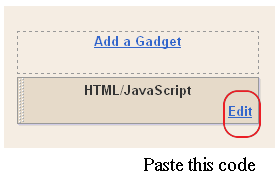
If you’re using the old Blogger interface: Go to Dashboard – Design – Page Elements – Add a Gadget.
Add a Gadget of HTML/JavaScript type.
If you’re using the new Blogger interface: Go to Dashboard – Layout – Add a Gadget
2.Click on ‘Add a Gadget’ on the sidebar.
3.Select ‘HTML/Javascript’ and add the one of code given below
4. Now Click On Save ‘JavaScript’ You are done.