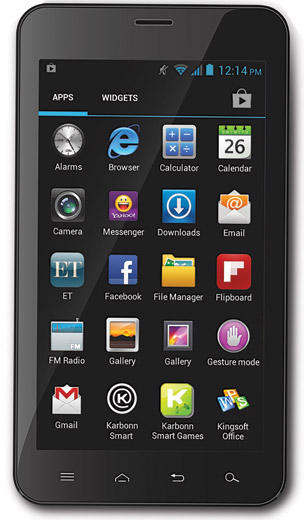
Review : Karbonn A30

GENERAL 2G Network GSM 900 / 1800 / 1900 – SIM 1 & SIM 2
3G Network HSDPA 2100
SIM Dual SIM (Mini-SIM)
Announced 2012
Status Available

BODY Dimensions 166 x 91 x 10.7 mm (6.54 x 3.58 x 0.42 in)
Weight 280 g (9.88 oz)
DISPLAY Type TFT capacitive touchscreen, 256K colors
Size 480 x 800 pixels, 5.9 inches (~158 ppi pixel density)
Multitouch Yes
SOUND Alert types Vibration, MP3, WAV ringtones
Loudspeaker Yes
3.5mm jack Yes

MEMORY Card slot microSD, up to 32 GB
Internal 4 GB, 512 MB RAM

DATA GPRS Yes
EDGE Yes
Speed HSDPA, 7.2 Mbps
WLAN Wi-Fi 802.11 b/g/n, Wi-Fi hotspot
Bluetooth Yes, with A2DP
USB Yes, microUSB v2.0

CAMERA Primary 8 MP, 3264×2448 pixels, autofocus, LED flash
Features Geo-tagging, face detection
Video Yes
Secondary Yes, 1.3 MP
FEATURES OS Android OS, v4.0.4 (Ice Cream Sandwich)
CPU Dual-core 1 GHz
Sensors Accelerometer
Messaging SMS(threaded view), MMS, Email, Push Email, IM
Browser HTML
Radio FM radio
GPS Yes, with A-GPS support
Java Yes, via Java MIDP emulator
Colors Black/White
  – SNS integration
– MP3/AAC/WMA/WAV player
– MP4/WMV/H.264/H.263 player
– Organizer
– Document viewer
– Voice memo/dial
– Predictive text input
BATTERY   Li-Ion 2500 mAh battery
Stand-by Up to 600 h
Talk time Up to 10 h
MISC     SAR EU 0.45 W/kg (head)   

Enjoy Guys! and don’t forget to post your comments. � MyTricksTime.com

How To Set Default Video Player In Mac OS X?

How can I set the default player for video is to VLC player? In my Mac OS X, Quicktime is the default media player.
Each and every video I need to manually set VLC as default player.
Are you facing the above mentioned problem?
If so, here is the solution to fix this problem.


Setting Default Media Player in Mac

  • Right click on the file you wish to always open in VLC.
  • Click �Get Info�.
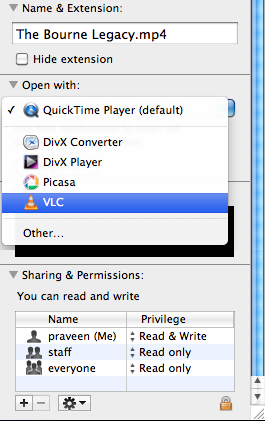
  • In the �Open With� section, select VLC from the drop down menu. In the below screenshot �The Bourne Legacy� movie with *.mp4 file format�s default media player is changed.

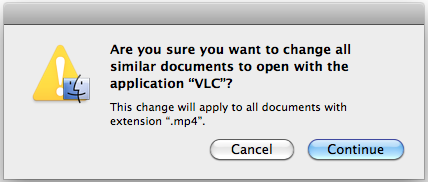
  • To apply this change to all files of this type, click the �Change All� button.

Enjoy Guys! and don’t forget to post your comments. � MyTricksTime.com

How to Install Windows quickly

How to Install Windows quickly OR Save your time while installing new windows

How to Install Windows quickly

RICK TO SAVE YOUR TIME WHILE INSTALLING WINDOWS

  • Boot through windows XP CD.
  • After all the files are completely loaded, you get the option to select the partition. Select �c�.
  • Now Format the partition, whether it is normal or quick with NTFS or FAT
  • Once the formatting is completed, All the setup files required for instllation are copied.Restart your system by pressing Enter.Now, here begins the Simple trick to save 10-15 minutes.
  • After rebooting, you get a screen where it takes 40 minutes to complete or finalize the OSinstallation.
  • Now, Press SHIFT + F10 Key -> This opens command prompt.
  • Type �Taskmgr� and press enter. This will open Task Manager.
  • Click the Process Tab, here we find a process Setup.exe. Right Click on Setup.exe and Set Priority -> Select High or Above Normal. Initially it will be Normal

Enjoy Guys! and don’t forget to post your comments. � MyTricksTime.com

iPhone tricks most people don�t know

  1. *3001#12345#* and tap Call. Enter Field Mode.Field mode reveals many of the inner settings of your iPhone, specifically up-to-date network and cell information.
  2. *#06# Displays your IMEI. No need to tap Call.IMEI is the unique identifier for your cell phone hardware. Together with your SIM information it identifies you to the provider network.
  3. *777# and tap Call. Account balance for prepaid iPhone.
  4. *225# and tap Call. Bill Balance. (Postpaid only)
  5. *646# and tap Call. Check minutes. (Postpaid only)These three are pretty self explanatory.
  6. *#21# and tap Call. Setting interrogation for call forwards.Discover the settings for your call forwarding. You’ll see whether you have voice, data, fax, sms, sync, async, packet access, and pad access call forwarding enabled or disabled.

    Read Also :  All Mobiles Secret Codes

  7. *#30# and tap Call. Calling line presentation check.This displays whether you have enabled or disabled the presentation of the calling line, presumably the number of the party placing the call.
  8. *#76# and tap Call. Check whether the connected line presentation is enabled or not.State whether the connected line presentation is enabled or disabled. Presumably similar to the calling line presentation.
  9. *#43# and tap Call. Determine if call waiting is enabled.Displays call waiting status for voice, data, fax, sms, sync data, async data, packet access and pad access. Each item is either enabled or disabled.

    Read Also :  7 Nokia Secret Codes For You

  10. *#61# and tap Call. Check the number for unanswered calls.Show the number for voice call forwarding when a call is unanswered. Also show the options for data, fax, sms, sync, async, packet access and pad access.
  11. *#62# and tap Call. Check the number for call forwarding if no service is available.Just like the previous, except for no-service rather than no-answer situations.
  12. *#67# and tap Call. Check the number for call forwarding when the iPhone is busy.And again, but for when the iPhone is busy.
  13. *#33# and tap Call. Check for call control bars.Check all the usual suspects (voice, data, fax, sms, etc) to see whether barring is enabled or disabled for outgoing. 


Enjoy Guys! and don’t forget to post your comments. � MyTricksTime.com