
Facebook’s Newest Feature: the Save Button

Facebook has introduced its newest feature that allows users to save pages from their news feed for later viewing.
The Save button is a bookmarking tool that can easily save content such as links, pages, videos and articles so that users can check them out at their convenience.
It will appear in a few days on Facebook for both web and iOS and Android users.
The Save button came into existence because many users don’t have enough time to scroll through their news feed. Facebook thought of a solution to encourage users to share and access more content for their later perusal.

All saved items are private but users can share them with their friends. Facebook will also send reminders about the saved items to users that will show up on their news feeds.The Save button can be accessed through a drop-down button at the upper right corner of any post. Saved items will be organized in categories and can be found near the Like button.
Users can view all their saved content or arrange them by category on the left sidebar menu. For its mobile version, Facebook will introduce the Save button through a ‘More’ tab where all saved content is organized.
Before the Save button, users pseudo-bookmarked their favorite content by ‘liking’ them on Facebook and viewing them on their activity log. With hundreds of posts on their news feeds daily, users usually don’t have the time to explore and read everything in one sitting.This bookmarking tool can be compared to other bookmarking sites such as Pocket and Pinterest. Unfortunately, Facebook’s saved content cannot be accessed offline.
All saved items are also viewed as regular posts on Facebook where a saved item has its own privacy settings and can be liked, shared, and archived .

Enjoy Guys! and don’t forget to post your comments. � MyTricksTime.com
Micromax Canvas 2 Colors A120: Price, specifications, features and comparison

The Micromax Canvas 2 Colors A120 is the first smartphone in the company�s portfolio to give users a degree of customization. With swappable back panels, users can buy the device along with extra colored panels including Radiant Red, Vibrant Yellow, Splendid Green and Mystic Blue. This would make Micromax local brand to offer swappable back covers. So far only Motorola offers this kind of customization, while Panasonic too is expected to offer the same feature on its forthcoming P81.

MICROMAX CANVAS 2 COLORS A120 PRICE IN INDIA
Micromax has priced the Canvas 2 Colors A120 at Rs 9,999. The device though is available on various e-commerce sites for as less as Rs 9,413.
MICROMAX CANVAS 2 COLORS A120 HARDWARE
DISPLAY � The device flaunts a 5-inch IPS HD display with a resolution of 1280�720 pixels. At this price point it is good to see companies offer HD displays, where most only offer qHD resolution displays.
PROCESSOR � The device is powered by a MediaTek MT6582 quad-core processor clocked at 1.3GHz and paired with 1GB of RAM. This should mean there is enough power to run most of the apps and services smoothly.
STORAGE � There is 4GB of internal storage in hand, which can be further expanded up to 32GB using a microSD card.
BATTERY � Micromax has offered a 2,000mAh battery, which it claims is good enough to survive more than seven hours of talktime and over 225 hours on standby mode.
CAMERAS � At the back is an 8-megapixel camera with Auto Focus and LED flash, which is capable of recording videos at 720p. This rear snapper is supplemented with a 2-megapixel front-facing camera with Fixed Focus.
MICROMAX CANVAS 2 COLORS A120 SOFTWARE
On the software front, the device runs on Android 4.2.2 Jelly Bean. There is however no word at the moment if the device will be updated to KitKat in the near future.
MICROMAX CANVAS 2 COLORS A120 CUSTOMIZATION
As mentioned above, the selling point of the device is the customization option that differentiates from other devices offered by local brands. The device has swappable back covers with options to choose from a variety of colored back covers including Radiant Red, Vibrant Yellow, Splendid Green and Mystic Blue.
MICROMAX CANVAS 2 COLORS A120 COMPARISON
As far as competition is concerned, the closest device that comes to the Canvas 2 Colors is the Xolo Q1010. Both the devices may be similarly specced, but the Q1010 comes with a slightly bigger battery (2,200mAh), and a bigger price tag (Rs 12,990). The Xolo Q1010 also misses out on customization options.
FEATURES  Micromax Canvas 2 Colors A120 Xolo Q1010
Display 5-inch (720p) 5-inch HD (720p) OGS-based
Processor 1.3GHz quad-core MediaTek 6582 1.3GHz quad-core MediaTek 6582
Memory 1GB of RAM, 4GB of internal memory, up to 32GB on microSD card 1GB of RAM, 4GB of internal memory, up to 32GB on microSD card
Software Android 4.2.2 Jelly Bean Android 4.2.2 Jelly Bean
Camera 8-megapixel rear camera/ 2-megapixel front-facing camera 8-megapixel rear camera/ 2-megapixel front-facing camera
Battery 2,000mAh 2,200mAh
Connectivity Dual-SIM, 3G, Wi-Fi, Bluetooth, GPS/AGPS Dual-SIM, 3G, Wi-Fi, Bluetooth, GPS/AGPS
Price Rs 9,999 Rs 12,990

Enjoy Guys! and don’t forget to post your comments. � MyTricksTime.com

4 Tips for Picking the Right Gadget (Smartphone, Tablet & Laptop)

4 Tips for Picking the Right Gadget (Smartphone, Tablet & Laptop)

With so many gadgets in the market, especially when it comes to smartphones and laptops, it can be overwhelming to make a choice. Here�s a simple list that can help narrow down your options.


1. Set a budget. By doing this, you should be able to narrow down your options significantly almost immediately.


2. Shortlist all the products that are available for your budget according to prices.

3. Note down the most desirable, as well as the least wanted features of the products in your list. This might be a meticulous process, but it will give you the full picture in terms of potential for each product.
4. If you are still not able to pinpoint your choice by now, it is time to visit your favourite retailer to test some products. Sometimes, hands-on experience is the only way to make sure that the product you purchase is the right one for you.


Enjoy Guys! and don’t forget to post your comments. � MyTricksTime.com
Tips to Identify Fake Facebook Account Easily

Image result for facebook
Fake Facebook Accounts is Proving out to be a new Trend on Facebook. Probably 20-30% of total Facebook Accounts are fake or even more, This Number is Anticipated to be Increasing in Future. Fake accounts on Facebook are  mainly Created with an intention to Spam all over Facebook and Spread Virus. Many people Create Fake Girl�s Profiles to Dupe Some innocent Fb Users too.

Its Sad that Facebook Can�t Identify Fake Facebook Account and Delete them all Manully,and One Should not expect it from Facebook because of obvious Reasons. But yes they will Definately Block your account if you send lots of Friend requests to Unknown People and if you post or Comment Spammy Links over and over again. Facebook Catches you and then next time when you try to Login again, it asks you to Identify Photos of Friends, This is where Fake Account Users Get Caught.
But This Don�t Stop Spammers to Create another Fake Facebook account, So in this article we will Discuss Some Tips that will Help you to Identify Fake Facebook Account easily, So that you don�t fell in thier Traps, Report that Account to Facebook which will Help to Make Facebook Safer to all of us.

 Tips to Identify Fake Facebook Account


1) Profile Picture :
  • Goto Google images Click on Camera icon which says Search by image, Click on Upload an Image, now choose the Picture you  had downloaded earlier , Now once the uploading Completes, google will show you Similar Images that already exist over internet.
  • 2) Timeline:
    • The Facebook timeline of a Facebook accounts says a lot about that Profile. Most Fake Profiles have �Female� as a gender, this doesn�t Mean all fb accounts with �Female� Genders are Fake, There are many other things to Identify Fake Facebook Account.
    • if thier photos folder shows only 1 or 2 Pictures that too of random Celebrities then probably its fake.
    • if the Person does not update Status, or if he does, the Comments does not read like his Real friends or the profile does not comments on others status,then its likely to be a Fake profile
    • The �About� tab will Give you More information about the Profile, if the �About� tab don�t show you any info about the persons profile then thats an indication about fake profile
    3) Wait for 1st january:
    • This is kind of Funny, Why Would one Wait for 1st jan to Identify Fake Facebook Account, Well Fake Profile Makers Most Probably Enter 1st jan as thier birth date while creating Fake account. So on 1st Jan, Facebook will Show you People who have birthdays today. Go through that list and Unfriend them if you dont know them Personally.
    • On 1st jan 2014, i was shocked to see 28 people Having thier birthday, Guess what i performed the above Proccess.
    4) Girls Profile :
    • Most of the Fake profiles are created with Girl Identity and with a Beautiful face as a Profile Picture, You may even find Cell phone Number, Girls Hardly will Share thier Contact number in Public.
    • A girl Profile with Lots of Friends and Followers indicates a Fake Profile.
    These were some tips to Identify Fake Facebook Account , which i wanted to share with you all, if you find any Fake profile then you and your friends can report it to facebook.
  • First Thing we see about any Facebook account is thier Profile Picture, If you Find any Facebook Account on your Friendlist suspicious, First thing you will do is Use Reverse Image Search. This helps you find out if Similar Pictures are available on Internet.  First Download the Profile Picture of the account you find suspicious

Enjoy Guys! and don’t forget to post your comments. � MyTricksTime.com

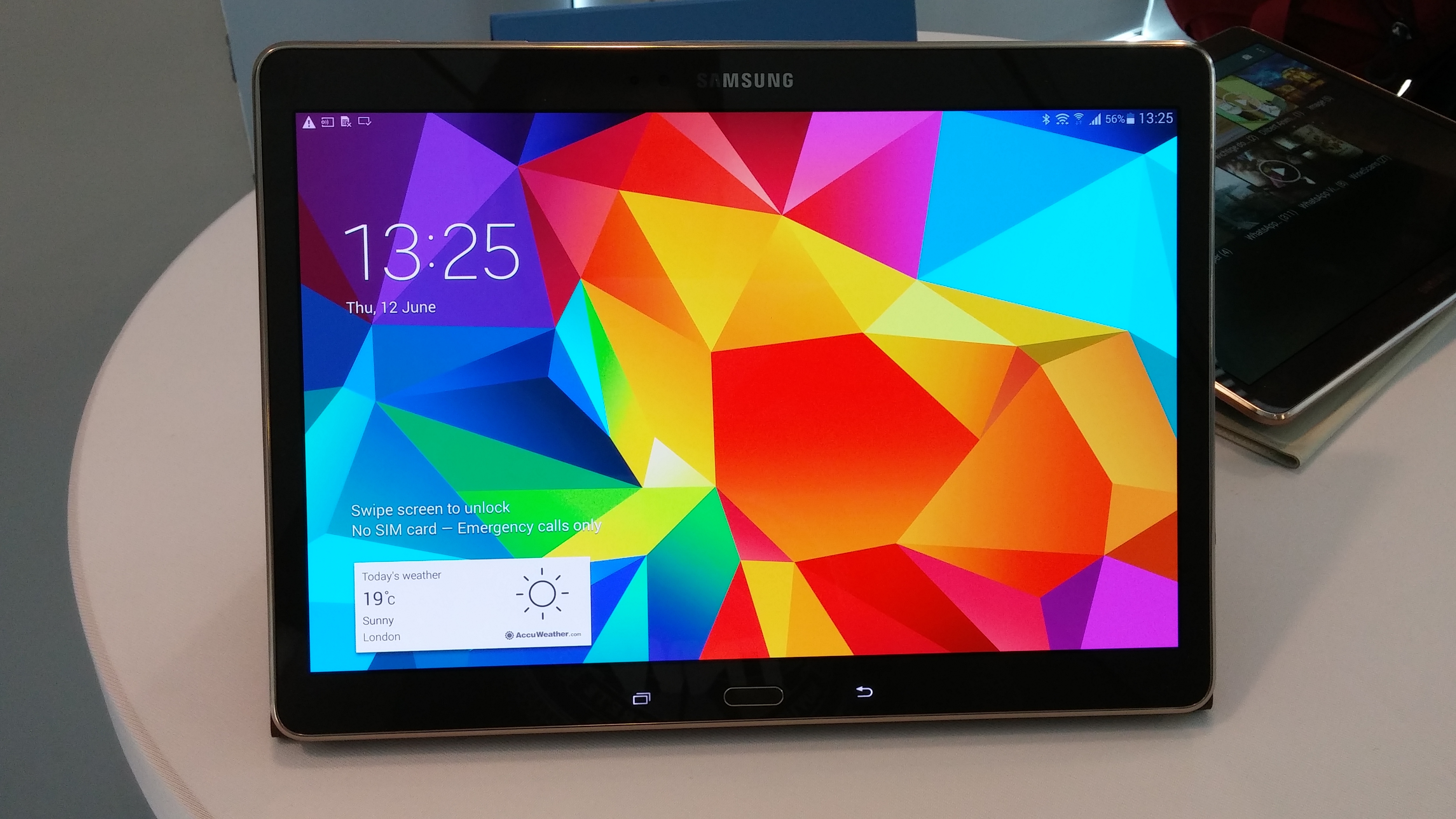
Samsung Galaxy Tab S 10.5 review


Key Features: 10.5-inch, 2,560 x 1,600 AMOLED display; Exynos 5 Octa 5420; 3GB RAM; 16GB storage; 802.11ac Wi-Fi; Bluetooth 4.0; microSD up to 128GB; 7,900mAh battery; 465g

What is the Samsung Galaxy Tab S 10.5?

The Galaxy Tab S 10.5 is the big brother to the Galaxy Tab S 8.4 � it�s what the iPad Air is to the iPad mini 2. It has the same basic design and features. That means an outstanding 2,560 x 1,600 resolution Super AMOLED screen and plenty more besides. We loved the smaller version, so it�s no surprise that the 10.5-inch version is just as impressive.

SEE ALSO: Tablet Buying Guide

Samsung Galaxy Tab S 10.5: Design

We like the the Galaxy Tab S 10.5�s design, but we don�t love it. The dimpled, soft-touch rear is pleasant to handle, but the bronze-gold colour scheme is an acquired taste. It�s nothing like as refined as the iPad Air, which is a shame given they cost the same.

But the Galaxy Tab S 10.5 is well put together and it�s a featherweight. It weighs just 465g, though this is only a few grams less than the iPad Air. It�s also thin � 6.6mm makes it 1mm thinner than the iPad Air. These are all fine margins, but the Galaxy Tab S 10.5 has less competition among Android tablets at this size. As 10-inch Android tablets go, it�s way out in front.

SEE ALSO: Best Android Tablets 2014 Round-up

Samsung Galaxy Tab S 10.5 11

The other interesting design point is case support. We weren�t sent a case for the 8.4, but we have one for the Galaxy Tab S 10.5. Like the 8.4, it fastens to the tablet via rather odd jacket style �poppers�. They don�t help the looks much, but they hold the case securely.

We like the case, too. It�s slim, so adds little weight. It also offers three angles from which to view the screen. The only issue is the folding required to make them takes some learning. Even after a week or so we�re still fumbling about each time.

SEE ALSO: Best Tablet 2014 Round-up
Samsung Galaxy Tab S 10.5 7

Samsung Galaxy Tab S 10.5: Features

This tablet has everything. You get the fastest version of Wi-Fi 802.11ac and Bluetooth 4.0. The Wi-Fi version has 16GB of storage built-in, but the microSD slot supports up to 128GB cards and there’s a 4G version that has 32GB built-in. There�s an IR Blaster for controlling your TV, too. We find the feature a little hit and miss, but it�s a nice extra. There are cameras front and back and there�s an LED flash for the main camera � a rare feature on a tablet.

Less impressive is the fingerprint reader. This is the same one found in the Galaxy S5 and it�s no more successful here. The swiping system is just too unreliable to use it to unlock your tablet. It only works 40/50% of the time, which isn�t a great hit rate

Enjoy Guys! and don’t forget to post your comments. � MyTricksTime.com