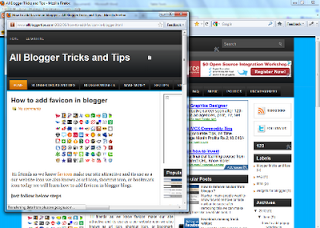
how to add popup window in blogger

Popup window is an extra window it’s open in load on page or click on mouse and many other type now we will learn how to add click on mouse open popup window in blogger.

Pop up window is very use full for any important page show to viewers .


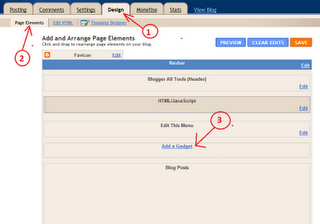
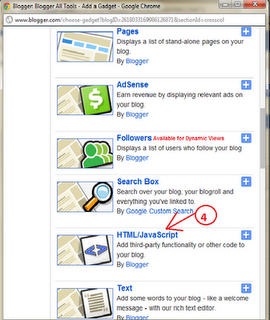
Click below Images for help with Screen short

Just follow below steps for add a popup window in your blogger

  • Log in to your Blogger account
  • Go to Design > Page Elements
  • Click Add a Gadget.
  • Select HTML/JavaScript widget
  • Copy the below code and past it in HTML/java script box.

<script type=”text/javascript”>
document.body.onclick= function(){
window.open(‘your web address‘, ‘poppage’, ‘toolbars=0, scrollbars=1, location=0, statusbars=0, menubars=0, resizable=1, width=650, height=650, left = 300, top = 50′);
}</script>


 Note 1. – 
your web address’  Replace this with your Web url (web address)

 Note 2.-   width=650, height=650  You can customize Window size.

6. Now save your Template your popup window is ready


Enjoy Guys! and don’t forget to post your comments. � MyTricksTime.com

How to Create Cracks On the Face in Photoshop CS6

The Adobe Photoshop has taken the standards of editing and photo manipulating at it�s peak. People are just crazy about it�s effect and awesome interface. Furthermore, it is easy to use photo editing software.

Now a days, Photoshop has become a mandatory tool for many individuals who want to do something creative like Photographers, ad agencies, feature films, start up companies, webs designers etc.

Here is a cool tip which can be used to edit an image in Photoshop CS6, which can generate cracked look to your image. This effect can also be achieved in any versions of Photoshop.

Since, there are many more awesome versions of Photoshop available. Furthermore, the reason of our for using CS6 is that it is most advanced and professional version of Photoshop. So now, without wasting much of your time let�s get towards the trick.

You May like Also:

The effect of creating cracks on the face in Photoshop CS6 is not such hard job to do. You need to follow the simple steps and you are all the way through it.
Additionally, believe me it is hell fun creating such cracked face images of young ones. It can give you a look that how a person is going to look when he or she�ll become old.
Step 1 : Open the raw image on Photoshop A portrait of a person preferably.
Step2 : Open Google, type �Cracks on the wall� and check the images. Download an image of a wall with the cracks on it.
Step 3 : Copy paste the downloaded cracks image right above the portrait image.
Step 4 : In the right side corner, you will find a box called Layers. There you will see both the images you have loaded on Photoshop. Be sure, that the cracks image layer is on the top and the portrait layer is in the bottom.
Step 5 : Now Select the cracks image in the layers box, and click on the drop down menu on the top of the layer box. You will get various options like Lighten, Softlight, Hard light, Linear etc. Click on �Multiply�.  That will directly give the crack effect the portrait picture.
Step 6 : Click on the history brush and erase the unnecessary cracks on the face.

Congratulations! You have successfully created crack effects on the face of your desired image.

Conclusion

This was detailed guide for the people who wanted to learn that, �How to Create Cracks on the Face in Photoshop CS6?� I am sure this would have been interesting and helpful tutorial for you guys.
Thus, if you have any confusions or questions left related to this article then do let me know. So, that we could help you to resolve your queries and questions as soon as possible.
Finally, if you have found this guide helpful then don�t forget to share it with your friends in order to help them to learn photo editing. Your shares and likes mean a lot to us.

Enjoy Guys! and don’t forget to post your comments. � MyTricksTime.com

Mr Bean on Facebook comments and status

Mr Bean on Facebook comments and status –

Hi friends,
MyTricksTime team bring a latest trick for you.
Now you can�post Mr. Bean in Facebook &� You can use these codes on Facebook comments, status &� chat also
Just copy below code and post…

[[586061134788981]]
[[586061144788980]]
[[586061158122312]]
[[586062524788842]]
[[586062561455505]]
[[586062604788834]]
[[586065874788507]]
[[586065884788506]]
[[586065894788505]]
[[586067094788385]]
[[586067104788384]]

An Update on FaceBook and Hashtags

facebook hashtag updateAs was previously reported by The Wall Street Journal, Facebook plans to launch its own version of the hashtag, allowing users to connect common themes and trending topics around the social network by adding the simple hashtag symbol to a status update. Clicking through sends a reader down a rabbit hole of information, all connected to the hashtag being followed.

But drilling down on the hashtag specifically is a direct affront to Twitter, potentially dipping into Twitter�s valuable ad dollar territory.
Imagine the power of an advertiser sticking an ad in a user�s face at the exact time they want to see it. If a user follows a hashtag about, say, #desserts, a company like Hostess could sell ads against anyone who searches that hashtag, sticking a promoted tweet for their delightful pink Sno-Balls in front of everyone following the hashtag. It�s a practice that�s slowly catching on for the advertisers who can understand it.
Facebook, on the other hand, can�t tap into that trending sentiment quite as effectively. While the company does attempt to place relevant ads in the New Feed and lower-right-rail to reach its users, it would do better to let people dig deeper into trends across categories. So blatantly ripping off Twitter makes some sense here.
The idea behind the introduction of hashtags to Facebook is much the same as it is on Twitter. A person could include a hashtag with a post which, when clicked on, would link users to a page where other posts and discussions based on the same theme would appear.
The hashtag symbol would in effect represent a way into group conversations on a particular topic. The advantage thus being that Facebook would provide a better platform for participation in �real-time� events be it events from cliff-hanging national television to local sporting moments.
This paves the way for new advertising opportunities. Facebook business pages and advertisers could target their associated products and services to an engaged audience and take advantage of the real-time spikes in interest- as businesses do on Twitter via sponsored tweets.
Further to this real-time conversation debate, the inclusion of hashtags on Facebook is also likely to relate to the authorization of the recently launched Facebook GraphSearch. For those who can�t remember what this is, in simplified terms it�s a really advanced search bar that dives through data from your Facebook history as well as those within your wider network.
The GraphSearch essentially bases its results on you and your network�s Facebook �likes�. However, these �likes� have been widely criticized as flawed from finding true and usable search results. The thing is, research suggests that users tend to like a lot of things they see on Facebook because they feel a social obligation to do so. It�s very easy to click a button and like a post- the user might not actually have any real interest in the subject matter at all. Therefore, the introduction of hashtags hopes to see users expressing more of a commitment to something, making the GraphSearch results more accurate.
And Facebook has hinted that this could be a reality for the site. In January, the company debuted Graph Search, the nascent way of digging deep into Facebook by making connections through the Friend Graph. Also, Instagram has used hashtags for some time, though that seems to have grown out of the language of Twitter.
Essentially, edging in on Twitter�s advertising territory by offering a better way to connect ads to users could spell trouble for Twitter.
One of Twitter�s largest issues has been its difficulty translating just how normal people are supposed to use the hashtag in the first place. When on-boarding new users, they�re faced with a litany of �at symbols� and hashtags, a language of Twitter�s own that isn�t immediately clear. Not to mention the difficulty of letting users know how to use hashtags effectively in search and discovery; right now, Twitter�s search and discovery tab has improved, but it has long been terrible.
So Facebook�s widespread adoption of this language could actually bring the lexicon to the masses, essentially introducing a billion newbies to a gnarly language- one which Twitter is still trying to figure out how to introduce to users.

Remember, Twitter: Imitation is the sincerest form of flattery. Just hope that this rip-off is to your advantage.source:dreamtechie

Enjoy Guys! and don’t forget to post your comments. � MyTricksTime.com
12 ways to Improve Alexa Ranking of Your Website

increase Alexa ranking There are more than 633 million websites in the world. It is said that websites are getting double every year. So, it�s a cut through neck competition to enhance your website Alexa ranking.

But it is also true that, it is very necessary to improve website ranking to gain high traffic to uplift business growth. Major challenge is for the startups.
So, I did a bit online research and find out some ways to improve your Alexa ranking. Let me share those tips with you.
But before that let�s discuss about what is Alexa and how ranking of a website is measured?

What is Alexa?

It is a web information company by Amazon that maintains the ranking data of a site according to site�s performance. It gives a metrics that determine the quality of your website.
Like a grading system in a school decides the rank of children, the highest grade-maker-child gets first rank. Second highest grade maker gets the second rank and so on it goes.

  • In case of websites, the daily number of traffic visitors and page views decides the Alexa ranking of the site. More the traffic on your site, more is the probability of increasing Alexa ranking.
increase Alexa ranking
  • The most important part of Alexa algorithm is, they give more weightage to that traffic that pass to their system. It means that, when visitors having Alexa toolbar installed on their browser, come on your site, your website ranking will be boost up.

Most important thing is, Alexa collected website traffic on your site by tracking the visits from the visitors who have installed Alexa toolbar.
Now look into the tips below:-

Tip# 1:Increase the Traffic on your site:

Website traffic will improve when more visitors will be able to come on your site. Which is only possible when your website will index on first few pages in search engine result page ranking.
So it is a long process though, I will give you some tips in general and related to search engine optimization, in brief to increase website traffic.
Non-SEO tips

  • Consistent Blogging
  • Encourage visitors to share your site
  • Guest blogging
  • Directory listing of your website

SEO tips

  • Use proper keywords. Use keywords in each of your web page title, description, domain name (on page SEO)
  • Use ALT tags in images and links
  • Use proper Anchor tags
  • Use strategic keywords in meta title
  • Do a proper on-site and off-site optimization
  • Good backlinks that can shoot your site at high rank in search engines. Use Do follow links mostly.
  • Get paid traffic with the help of Google Adwords or Microsoft Ad Centre.

Tip# 2:Install Alexa toolbar

Install Alexa toolbar into your every browser. You can install the toolbar from here. It plays a very important role to track your website

Tip# 3:Put up an Alexa Rank Widget

You can create the Alexa widget and paste the java script codes for it on your html page. Make the Alexa widget for your site from here. It displays the Alexa ranking stats of your website on each of your pages and blogs.

Tip# 4:Encourage your visitors to use Alexa toolbar

It is a very important task to do as it counts on traffic to your website. You can do this by creating your custom toolbar.

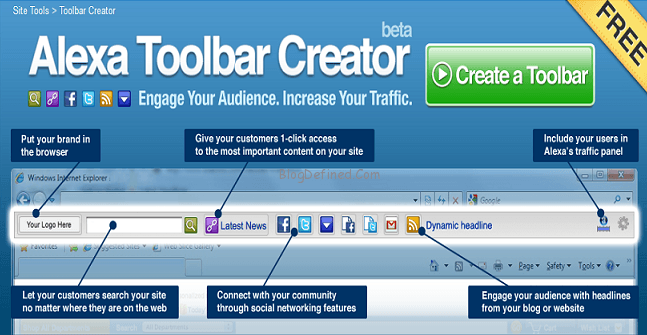
Tip# 5:Create Custom toolbar using Alexa Toolbar Creator

It will help you to connect to customers and drive more traffic. You can create your custom Alexa tool bar and promote your site with it. Let your customers installed the toolbar. This will increase visibility of your site.

create Alexa toolbar

Tip# 6:Claim/verify your Website on Alexa.com

Claim your website at the following link. Here is an video by Mike Barnes that teaches you how to claim your site on Alexa.
There are plugin as Claim Alexa, Alexa Claim and Certify that enables you to claim your WordPress site on Alexa easily.
You can easily claim your website on Alexa.com. Sign up with a new account of your website and then insert meta tag in the head Section of your site.

Tip# 7:Generate Quality Backlinks on your Websites and Blogs.

Backlinks are being primary keys that create a link between the webpages. Other terrific thing is that Search engine gives more weightage to the good quality of backlinks available on your webpage. It helps search engines to boost traffic on your website.
Don�t create no-follow tag backlinks as it is avoided by search engines while crawling and indexing your website.
You might be confused how Backlink can increase the Alexa ranking. Well, here is the relationship.
Good backlinks will increase page rank of your website. Good page rank websites are very search engine friendly. As a result, it will increase the chance of indexing your site among first few pages of search result.  There are more possibilities of more users on your website.

quality backlink improves Alexa ranking

Promote your articles on the internet marketing forums, webmasters forum and get massive traffic on your site/blogs. Here is a list of top forums given by prelovac.com.

Tip# 9:Write Useful and Qualitative Content 

The blogs/articles which you publish on your website should have interesting content, which the visitors likes to read. Contents related to SEO, webmaster tools are very beneficial. In fact, webmasters always visits to such sites to get knowledge, they have a Alexa toolbar installed in their browser. There is a big opportunity in increasing Alexa ranking.

Tip# 10:Connect To Social Networking sites

When you get your site stumbled or dig and your blogs get shared in social networking sites by visitors, you get a maximum visitors to your website which have a positive impact on your Alexa ranking.

increase traffic through social media

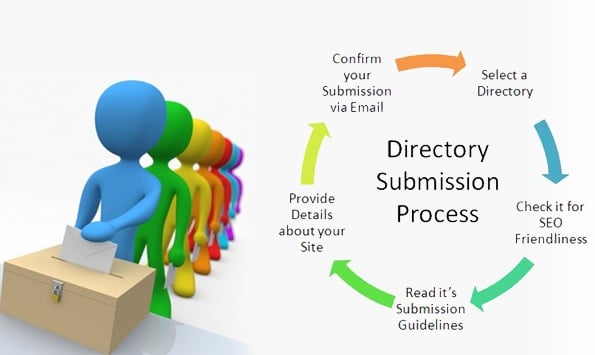
Tip# 11: Submit your Sites in Directories

Directories contains website in category wise. It helps you to make popular inbound links. Good quality backlinks play a major role in increasing the PR of a site and thus increase the Alexa ranking. Some important directories are Dmoz, Yahoo.

website submission in directories

Tip# 12: Submit Blogs in Blog Directories

Blog directories stores blogs and blog sites according to different categories. Once your blog is approved by the directory, you will be on a track to become an owner of a branded blog site. It will bring traffic on your blog and helps to bring inbound links. Some best blog directories are Technorati, Best of the web blogs, boing boing.

Conclusion

Boost in Alexa ranking of your site is an outcome of traffic volume on your site. Traffic that uses Alexa toolbar matters a lot in this track.
There is not direct relation between the SERP ranking and Alex ranking of your website. The relation goes via traffic.
When your site is properly visible on SERP results, there will be more increase in traffic and it results in better Alexa ranking. Better the Alexa ranking, more the site is popular. More the site is popular, high the visitor traffic, which results in more boost in Alexa ranking .
One more thing to notify, its mostly seen that higher the Alexa ranking, greater is the strength of Google Page Rank. It�s seen in most of the cases but not always.
Reference Moneybies.com www.slideshare.net
Enjoy Guys! and don’t forget to post your comments. � MyTricksTime.com