Google introduces Android 5.0 Lollipop

After months of speculation on what dessert would take on the �L� name for Android 5.0, Google has announced it will be called Lollipop.
The latest version of Android has over 5,000 APIs and a new design approach called Material Design that is supposed to create a consistent feel across multiple devices including gadgets running Android Wear and vehicles equipped with Android Auto. The mobile operating system was previewed at Google I/O in June.
Google says that Lollipop is, �made for a world where moving throughout the day means interacting with a bunch of different screens�from phones and tablets to TVs. With more devices connecting together, your expectation is that things just work.�
The Material Design element has a more flat approach to the look on Android with bolder colors typography. Google also says that the UI is more responsive and intuitive with natural motions and realistic lighting elements including shadows.
Battery life on devices running Lollipop will be extended up to 90 minutes according to Google. A huge win anyone that has to recharge their smartphone multiple times a day.
Lollipop will be released to the public on Friday October 17. The first devices running the updated operating system will be the Nexus 9 tablet,  Nexus 5 and Nexus 6 smartphones and the Nexus Player set-top box.
Enjoy Guys! and don’t forget to post your comments. � MyTricksTime.com

Airtel Free Internet in 3G Speed For November and December

Airtel Free Internet in 3G Speed

Airtel Free Internet in 3G SpeedAirtel Free Internet in 3G Speed – Airtel has one of the best internet services in India. The internet speed of Airtel internet in considerably better than other telecom companies. But now Jio also comes in market and giving competition to airtel. But when you compare Airtel internet plans are a bit costly. So, lot of people search for Airtel internet trick to use free internet on airtel. Well, here is an Airtel internet trick which you can use to access free internet on Airtel.

Read more

5 deals you need to check out on popular smartphones

we’ve shortlisted the best deals available on flagship smartphones. Read on, but make sure that if you like something, you buy it soon, because these devices are available in limited quantities, and with such enticing deals, are bound to go out of stock in a moment.

LG Google Nexus 5, 16GB

Deal price: Rs 25,740 (Offered exclusively on Amazon India)
Current market price: Rs 30,000
Despite the fact that Google�s latest flagship Android smartphone is now the Nexus 6, the Nexus 5 continues to be a noteworthy option.
The Nexus 5 features a 4.95-inch full HD display, and is powered by a quad-core Qualcomm Snapdragon 800 processor clocked at 2.3GHz. It houses 2GB of RAM and 16GB of memory, which is non-expandable. However, if you require more storage, you can opt for the 32GB variant as well. The device runs Android 4.4.4 KitKat  and will be one of the first to get updated to Android 5.0 Lollipop..
For imagery, there is an 8-megapixel camera at the back, and 1.3-megapixel camera in the front for selfies and video calling.

Samsung Galaxy S5

Deal price: Rs 34,806 (Offered exclusively on the Electronics Store)
Current market price: Rs 44,000
The Samsung Galaxy S5 is a good-looking, feature-rich Android smartphone meant for users who seek innovation. Now, you can own this device without shelling out the big bucks, as the price has come down by almost Rs 10,000 from its MRP. The device is loaded with features such as water- and dust-resistance, and an on-board heart rate sensor and fitness tracker app for those who like to keep themselves in shape.
The Samsung Galaxy S5 is built around a 5.1-inch super AMOLED display featuring a resolution of 1,920 x 1,080 pixels. Under the hood, Galaxy S5 gets an octa-core Exynos 5 processor, with two separate quad-core clusters running at 1.9GHz and 1.3GHz respectively. With the latest software upgrade. the device can make use of all eight cores simultaneously for maximum performance. There is a healthy 2GB of RAM and 16GB of onboard storage that can be further expanded up to 128GB with the use of microSD card.
For imagery, there is a very capable 16-megapixel autofocus camera at the back featuring an ISOCELL sensor, complemented by an LED flash. At the front, there is a 2-megapixel camera for video calls.

Apple iPhone 5s, 16GB

Deal price: Rs 35,980 (Offered exclusively on eBay India)
Current market price: Rs 52,000
The iPhone 5s has just been ousted from its flagship title by the newly-launched iPhone 6, however it is still one of the best performing smartphones available in the market today. It features an A7 chip based on 64-bit architecture, that can deliver more than twice the computing power of 32-bit architecture seen on most other smartphones. This is coupled with 1GB of RAM and 16GB of internal storage, which is non-expandable.
The iPhone 5s features a 4-inch 640 x 1,136 pixel Retina display. For added security, Apple has integrated a Touch ID fingerprint sensor into the home button, which lets users make purchases on the iTunes Store and unlock the device securely.
For photography, the smartphone features an 8-megapixel iSight camera at the back, and a 1.2-megapixel FaceTime camera in the front.

Sony Xperia Z3

Deal price: Rs 39,990 (Offered exclusively on eBay India)
Current market price: Rs 48,000
If you are looking for a powerful, water- and dust-proof Android smartphone that can easily run with heavy usage, the Sony Xperia Z3 should be on your shortlist. This smartphone was launched last month, and with this price reduction is now more affordable.
The Xperia Z3 features a 5.2-inch 1,080 x 1,920 pixel display and is powered by a quad-core Qualcomm Snapdragon 801 processor clocked at 2.5GHz. Complementing the processor, there is a juicy 3GB of RAM and 16GB of onboard storage that can be further expanded up to additional 128GB using a microSD card.
At the back, there is a mammoth 20.7-megapixel autofocus camera supplemented by an LED flash, and in the front, there is a 2.2-megapixel shooter.

HTC One (M8)

Deal price: Rs 36,527 (Offered exclusively by eBay India)
Current market price: Rs 45,000
The HTC One (M8) is this year’s flagship smartphone, and features 20 percent more metal than its predecessor.
The device sports a 5-inch display with full HD resolution. It is powered by a 2.5GHz quad-core Snapdragon 801 processor from Qualcomm, coupled with 2GB of RAM and 16GB of internal storage, that is expandable up to an additional 128GB with the use of a microSD card.
The One (M8) gets a 4MP UltraPixel camera at the back, and a 5-megapixel front camera for video calling and selfies.
With this we wrap up another edition of the best online deals on smartphones. We hope we have managed find you your favourite smartphone at a discounted price. But if that�s not the case, keep watching this space as we promise to bring you more money savers next week.
Enjoy Guys! and don’t forget to post your comments. � MyTricksTime.com

How To Create/Design Contact Us Form For Blogger

Blogger is best free CMS platform which becomes real competitor for WordPress in these days. Not doubt WordPress is too much extended  platform and easy to understand even your have technical knowledge or not. But in blogger you need some technical knowledge about basic HTML and js just because you need to setup some features manually. Blogger is not become vast and comes out with great feature within few last years. Now You can easily Design a great profession responsive blogger template and without using default boring theme. Even our safe tricks is at Blogger and but i also really don’t feel any kind of need to shift at WordPress just because i know how to use and develop every which i want at blogger.
Some major problem based by Bloggers which using and setup their blog at blogger platform is create a pages like contact us, sitemap page and while designing many other pages. I already discuss about how to design Sitemap according to label wise. So today i will explain you the method to design your contact us form. Many of users face problem while make contact us form page just because they don’t know to get fields like name, email, message and many other which will get submit just on single click. You can develop by using JavaScript and HTML but for non technique it really a great issue. So here i going to share a best way to create quick and easily contact us form with JotForm service.

How To Design Contact Us Form With JotForm ? 

  • First of Visit Official site of JotForm.
  • Then Setup Your New Account with the email address where you want to receive contact message and then login.
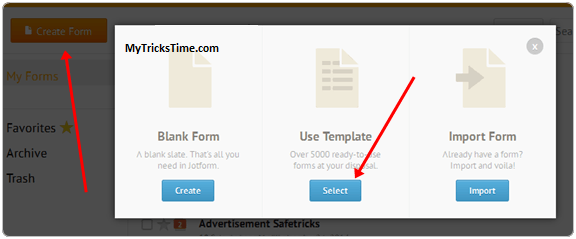
  • Now Click on MyForm option from the menu and click on create form.

  • New Window will appear with three option just select use template option and thousand+ different style form will appear just select template you like and click on continue button.
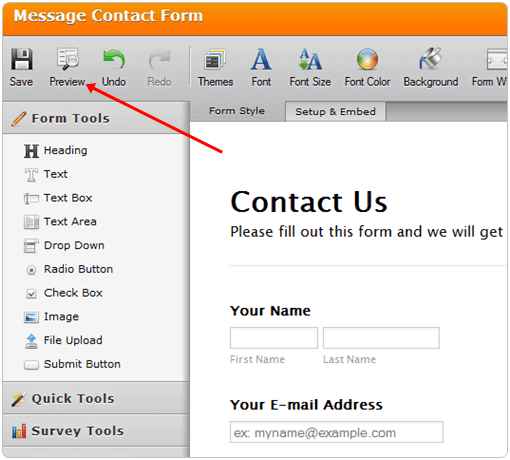
  • Now Customize your Form and simply add and remove option available on left sidebar. Every thing is done just by doing Drag and drop.
contact us form jotform

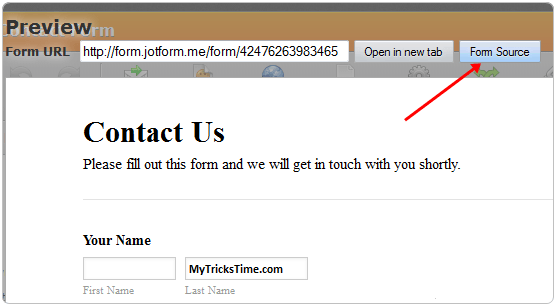
  • After finalizing your form design just click preview button and then click Form source

  • Now Copy Paste all the coding and save it in notepad for further usage.

Method To Setup Contact Form At Blogger

  • Open your Blogger’s blog and then go to Pages option.
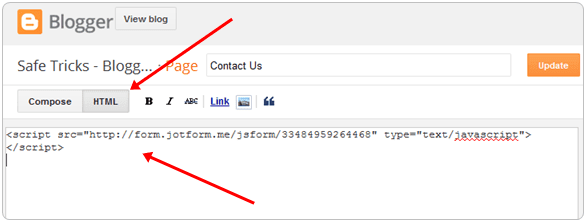
  • Create New Page option and shift to HTML Editor.
  • Now Place all the coding of form which already saved in notepad.
contact us blogger page
  • After Placing code accurately just publish your blogger page and see your contact us page working live.

Important Tips:- 

  • Jotform free account have limits on receiving month submission. Which can upgrade by completing various task available in profile.
  • Even you can buy their premium plans to increase your monthly submissions.

Enjoy Guys! and don’t forget to post your comments. � MyTricksTime.com

Add Google Translate Button In Blogger

 In this world a huge number of peoples
 and they are different from us i mean there
 culture, caste, society and the main is
 language. Here is approximately thousands
 of languages in our world and if we talk
 about our Blogging field here is also many
 people who cam to your site is from another
 country and region and they don�t know the
 specific language that we use to write our
 blog posts well as we know we also almost use English language that also known in many countries but in some country people don�t know this language so its difficult to show our knowledge to them, But Google always help Bloggers and this time also they introduce its translate button feature which help your readers to read what you exactly want to tell your readers so its a simple procedure lets have a look.

How To Add Google Translate Button In Blogger ?

   First of all go to Google Website Translator Page  now click on �Add New Website� button on the upper right side as shown below

Now in Website URL box enter your website URL and select your website language and click next as show below

Now in translation language click all languages and in second option set its mode what you want and click on get code

Now you can see two types of code the first is to verify your site and second is to show button where you want in your blog

Copy first code and Go to Blogger > Edit HTML and search for </head> tag using ctrl + f and just above it paste the first code and click on save template button.

Now copy the second code and Go to Blogger > Layout > Add a HTML / JavaScript  and paste the second code and click on save button and adjust it where you want to show this button.
Enjoy Guys! and don’t forget to post your comments. � MyTricksTime.com