Rs 100+ Free Talktime for downloading Android App – Mcent

YES Dear Friends,
You heard right after the old offer of Rs.10 recharge by watching video and downloading guitar app Mcent giving free Mobile Recharge with more activities where you just have to log in to
your account ( make a new if you don�t have one )
and visit here Offer page to Download list of mcent app and get talktime of Rs. 100.

To get 100/- Rs. Talk Time Please Follow Step by Step which is showing Below
Be Careful..

Important :Use  Desktop chrome browser for sign up OR in mobile Opera browser, you must set websites view mobile to DESKTOP in opera mobile

Step – 1

Click Here
to Login to your account by mobile or PC browser/ make a new one if you don�t have one by CLICK HERE for sign up & use opera in mobile.

Step – 2

After Signup Verify your E-mail and download mcent app from the list [Android App to get your credit]

Step – 3
Come back to this page and install one by one app to get Talktime from bellow apps

Download RedBull to get Rs. 8/- (INSTANTLY)
Download DU Speed Buster to get Rs. 13/- (INSTANTLY)
Download GO Launcher EX to get Rs. 7/- (INSTANTLY)
Download Ixigo flights  to get Rs. 11/- (INSTANTLY)
Download Chifro ABC to get Rs. 11/-

Note : Amount May be take maximum 30 minute to update in your a/c 

Step – 4
Now Download Mcent App To Recharge Your Amount to Your Mobile No.
Click Here to Download Mcent App

Next Day you’ll get more offer of more then 30 Rs.

Note:- First Signup using Mobile browser, and Visit this page to download application and Download Mcent App At last to recharge mobile otherwise you’ll not get daily offer.

Enjoy Guys! and don’t forget to post your comments. � MyTricksTime.com

5 Biggest Differences in WordPress.com vs WordPress.org

Choosing between WordPress.com & WordPress.org can be hard for some people, but its not that of a rocket science. Before you begin to make a blog for yourself, you have to understand what the real difference are there in between the two.
For some people, like newbie and starters it may come like a surprize that there are two types of WordPress, even if you know that, but don�t understand what the real difference is, then this post will help you understand better.
We have made this post to simplify the needs and demand of this WordPress community. Make sure you spend little time to clear all your doubts, because when you begin your quest there�s no turning back.
WordPress.com
1. For starters there is no need for any investment.

2.Apart from hassle free start, you get spam protection, auto backups, updates, and free plugins that do wonders
3. 200+ themes to choose from.4. Ads cannot be removed in free version, but by paying $30 yearly, you can remove them
5. Premium themes are payable, you cannot edit themes for free, give another $20 for extra storage and $60 for video blogging.
Apart from all the difference you need to understand the need of the hour, what is your goal? Are you opening a blog for fun and entertainment purposes or for a company, business and sales.
My advice would be to open a blog on WordPress.com for starters and newbie and then convert into WordPress.org format, yes its possible and you get to learn a lot when opening on a free platform.
So my advice would be to open a blog with a platform that can make you learn about this new venture you are about to start, as blogging has tremendous potential and one can earn living out of it.
WordPress.org
1. Registering your domain & hosting is prime requirement.

2. Update it, keep backups and install and try plugins at your own risk.
3. Many options available as far as themes go, upload any, edit it as per your needs.4. No ads, instead you can add ad code from adsense and other advertising as income stream.
5. Use of theme frameworks and better SEO management can lead to good exposure and growth.

Enjoy Guys! and don’t forget to post your comments. � MyTricksTime.com

10 tips to increase your email subscribers

10 tips to increase your email subscribersIf you want to keep a record of your loyal reader then start building an email list of them. The more people you are having in your email list, the more readers you are going to get and finally more shares and likes for your content or product.

Emails are permanent source of traffic as they are the most read thing on internet even more than social media websites. So having an email list is crucial for every online business and marketer.

Ways to improve your email marketing campaign:

You have sign up for some email service provider and setup an opt-in form on your website. Everything is done and you are waiting for the people to subscribe but your daily subscription are limited to 1 or 2. If this is the case then everything is not done properly.

Like many other people on internet who are doing email marketing but results are zero, here are some quick ways to increase your email subscribers.

You may also like: Stylish email subscription widgets for Blogger

1. Email subscription box on your Home page

Most people are going to see your home page after finding your website through search results and if you are intelligent enough then you can place a simple subscription box at the top with some call to action.
10 tips to increase your email subscribers

2. Have one in your sidebar

If you don’t want to add one on your home page then here is an option for you. Add a simple subscription box in the side bar as you can see in this blog. This will help you to get more subscribers from every page of your website.
Clearly display email subscription box and try to place it above the fold. Clearly display your call to action and give your best reason for subscription. One can also add feed and social media links to increase social media subscribers.

3. Place subscription form within the post 

Many marketers are using this technique and the results are awesome. Find the most popular pages of your website (Consult your analytics) and place these forms with a professional message above them.
Don’t forget to add it in your About page as it is the best place for it.  

4. Use two step opt-in process

Currently this opt-in process is provided by ever ESP. In this process first you present a simple button with a message like “Click to subscribe” and when a reader click on that button, another window opens with subscription form. 
10 tips to increase your email subscribers
This method is really successful as the reader clicking the button is already providing a positive signal and when he see a subscription form on the next window, he happily enters his email address.

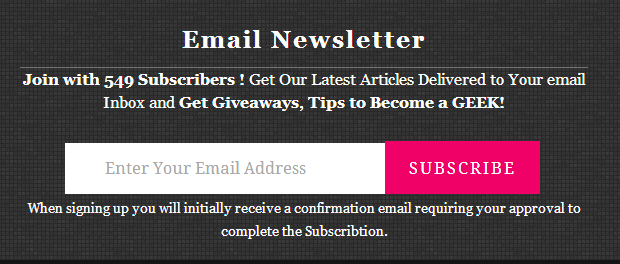
5. Tell them the numbers

One can add total number of subscribers to show that what that person is losing. Like you can write this message above the subscription box,
“Be a part of over 5000 daily subscriber’s community. Simply click below and get whatever you are missing”.

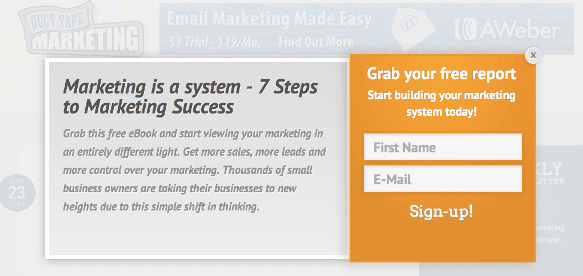
6. Offer something special

If you have something to provide for free then use it to increase your email subscribers. Make a popup form which will redirect your user to something free like a free tool or a free eBook. People will more than happy to subscribe if they get something free with just a simple subscription.

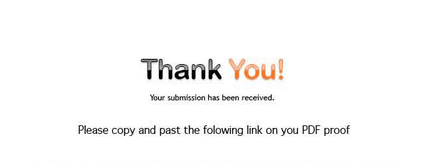
7. Say Thank you

Create a custom page with a thank you note. This method can also be used with the above step as providing something free and then saying “Thanks for your subscription” will make your subscriber emotional 🙂
10 tips to increase your email subscribers
You can also use social media gadgets on these pages to increase your social media subscribers.

8. Welcome them warmly in first email

This step is just to increase your interest. Almost every ESP provider allows to add a custom first message so choose it carefully. Welcome your reader and introduce them to your blog. Try to create a humanly relation, ask their problems or appreciate their suggestion.

9. Run a contest

I have seen many people using this trick. Like they introduce a contest on their social media pages and then define a process to win the contest. And the first step in this defined process email subscription form. This helps them to get many email subscribers and cross promote their blog to other people. 

10. Guest posting

This can be a good source of traffic as well as can help you to increase your email subscription. Use related blogs to do guest posting and add a link to your social media profile and subscription form for your own blog. 

Up to you

These 10 steps can make your email marketing campaign really effective so use all of them and don’t forget to share your experience about this post.
In the last if you like it then share it across every platform.

Enjoy Guys! and don’t forget to post your comments. � MyTricksTime.com

Unique Email Subscription Box Widget for Blogger

If you are a Blogger, I am sure you must be aware of advantage of having a Blog subscription box. Subscription box is a widget that simply allows the readers to subscribe to your blog, either via RSS or Email and to connect with you on various other social networking sites. So, it is an essential widget for every blog.

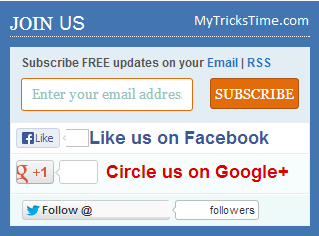
This subscribe box is simple yet loved by many as it features Facebook, Google + and Twitter in a miniature. All those who like to have this widget, just follow the below steps to have it on your blog.

Read Also:

How to Get it:

Step1. Log in to your blogger account.

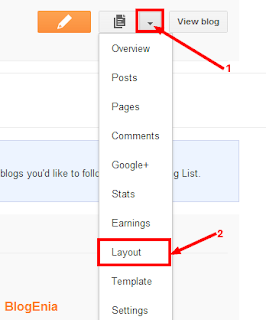
Step2. From the dashboard click on the drop down menu and select the Layout option.

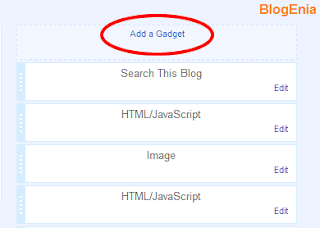
Step3. Click on Add a Gadget.

Step4. A new window will open. Now click on HTML/JavaScript.

Step5. Now paste the below code in the Content box.

<div align=’CENTER’class=”bd_widget”>

<div align=”left” id=”bd-text”><h3>JOIN US
</h3>
<div id=”bd-subscribe-box”>
<div class=”email-box”>
<h4>Subscribe FREE updates on your <a href=”http://feedburner.google.com/fb/a/mailverify?uri=MyTricksTime” target=”_blank”>Email</a> | <a href=”http://feeds.feedburner.com/MyTricksTime” target=”_blank”>RSS</a></h4>
<form onsubmit=”window.open(‘http://feedburner.google.com/fb/a/mailverify?uri=MyTricksTime‘, ‘popupwindow’,
‘scrollbars=yes,width=700px,height=700px’);return true” target=”popupwindow” method=”post” action=”http://feedburner.google.com/fb/a/mailverify”>
<input name=”email” onblur=”if (this.value == &#39;&#39;) {this.value = &#39;Enter your email address&#39;;}” onfocus=”if (this.value == &#39;Enter your email address&#39;)
{this.value = &#39;&#39;;}” value=”Enter your email address” class=”txt” />
<input type=”hidden” name=”uri” value=”MyTricksTime” />
<input type=”hidden” value=”en_US” name=”loc” />
<input type=”submit” value=”Subscribe” class=”btn” />
<div style=”clear:both;”></div>
</form>
    </div>
<div class=”fb-like-box”>
<iframe src=”//www.facebook.com/plugins/like.php?href=http%3A%2F%2FMyTricksTime%2F&amp;send=false&amp;layout=button_count&amp;width=450&amp;show_faces=false&amp;font&amp;colorscheme=light&amp;action=like&amp;height=21&amp;appId=408184442589211″ scrolling=”no” frameborder=”0″ style=”border:none; overflow:hidden; width:80px; height:21px;” allowtransparency=”true”></iframe>
<a href=”http://www.facebook.com/MyTricksTime” target=”_blank” rel=”nofollow” style=”color: #3B5998; font-family: arial; font-size: 15px; font-weight: bold; line-height: 20px;”> Like us on Facebook </a><div class=”clear”></div>
    </div>
    <div class=”gplusone”>
<div style=”float:left;width:90px;”>
<g:plusone href=”http://www.MyTricksTime.com“></g:plusone>
</div>
<a href=”https://plus.google.com/1062174130577068740” target=”_blank” rel=”nofollow” style=”color: #d00; font-family: arial; font-size: 17px; font-weight: bold; line-height: 24px;”>Circle us on Google+</a><div class=”clear”></div>
</div>
<div class=”twitter-follow”>
<a href=”https://twitter.com/MyTricksTime” class=”twitter-follow-button”>Follow @MyTricksTime</a>
<script src=”//platform.twitter.com/widgets.js?4a2793″ type=”text/javascript”></script>
    </div>
</div></div>
<style type=”text/css”>
/* BD Style sheet for subscription box */
#bd-subscribe-box .fb-like-box { border: 1px solid #EBEBEB; padding: 5px; background:#fff;}
    #bd-subscribe-box .gplusone { background: #f7fcfc; border: 1px solid #EBEBEB; border-top: 1px solid #fff; color: #000; font-size: 10px; line-height: 1px; padding:5px;}
    #bd-subscribe-box .twitter-follow { background: #eef9f9; border: 1px solid #dff6f6; border-top: 1px solid #fff; padding:5px 11px;}
    #bd-subscribe-box .email-box {background:#e3edf4; padding:11px;}
        #bd-subscribe-box .email-box h4{color: #555;font-family: Arial;font-size: 11px; margin: 0 0 10px;}
        #bd-subscribe-box .email-box .txt,#bd-subscribe-box .email-box .txt:focus{background:#fff; float:left; color:#92c3c3; border:1px solid #E36B0A; border-radius: 3px; padding: 7px 10px 8px; width: 150px;}
        #bd-subscribe-box .email-box .btn,#bd-subscribe-box .email-box .btn:focus{background:#E36B0A; border:1px solid #AD5513; color:#fff; border-radius: 3px; float: right; font-size: 12px; font-weight: bold; padding: 8px 8px; text-shadow: 1px 1px 0 #D08D00;}
            #bd-subscribe-box .email-box .btn:hover{background:#FF9b00;}
input, textarea {
font-family: Georgia, “Times New Roman”, Times; font-size: 1em;}
#bd-text {
background:#369;
border: 1px solid #CCC;
box-shadow: 0 0 5px
#EEE;
line-height: 10px;
margin: 10px 10px 15px 0;
padding: 10px;
width:280px;
}
#bd-text h3 {
color:white;
border-bottom: 1px dotted
white;
line-height:1.385em;
font-size: 18px;
padding: 0;
margin: 0 0 10px;
border-bottom: 1px dotted
#AAA;
font-wieght: bold;
text-transform: uppercase;
letter-spacing: 0;
}
</style></div>

Now make sure that you changed the Red Colored user ids with your own.

Done!!

You can also adjust the width and colours as per your requirements. If you want any adjustments or having any doubt comment below, I will try to resolve it soon.
Enjoy Guys! and don’t forget to post your comments. � MyTricksTime.com

What is USB Type C?

1
Take a look around your room and you will find many devices plugged with Universal Serial Bus or popularly known as USB Cables. USB Cables are used everywhere. From connecting a phone to PC and from connecting printer to the PC, USBs can be easily found. They are one of the most successful type of peripheral connection. However, there are some issues with these USBs. Most of the time the confusion remains that which one is the front side and which one is the back side. Sometimes the question comes that whether the cable should be connected upside down or in the other way. So to overcome all these shortcomings, USB Type C is coming. Now before going into the details let us understand what Type C is.

What is USB Type C or USB 3.1?

There are four main categories of USB:

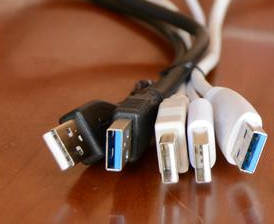
USB Type A: Is the very first, and the original USB which comes in a flat rectangular shape used by USB Keys and external drives. Versions of USB like USB 1.1, USB 2.0, and USB 3.0 shares the same USB Type-A design. This indicates that USB Type A is always compatible with a Type-A port even if the device and host are using different versions of USB.
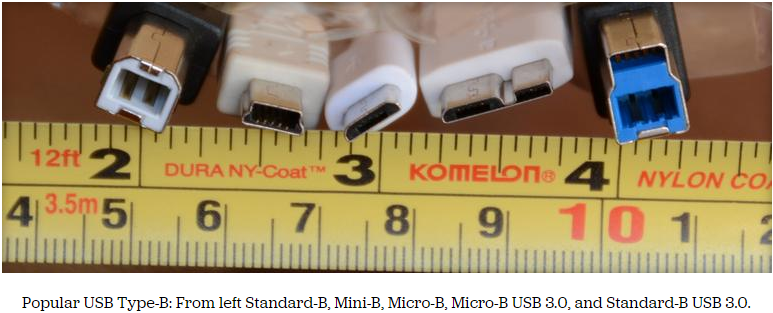
USB Type BThese are the much upgraded version of Type A which comes in the shape of the little used square form factor most commonly seen on the back of printers.
Capture
Micro USB: It is the successor of Type B which are very tiny in the shape and are used by smartphones and tablets.
Mini USB: It is the predecessor of Micro USB which was used at the device like GPS units and some external hard drives. However, they are not used so much now.
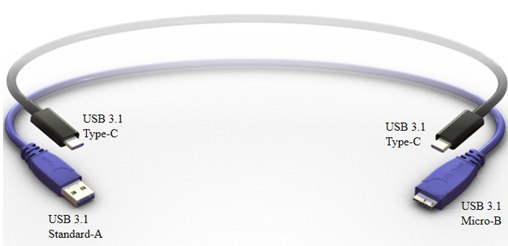
USB Type C: The most advanced and the latest is the Type C, which combines the small size of Micro USB and speed of USB Type A.
usb-type-c-plugs-508-100391081-orig

What�s new in USB Type C?

  • It has completely new design and it can be used backwards which means it has backward compatibility. A user can use any side of the cable.
  • It is smaller in size. Even smaller than USB 2.0.
  • One of the most interesting feature is the reversible plug orientation. It can be used either upside down or the other way.

Advantages:

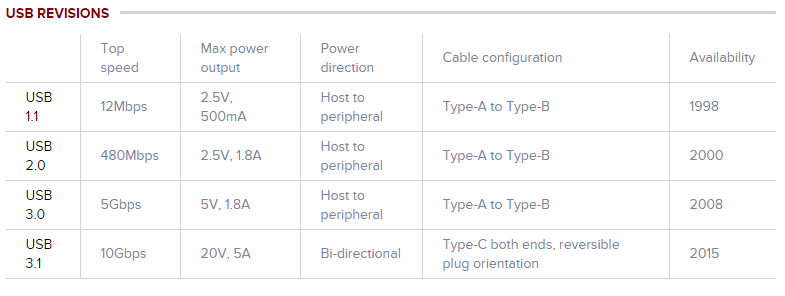
Speed: Everyone wants to be faster. USB Type C will be able to provide the speed performance of up to 10 Gbps as compared to present speed of 5 Gbps. 10 Gbps means 1250 MB of data in a second.
Power: USB 2.0 can support current of up to 500 mA for up to 2.5W of power and USB 3.0 can support up to 900mA for up to 4.5W of power. But USB Type 3 is much more powerful and can support up to 5 amps (5000mA) for 100W of power. This implies that devices can be charged at a faster rate by using USB Type C.
2
Reversible: There is no doubt that this is one of the most important advantage of USB Type C. In a Type-C USB cable both ends will be the same thus allowing for reversible plug orientation. A user also don�t need to worry about plugging it in upside down.

Disadvantages:

Need of new adapters: The main problem is that there are millions and millions of existing USB devices and cables that will need adapters and new cables to work with new Type-C devices. So making a universal port for all the devices would be a challenge for sure.

When it will be launched?

It will launch at the end of 2014 and the mass adoption will start in early 2015.

What will it cost?

There are no news on how much will a USB Type C cost. Better to wait for the official announcement.
Finally the day is not far when we all will have a same tiny cable for all the devices.
Enjoy Guys! and don’t forget to post your comments. � MyTricksTime.com