How To Submit Blogger Sitemap In Google and Bing Webmaster

For the successful blogging you must have a traffic to your blog. Using term of organic traffic. I mean to say traffic like which to your blog through Google, Bing, Yahoo Search Engines. You must submit your blog in web master tools. a treat tools is provided by Bing, Google itself. it�s use-ful for the bloggers & web-master to-get their blogs-website indexing by the bing

and google it will also help to the improved our blog craw.ling rates.
The first thing you have to do verify your blog/website owner-ship in Google web-master-tools (How to Submit your blog in Google web master tools ) Bing web-master tools ( ).
It�s important to submit your blog site-map to Google-Bing using term of SEO(search engine optimization) which tells Google-Bing about your website/blog�s contents. whenever you update your website or blog with the new post, this site-map help you to index them easily in Google,bing search engine. Let see How To Submit Blogger Site-map in Google & Bing Webmaster

Submit Your Blogger Site-map To Google Web-master Tools.

Some easy step Below you have to go through using term to submit blogger blog site-map
  • Sign-in to your Google Webmaster tools.
  • Select the blog tittle for which you want to add site-map.
  • Click on the Site-maps button as shown below.
  • Now click on the top right side-corner of page, and press Add site-map button
When you click on button, a small box will appears as shown in the screen-shot below.
  • Add the below code in the text field

It�s a site-map code for your blog which you need to add in web-master.

atom.xml?redirect=false&start-index=1&max-results=500

  • Press �Submit Sitemap� button.
  • Refresh the page.
Congratulation! Now You are finished the processing of submit your blogger sitemap.
Note: The above sitemap will work for 500 posts only. If you have more than 500 posts published in your blog, then you have to add one more sitemap. Whole procedure will be same but at this time you have to add this code.

atom.xml?redirect=false&start-index=501&max-results=500

The sitemap which we submit to Google Webmaster Tools is a XML sitemap which is used by search engines to find our content easily. There is HTML sitemap too which is for our blog readers. We should add sitemap page to our blog so that our readers can easily view all of our blog posts at the single location. It�ll be easy for them to read post which they want to. If you don�t know how to add a sitemap page in blogger, then here is a tutorial for you.

Enjoy Guys! and don’t forget to post your comments. � MyTricksTime.com

Make Free Call to US & Canada From India With Skype (Exclusive)


Skype is having an awesome Christmas Gift for Indian peoples . Now Indian peoples can make unlimited call to US and Canada using their Skype account. Let’s Find out how it is possible…


STEPS TO FOLLOW:-

  • Just Visit the offer Page | Click Here
  • Download the Skype Application For PC/Mobile.
  • Make a new account or Just login to your existing account.
  • Now Dial any US or Canada Number.
  • Your call gets connected at free of cost.
Limited Time Offer:- 
  • From December 16, 2014 (00:01 IST) to March 1, 2015 (00:01IST) (the Offer Period) use Skype to make free calls from India to land-lines and mobiles in the U.S. and Canada (excluding special, premium service and non-geographic numbers). Skype account and internet connection required; Internet and/or mobile fees may apply. 


Your Existing Skype Account/Subscription:-

  • If you have credit in your Skype account during the Offer Period, you will not be charged (and your credit will not be used) for qualifying calls from India to the U.S. and Canada made during the Offer Period. Once the Offer Period has ended, you will be charged (and your credit used) as usual. 
  • If, during the Offer Period, you have a Skype subscription with a fixed-minutes allowance (e.g. 120 minutes per month) that includes calls from India to landlines and mobiles in the U.S. and Canada then your minutes allowance will not be used for qualifying calls made during the Offer Period. However, your subscription will still end at the specified time (e.g. after one month for a 120 minutes per month subscription) even if you have not used your full minutes allowance; unused minutes cannot be carried forward beyond the end of the subscription period.
Fair Usage Policy for this offer:-

This offer applies to Skype calls made for individual use only (personal or business communications) in accordance with Skype�s Terms of Use, this Fair Usage Policy and the above Terms (�Legitimate Use�). All calls will be disconnected and require a re-dial after a 4-hour duration.
The following is a non-exhaustive list of practices that would not be considered Legitimate Use:

  • Making calls for telemarketing or call centre operations;
  • Re-selling minutes;
  • Sharing minutes between users whether via a PBX, call centre, computer or any other means;
  • Calling numbers (whether singly, sequentially or automatically) to generate income for yourself or others as a result of placing the call, other than for your individual business communications (and subject to Section 4.1 of the Terms of Use); and
  • Unusual calling patterns inconsistent with normal use, for example, regular calls of short duration or calls to multiple numbers in a short period of time.

Enjoy Guys! and don’t forget to post your comments. � MyTricksTime.com

5 Cool Whatsapp Tips & Tricks For 2015

Hello Guys, Hope every one fine and enjoying our Blog posts. Today we are going to share with you 5 tips to use whatsapp Wisely. Because you know this day whatsapp is very popular social app and every one prefer This. So we are thinking to share some tips who is very useful to all whatsapp users. Some of the tip you know but some of you do’t know so i am going to list all below Read it apply it and enjoy.

1- Hide Last seen In whatsapp Chat

So if you do’t want to show that you read message notification on sender then we have a solution Download Hide stats app from play store it helps to hide read stats to sender. Actually hide stats app close the net connection when you open whatsapp and when you close whatsapp net connection is on it means you can read message without showing that you read this to sender.
There is lots more apps in play store but you can try this.

2-Trick To stop sending whatsapp Images to Gallery

You love whatsapp because there is image and video sharing option in whatsapp use to this you receive lots of photos and videos from friends. And there is some photos and videos who is private means you can’t show publically , in whatsapp all images and videos directly showing in gallery Which is seen by any one, Means your privacy at risk.
So if you do’t want to show images and videos in GALLERY then here is a post from that you can know 
How To Hide WhatsApp Images, Videos and Audios From Android

3-How To Check Who All Seen Your Group Message:

The concept of Blue Tick in Whatsapp group is not present currently. Now here is the only arrangement of single tick. In the group you can not know which person see or read your message.
So knowing who read your messages whatsapp inbuilt this features but very few people know this. To knowing read stats of message hold your message now you see the (i) button on top will appear. Click on it, you will know which members of the group and who does not have to read your message. Identify and try to ignore those leg-pulling. They will also shocked. 

4-On Whatsapp You Online But Number is Off Trick:

Any time you can change your whatsapp number. For this you do not need to install and then delete whatsapp. To change your number Go to whatsapp setting. Then “Account” and then “Change the number in ‘. Simply enter the new number to Verified. Remember that the number of display is only whatsapp number.And it is switch off or another number for safety or prank.
This trick is very helpful who do’t want to share there personal number to any one This is Best for Girls , You can easily give your number with them who do’t want to share personal number ,if in future you like you share personal number.     

5-Who’s Your Whatsapp Friend

If you are interested in statistics, you will like it. Is an application WhatStat. Whatsapp your friends to help you see the whole track. For instance, this is what your Top Friends or top group or what time of day or how many percent Whatsapp are most active just delivered the message to the rest, things like that.

Guys you all know recently whatsapp update last seen features with blue tick option when you read the message the sender see the double blue tick in message it means message is read by viewer. This is very cool features but some time it is not useful like we do’t want to tell sender that i read your message or do’t want to reply.
Enjoy Guys! and don’t forget to post your comments. � MyTricksTime.com

How to unlock your Samsung Galaxy after Too many pattern Attempts or Forgotten Password

Samsung Galaxy Lockout

So you finally did it, you locked yourself out of your Samsung Galaxy. You knew you should have used a simple pattern or a password you could remember easily. So what do you do now?, nothing works and you need to use your phone again. The worst thing is you did not associate a
Google account at the first sign in and that option of regaining access to your device has failed.
Well you have come to the right place we have the solution you need.


What will this Fix DO?

Note this method will allow you full access to your Samsung Galaxy after too many pattern attempts or aforgotten password, however this hard reset will wipe the phone clean, so all data on the phones internal memory will be wiped. The contents of your SD card and  SIM card will however remain intact. This will not damage or hinder the functionality of the device in any way.

Which Devices will this work on?

Now this fix will work on all Samsung Galaxy smart phones including the: Samsung Galaxy S3 and theGalaxy Y and many other variants of the galaxy line.

We will be using the Samsung Galaxy Y to demonstrate the procedure,but remember this works with other Galaxy devices as well.

How to Unlock the Samsung Galaxy After too many pattern attempts or forgotten password.

1. Power down the device.

2. Hold down the: up volume key,the home button and the power button all at the same time.

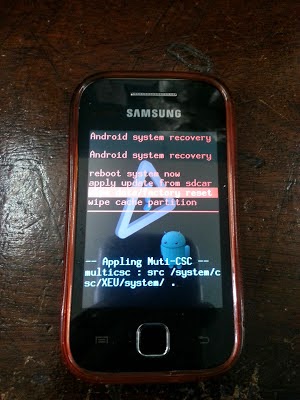
The device should power on into the Recovery  mode shown below:
Recovery Mode

3.Using the home button to select and the volume up and down to navigate either up or down select the third option as shown above which says : Wipe Data/Factory Reset.

4. You should now see the following recovery screen:

Select Yes-Delete all user to wipe all data on the device. Allow the device to do its thing and finally when it gives the options again-  Reboot.

5. That’s it the device will boot up similar to the first time you bought it, simply configure it and the device should boot up and not ask for the password.

Be sure to leave a comment if this was helpful and solved your problem.

Enjoy Guys! and don’t forget to post your comments. � MyTricksTime.com

Free Hello Tune for Airtel and Docomo {Proof Added}

Free Hello Tune for Airtel and Docomo {Proof Added} – Hello guys in this post i am going to tell you a trick in which you can get Free hello tune for your mobile number.This Trick is for AIRTEL and DOCOMO customers only and you will get 10 days free hello tune don’t worry you can activate again after 10 days.3 Days For Docomo users.

How to get Free Hello tune in airtel

1.Dial *678*559#

2.Reply 1 To Confirm.

3.Now Check your messages


4.Reply 1 to Confirm again.
5.Wait 2-3 mins Hellotune is Activated Successfully.


� � � � � � � � � To Deactivate Hello tune SMS STOP to 155223(TollFree).

This Trick/offer is Working in Delhi. I have tested in 2 airtel numbers.

Hello tune is Airtel Rehman

Free Hello Tune for Docomo

Docomo is Offering Free Hello tune of Your Choice for 3 Days.
  • To Activate-
  • Dial *678#�
  • You will Get Song List
  • Select a Song
  • Confirm Your Subscription
  • Your 3 Days Trial is activated.

To Deactivate Hello tune SMS STOP to 155223(TollFree).

Enjoy Guys! and don’t forget to post your comments. � MyTricksTime.com