

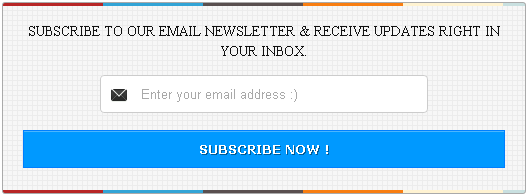
Almost every blogger knows the importance of email subscription widget in your blog. Email subscription helps your readers to reach your blog when you provide new article or update your blog. Moreover, an easy email subscription box attracts your readers to subscribe your blog straightforwardly. So today, this post is about adding a fast loading
email subscription widget to your blog and it might be helpful for those who doesn�t like default blogger Follow by Email.

Please note: This email subscription widget adjusts the dimension automatically according to the place where it belongs to. But it�s better to have at least 300px if you�re focusing on sidebar. To prove it, if you own a demo blog, try to add this widget in your blog�s sidebar as well as footer to see its automatic dimension.
And you can easily customize your blogger sidebar width if it�s below 300px via Customise.
Access path: Blogger Dashboard � Template � Customise � Adjust widths � Right sidebar.
Add this Email Subscription Box to your Blog
It�s for guys, who�s experienced adding widgets to their blog earlier. Kindly follow simple steps provided below.
- Go to Blogger Dashboard � Layout
- Click on Add a Gadget
- Copy & paste the below code in it (leave the title column blank)
<style type='text/css'>#sidebar-subscribe-box {
    background: url(http://1.bp.blogspot.com/-IyEBRR8yOQQ/UBhYdBd23PI/AAAAAAAAFTU/aeW3JdAlrCs/s1600/colored-strip.png) repeat scroll 0 0 transparent;
    border: 1px solid #aaa;
    border-radius: 3px;
    padding: 3px 0;
}
.sidebar-subscribe-box-wrapper {
    background: url(http://2.bp.blogspot.com/-tUlo5p5gP8o/UBhYciGNgwI/AAAAAAAAFTM/x22pIuNLVPw/s1600/bg-pattern.png) repeat scroll 0 0 #f7f7f7;
    color: #111;
    font-size: 14px;
    line-height: 20px;
    padding: 1px 20px 10px;
    text-align: center;
    text-transform: uppercase;
}
.sidebar-subscribe-box-form {
    clear: both;
    display: block;
    margin: 10px 0;
}
form.sidebar-subscribe-box-form {
    clear: both;
    display: block;
    margin: 10px 0 0;
    width: auto;
}
.sidebar-subscribe-box-email-field {
    -moz-border-radius: 4px;
    -webkit-border-radius: 4px;
    background: #fff url(http://1.bp.blogspot.com/-JMYdQsIa9WQ/UDZqxqqrTEI/AAAAAAAAFho/AocEv70U8K8/s1600/sprites.png) no-repeat 0 -27px;
    border: 1px solid #ccc;
    border-radius: 4px;
    color: #444;
    margin: 0 0 15px;
    padding: 10px 40px;
    width: 68%;
}
.sidebar-subscribe-box-email-button {
    background: #09f;
    border: 1px solid #007fff;
    box-shadow: 0 1px 0 rgba(255,255,255,0.3) inset, 0 1px 0 transparent;
    color: #fff;
    cursor: pointer;
    font-family: verdana;
    font-weight: 700;
    padding: 10px;
    text-shadow: 1px 1px 0 rgba(0,0,0,.4);
    text-transform: uppercase;
    width: 100%;
}
.sidebar-subscribe-box-email-button:hover,.sidebar-subscribe-box-email-button:focus {
    background: #1ca4ff;
}
.sidebar-subscribe-box-email-button:active {
    -moz-box-shadow: 0 1px 4px rgba(0,0,0,0.5) inset;
    -webkit-box-shadow: 0 1px 4px rgba(0,0,0,0.5) inset;
    box-shadow: 0 1px 4px rgba(0,0,0,0.5) inset;
    outline: 0;
}
iframe,object,embed,.yt-border iframe,.yt-border object,.yt-border embed,table {
    width: 100%;
}
embed {
    border-radius: 3px;
    -moz-box-shadow: 0 2px 4px rgba(0,0,0,0.2);
    -webkit-box-shadow: 0 2px 4px rgba(0,0,0,0.2);
    background: #FFF;
    border: 1px solid #ddd;
    box-shadow: 0 2px 4px rgba(0,0,0,0.2);
    margin: 0;
    padding: 4px 4px 4px;
}
#footer-section {
    background: #f5f5f5 url(http://1.bp.blogspot.com/-n5s9Bu0JCgg/UA_AfQ5qLkI/AAAAAAAAFMU/G9FOuh4SP7k/s0/bg-pattern.png) repeat top left;
    border-top: 1px solid #aaa;
    box-shadow: inset 0 4px 6px -3px #aaa;
    font-family: cambria;
    font-size: 14px;
    height: 100px;
    margin: 10px -30px 5px;
    padding: 0 30px;
    text-align: center;
    width: 100%;
}</style>
<div id="sidebar-subscribe-box"><div class="sidebar-subscribe-box-wrapper"><p>Subscribe to our email newsletter & receive updates right in your inbox.
</p><div class="sidebar-subscribe-box-form"><form action="http://feedburner.google.com/fb/a/mailverify?uri=MyTricksTime"
class="sidebar-subscribe-box-form" method="post" onsubmit="window.open('http://feedburner.google.com/fb/a/mailverify?uri=MyTricksTime',
'popupwindow', 'scrollbars=yes,width=550,height=520');return true" target="popupwindow">
<input name="uri" type="hidden" value="MyTricksTime" /><input name="loc" type="hidden" value="en_US" />
<input class="sidebar-subscribe-box-email-field" name="email" autocomplete="off" placeholder="Enter your email address :)"/>
<input class="sidebar-subscribe-box-email-button" title="" type="submit" value="Subscribe Now!" /></form></div></div></div>
Don�t forget to replace MyTricksTime [line no: 86, 87 & 89] with your FeedBurner username. Hope you added this attractive subscription widget to your blog. In case you need any more customization, feel free to mention via comment provided below
Enjoy Guys! and don’t forget to post your comments. � MyTricksTime.com



 Now a days What’s App is become most popular Social networking app. From some time