Why I Love Blogger | New Dynamic View Launched

The first good thing about Blogger it’s free, it’s easy to use, It’s secure then any other service, and you no need to think about new ideas and gadgets. Google always work on them. After i started on blogger they released template designer, recent post gadget, popular post, and total visits gadget. After some days the awesome feature stats released. Comment moderation and Mobile view, and now blogger has released dynamic view.


Although these views are not available for HackTheWorld without pawan’s permission but as soon as he will be free , we will try to try…..

Blogger currently offers five dynamic views for its public blogs. These views are only accessible if allowed for by the blog author.
Flipcard: available at [blogURL]/view/flipcard
Mosaic: available at [blogURL]/view/mosaic
Sidebar: available at [blogURL]/view/sidebar
Snapshot: available at [blogURL]/view/snapshot
Timeslide: available at [blogURL]/view/timeslide

As an example, the URL for accessing the Sidebar view for Blogger Buzz would be http://buzz.blogspot.com/view/sidebar.

These views require modern browsers such as Internet Explorer 8+, Firefox 3.5+, Chrome or Safari. Many elements of these views will not work should you have an older browser.

In all views, search is available in the upper right hand corner. Clicking on the “>” arrow in the very top left of the header bar will slide the header bar across and allow you to choose different views for the current blog as well as type in a new blog URL.

Flipcard

  • Mouse over any of the cards to see the post title and comment count. As you scroll down, additional posts will continue to load.
  • Click on a card to see the post in full view. You can navigate through the posts using J (older post) and K (newer post) or the arrow keys. Hit escape or click Back to all posts to return to the Flipcard view.
  • In the upper left, click to sort by DateAuthor and Category.


Mosaic

  • Clicking on an individual tile will expand that post to the full width of the view, and clicking again will collapse the post back into its original position.
  • The exact position of the tiles is randomly determined each time the blog loads, but they will appear chronologically from top left to bottom right.
  • Once a tile is expanded, you can page down by using the “up” and “down” arrow keys as well as J and K.
  • This view is optimized for the tablet viewing, and supports screen rotation.

Sidebar

  • Optimized for quick reading and browsing.
  • Left sidebar is list of chronological posts, with comment counts and thumbnails for individual posts.
  • and arrow keys will navigate through the posts, and comments can be displayed on the same page by clicking the Show link.

Snapshot

  • This view will display only the posts which have images.
  • Clicking through any photo will display the full post page, with naviagtion links at the bottom for Newer and Older posts
  • Mousing over any photo will display a post snippet

Timeslide
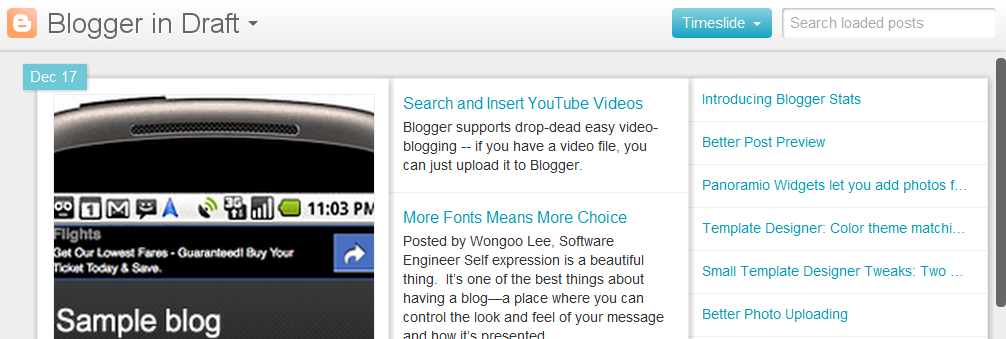
  • This view breaks the blog content down into three different areas:
    • Left column: Enlarged picture with a post snippet, title, and snipppet displayed in chronological order
    • Middle column: Displays just the post title and snippet
    • Right column: Displays just the individual post titles
  • When searching for posts in this view, the results will be highlighted

Enjoy Guys! and don’t forget to post your comments. � MyTricksTime.com

    LATEST AIRTEL FREE INTERNET TRICKS MARCH 2012

    Here is the latest airtel free internet 200% working trick.
    REQUIREMENTS FOR THIS TRICK:-
    1)PC/LAPTOP
    2)ANY GOOD INTERNET BROWSER
    3)MOBILE PHONE(along with airtel simcard)/ dongal/ modem
    Above listed requirements are must , so please step forward after getting them.
    Now u are almost done.Follow this simple steps mention below:-
    aceess point name- airtelgprs.com
    proxy adres- 157.129.176.292 or 184.154.167.242
    port- 8080 or 80
    home page- http://google.co.in
    thats all u can do.
    Now enter your wanted site adres and enjoy the ride.
    It is successfully running in WB.

    source:http://loudcamp.org/latest-airtel-free-internet-tricks-march-2012/
    Please let me know whether the trick is running in other states or not.
    Enjoy Guys! and don’t forget to post your comments. � MyTricksTime.com
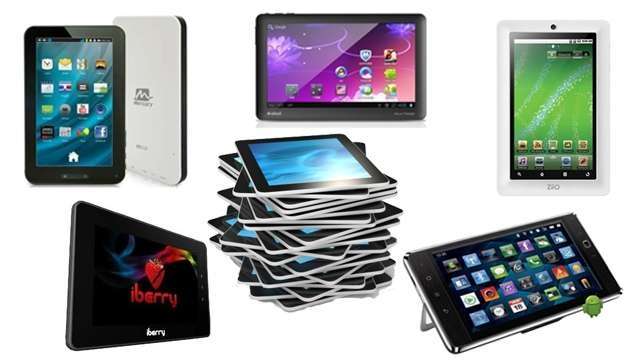
    5 tablets under Rs.10,000 in India

    The not-so-good performance of the Aakash tablet raised many questions about low-end tablets that flash affordable price tags. A low-cost tablet need not necessarily come with an advanced feature sheet, and they certainly don�t. If you want your tablet to perform like an iPad, then buy an iPad – these were the words echoed by the Datawind head. But believing that �you get what you pay for,� a decent performance worth the price that the product comes attached with is something we can surely demand. For those who can’t get their hands on the hot and
    happening idevice, can opt for the affordable lot. Android tablets do a commendable job at providing the masses with the affordability factor, by going as low as sub-10K. For those with a tight budget that can reach just go up to Rs. 10,000, here are a few options of tablets within your reach.
    Slick tablet
    iBerry BT07i Tablet 
    To begin with, those hoping to own a tablet with a Rs.8,000 budget, can surely lay their hands on the iBerry BT07i. This average 7-inch tablet embeds a responsive capacitive touchscreen and supports 1080p videos. The display quality could have been better and there is no rear camera, but otherwise, the device performs well at computing, entertainment and more, putting aside the annoyance that usually comes with low-end tablets. It�s chic and good looking on the outside, while on the inside you will find an efficient 1GHz ARM Cortex-A8 processor, 4G internal memory expandable up to 32GB that gives you the taste of Android 2.3 Gingerbread.
    Beetel Magiq Tablet 
    Beetel, the good �ol landline phone makers entered the mobile space and not-so-surprisingly chose to enter the tablet domain. The company launched the Huawei Ideos 7 tablet in the Indian market re-labeled as the Beetel Magiq. The Magiq just touches the Rs.10,000 mark. This tablet again isn�t a slow device at functionalty and can multi-task, while even handling 720p videos. The device isn�t a bad buy for the moolah with a decent feature sheet, which includes 3G support and the functionality that doesn�t appear too sluggish. This is yet another option that one could consider while buying a tablet under Rs.10,000.
    Affordable and reliable
    Ainol Novo 7 Paladin
    The Ainol 7 Paladin selling on ebay India seems like a good buy for Rs.7,990, looking at its meaty specifications sheet and obviously the price.  The striking feature of this sub-10K tablet is that it runs on Android 4.0 Ice Cream Sandwich. Besides bringing in a scoop of the latest Android OS, the device is powered by a 1.2GHz XBurst chip, which claims superior performance, while capacitive 7-inch touchscreen accompanied by a longer battery life could make it a complete entertainment package. The tablet also comes with support for 3G and Wi-Fi. It is pre-loaded with games, and the 8GB internal memory can be expanded up to another 8GB with the memory slot.
    Mercury mTAB 
    The Mercury mTAB is yet another tablet to flash in the sub-10K price tag. It runs on the Android 2.3 Gingerbread operating system and is fuelled by a 1.2GHz Cortex-A8 chip. This slim and comfortable-to-hold tablet embeds a capacitive 7-inch touchscreen. The mTab supports 1080p MP4 videos, which play smoothly out-of-the-box without any stutter or lag. Here again, the screen could have been better, and we are always glad to see manufacturers giving the resistive screen a miss, even it were a low-end product. This tablet will make you empty your pockets by Rs.9,499.
    Low-end tablet segment dominated by Android
    Veedee D10
    This tablet shows off a comparatively advanced specifications sheet at a price of just Rs.7,990. Spotted on Rediff.com, this Android 2.3 Gingerbread tablet equips a 1.5GHz ARM Cortex-A10 with 512 MB DDR3 RAM. With support for SuperHD video playback, the Veedee D10 offers connectivity options, like 3G (via external dongle) and Wi-Fi. The device is loaded with 4G internal and up to 32GB external memory capacity. The feature sheet comes across as amazing and the price tag makes it further lucrative. Backed by a one-year warranty, this tablet also seems a good buy.Source:http://tech2.in.com/features/tablets/5-tablets-under-rs10000-in-india/289712
    Some other low-end tablets that one could consider include the new BSNL Pantel, Ubislate 7+ and one can also check out the Creative Zii07.
    Enjoy Guys! and don’t forget to post your comments. � MyTricksTime.com

    How to get forgotten MMC password back


    Option 1: 
    Install and launch MMCPWD application. it will display some special characters including your password.(MMCPwd.sis)

    Option 2: locate mmcstore file. install and launch System Explorer or FExplorer application. go to c:system and open (using unicode/hex editor) the mmcstore file. it will display your password. NOTE: you can also copy the mmcstore file to any folder of your phone memory, rename it to mmcstore.txt and open it without using any unicode/hex editor).

    1. open up fe explorer thingy.
    2. Go to C:system folder and locate a file called mmcStore. Scroll down till you find it.
    3. Copy it to C:nokiaothers
    4. highlight it
    5. click options
    6. FILE>RENAME
    7. IT should turn blue: right click then write “.txt” (should look like “MMCSTORE.txt”
    8. try to open it, (that should be your password, if nothing happens then go to 9.)
    9. connect phone to pc
    10. Open the file from C:NOKIAOTHERSMMCSTORE
    11. copy the file to your desktop
    12. open with Windows notepad/ microsoft word
    13. that should be your password

    “if mmcstore is no longer available (let’s say you already formatted your phone memory so mmcstore is deleted, or you bought a password-protected MMC, or whatever reason), proceed to formatting a password-protected MMC ’cause its hopeless to recover the password anymore.”

    FORMATTING PASSWORD-PROTECTED OR CORRUPTED MMC formatting a password-protected or corrupted MMC is different from formatting an ordinary working MMC. YOU CANNOT format such kind of MMC using any Nokia Series60 phone nor even the card reader. To format those kinds of MMC successfully, use a digital camera, Nokia Communicator series phones (such as N9210i), palm devices, or any MMC supported devices other than S60 phones and card readers. if all else fails, bring it to where you bought it and claim for a warranty (if not yet expired) or bring it to any certified MMC expert technician and see if he can do something about it.
    Enjoy Guys! and don’t forget to post your comments. � MyTricksTime.com

    How to Delete Old Facebook Content From your Profile


    Facebook Timeline enables people to search and access older content very easily. As in the old facebook profile it was  hectic task  to find out what has been posted about few months or a year ago but in Facebook timeline all your activities are arranged in chronological order and it allows your friends you check out all your Facebook content. So if you think you have posted something abusive then it is time to delete that content.

    How to Delete Old Facebook Content From your Profile

    Application For Android To Delete Old Facebook Content

    Exfoliate is an application for Android phones which can sweep content from Facebook which you have posted about one/two year ago. You can choose the content like status updates, photos, likes and many more that you want to remove from your timeline. You also remove all the posts that you had posted on your friends wall in past. If you are active user on facebook then it may take long time to clean all your activities.

    Click Here   to Downlod Android Application


    JavaScript To Delete Old Facebook Content

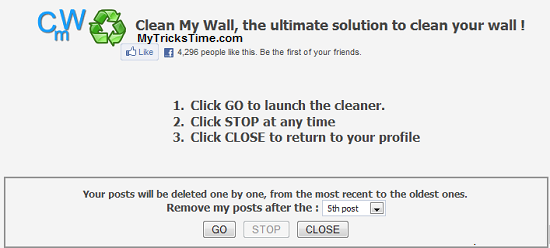
    Clean My Wall is JavaScript that run runs only in the Mozilla Firefox browser. To delete all your old Facebook content you have to follow following steps:
    • First of all you have to Remove Facebook Timeline your account. Click to check how to remove facebook timeline.
    • Now after removing Facebook timeline Bookmark Clean My Wall JavaScript and add it to your Favourites.
    • Click on the favourite created in second step.

    Now window will pop-up asking you from where you want to remove your posts. Select the number from the drop down list and click on GO button.
    Enjoy Guys! and don’t forget to post your comments. � MyTricksTime.com