Forgot To LogOut Facebook From Public Networks


Yeah there may be situations like you forgot to logout from a Cyber cafe and colleges.
If so there is a chance that someone misuses your FaceBook Account.

So lets see what to do in these situations


Steps:
Log in to Facebook from Home Computer
 
Click Account Settings -> Security

Click Edit  button near to Active Sessions
 
You can see the Active Sessions

 
End all Sessions by clicking End Activity

 
Hola Your Account Is Safe


Enjoy Guys! and don’t forget to post your comments. � MyTricksTime.com

How To Share Desktop Screen With Others

We have already known about TeamViewer by which we can operate any computer from anywhere. But, if you want to share only your screen with others then join.me is the right place for sharing desktop. You will find many other ways to share desktop. But join.me is the best and easiest way for sharing screen. Now, I am telling step by step how can you share your desktop very easily.
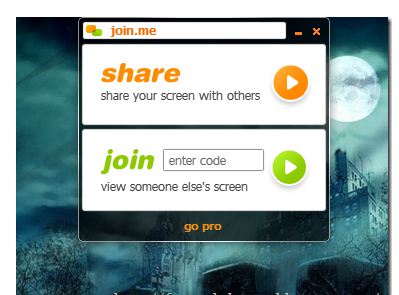
Step 1 : Go join.me then you will see share and join options. Firstly, click sharebutton. Then a software (1.52 mb) will be downloaded. After downloading install the software.

Step 2 :
 After installing run the join.me program. A toolbar will be opened on the top of your desktop just like the following image.
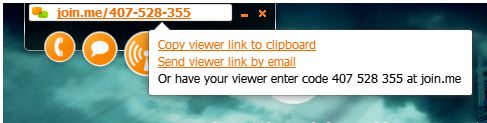
Step 3 : Click share button. Then you will get a code of 9 digits just like the next image. Give the code to your friend or copy the link to clipboard then send the copied link to your friend. Then your friend will see your screen by clicking your given link.

Step 4 : If you want see your friend�s desktop screen, then go join.me and enter your friend�s code in join box.
Enjoy Guys! and don’t forget to post your comments. � MyTricksTime.com

Samsung Corby Unknown Secrets For You

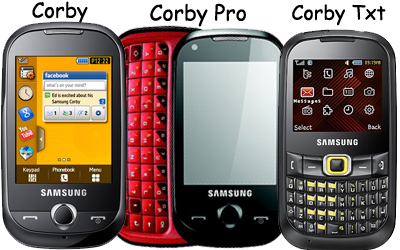
Samsung Corby is really a cool series from Samsung mobile phone and some of the models are having some unknown and never said secrets which are really surprising and a lot interesting. I want to share some secrets with you today. First we will go with basic codes and after that we will get into real action.

We Start with the basic secret code which is common for all mobile phones
  1. *#06#  � This will show the IMEI(International Mobile Equipment Identity) number of the mobile phone.
  2. *2767* 5282# � This will reset the Java Application (It Deletes All Java Midlets which are installed in your phone)
  3. #*7728# � This is a master reset code which will not delete any thing from your mobile but will set everything to factory default settings when it was on the time when we bought at the time of purchase.
  4. *#9998*3323# � This code is used to unlock the samsung corby to all networks. It needs some explanation which i have written in another post.
    You can check out  CLICK HERE 
Now i will write some codes which might not work in all mobile phones but they are really working in some other mobile models of samsung.
  1. *#9998*4357# � This will bring a Help Menu where we can select a lot of inbuilt options.
  2. *#9998*5282# � This will bring a Java Menu where we can set the GPRS/CSD Settings for java server.
  3. *#9999#0# � This will bring a Monitor Mode Menu.
  4. *#9999# or *#9998*9999# � This will bring a Software Version Menu.
  5. *#8888# or *#9998*8888# � This will bring a Hardware Version Menu.
  6. *#9998*746# or *#9998*0746# or *#0746# � This will give the Sim Information.
  7. *#9998*523# or *#9998*0523# or *#0523# � This will display the Contrast options.
  8. *#9998*842# or *#9998*0842# or *#0842# � This will bring the Vibration On options.
  9. *#9998*289# or *#9998*0289# or *#0289# � This will bring the Buzzer On option.
  10. *#9998*288# or *#9998*0288# or *#0288# � This will bring the Battery & Field Information.
  11. *#9998*377# or *#9998*0377# � This will bring the Error log
  12. *#9998*778# or *#9998*0778# or *#0778# � This will bring the Sim Service table
  13. *#9998*782# � This will bring the date and alarm clock options.
  14. *#8999*638# � This will bring the network information.
  15. *#9998*5646# � This will bring the change operator logo at startup
  16. *#9998*76# � This will show the production number
  17. *#9998*968# � This will bring the melody for alarm option.
  18. *#9998*585# � This will bring the Non-Volatile Memory (NVM) option.
  19. *#3243948# � This will bring the Digital Audio Interference Off option.
  20. *#32436837# � This will bring the Digital Audio Interference On option.

Enjoy Guys! and don’t forget to post your comments. � MyTricksTime.com

How to hide Advertisements on facebook

Hide facebook-ads
Facebook is filled with lot of ads, It is not so comfortable to use Facebook with lot of ads peeking in.
But  you can hide Ads on Facebook by using this trick.

Now open Facebook and check that Facebook ads are hidden on Firefox.

Samsung S 3 available in india at june

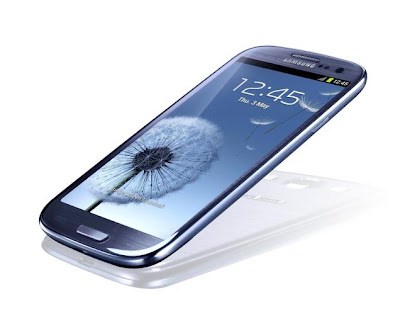
While unveiling the smartphone, J.K. Shin, president and Head of IT and Mobile Communication Division of Samsung Electronics said it is the best in the class smartphone. It �sees you, listens you and understands your needs�, he said, adding that the smartphone recognises your eye movements.


The Galaxy S III has come with a 4.8-inch Super AMOLED 1,

280-by-720 display, and runs Android 4.0 Ice Cream Sandwich. It features an 8-megapixel rear-facing camera and 1.9-megapixel front-facing one.  The phone, available in two colours � Pebble Blue and Marble White � weighs 133 grams and is 8.6 mm thick.

  1.     Android 4.0 with TouchWiz
  2.     1.4 GHz quad-core Exynos 4212 processor
  3.     4.8-inch HD Super AMOLED display with a resolution of 1280 x 720
  4.     8MP camera with AF, LED flash, BSI sensor and 1080p HD video recording
  5.     1.9MP front camera with a resolution of 720p for video chat
  6.     16/32/64GB Internal memory, expandable upto 64GB
  7.     1GB RAM
  8.     NFC, Wi-Fi, DLNA, GLONASS, micro-USB 2.0, HDMI, Bluetooth 4.0
  9.     2100 mAh battery

Samsung Claims that  the phone is inspired by nature and features �S Voice�, an advanced natural language user interface, which would listen and respond to the words of the user. �In addition to allowing information search and basic device-user communication, S Voice presents powerful functions in regards to device control and commands.� This includes asking the Galaxy S III to play your favourite songs, adjust the volume, send text messages and emails, organize schedules, or automatically launch the camera and capture a photos

Avalibility  in India
The Samsung Galaxy S III smartphone will be available in India from the first week of June and isexpected to launch at an MRP of  7px Indian Rupee symbol.svg Samsung Galaxy S III Unveiled, Price in India R.s 38,00038,000….

Enjoy Guys! and don’t forget to post your comments. � MyTricksTime.com