Password Protect Your Word Documents

We all use Microsoft Word to create documents.
and some times we dont want other people to access our documents
specially when you are on a shared computer in your company and you may have your certain secret data stored in your word document that should not be accessed by your boss or other employee�s.

To deal with such a situation Microsoft word 2007 integrated a security feature in Microsoft word so that you can password protect your files.


just follow these simple steps to make your document protected

  • Click on the Microsoft Office Button present on the top left corner of the window.
  • Now Click on the Save As option
  • Now a new window will pop up.
  • Click on Tools option at the bottom of the window.
  • Now you will have two options.
  • You can select either one or both options
  • One is Password To Open it will ask for the password every time the document is opened.
  • So to view the document you have to enter the password first.
  • Second is Password To Modify it will ask for the password every time somebody tries to modify the document.

Enjoy Guys! and don’t forget to post your comments. � MyTricksTime.com

How To Automatically Log Out From Facebook After Certain Time

I know its happen to many people , suppose you are chatting with your friends in Facebook then you got a phone on somebody came in your door , you just leave your PC without log out from Facebook and you forget that you were chatting with your friends in Facebook.On the opposite site your friend become angry that you are not replying.

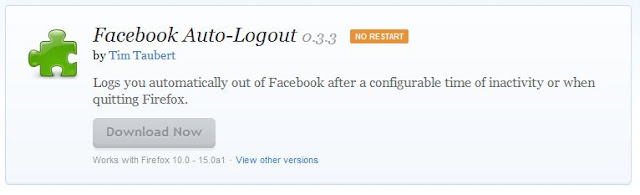
If you have face this kind stuff then best is automatically log off from Facebook after a certain or fixed time if you forget to log out.So try this awesome trick


This tool also make you log out if you close the window in which you open Facebook.This simple tool is awesome to automatically log off from Facebook.

Enjoy Guys! and don’t forget to post your comments. � MyTricksTime.com
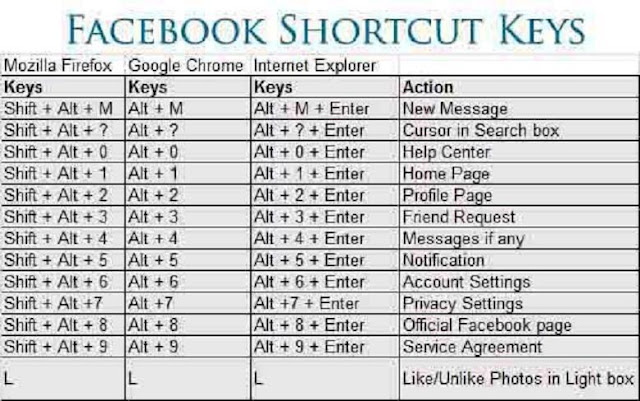
Facebook Shortcut Keys

Hello
Friends….

now i am again here with a very useful stuff…
every one today use facebook and want to know its keys short cuts…
so i am find thet all things for you and take this one only for you MyTricksTime readers….


just check out this one… please also leave your comment.

Enjoy Guys! and don’t forget to post your comments. � MyTricksTime.com

Airtel Free 3G GPRS Trick By MyTricksTime.com


Hello friends!
here is the settings which i am using to browse internet freely… i see there are many threds providing you settings for the free gprs…but most of them not work at all, many of them are incorrect also.
I realise that this happens as most of users dont know how to put the setting correctly…
thats y i am explaining what to do n how to do in detail so that you too njoy the free gprs

but only for 40 series phones………dammn!! shit!! sorry 4 dat


but
i am sure it will be most useful 4 u
 
FOR NOKIA PHONES (40 SERIES, I USE IN MY 3220),
 
1. activate airtel live and get settings frm airtel
2. Creat an access point (settings> configuration settings> personal config. settings> add new> access point, for 3220 n similar phones)
4. Go to (created) access point settings
Account name : NameOfAccount
Data bearer : Packet Data
Packet Data Access Point : airtelfun.com
Authentication Type : normal
User Name : <blank>
Password : <blank>
5. Yea, You have done alomost half, Now again go to Settings> Configuration Settings. Now do the following
Default Configuration Settings : AIRTEL- LIVE
Preferred access poing : NameOfAccount
* “NameOfAccount” is the Access Point created by u
** “AIRTEL – LIVE” is the settings of airtel live given by airtel
6. Now, go to Settings>Connectivity>Packet Data>Packet Data Settings>Edit Active access Point & set
Packet Data Access Point : airtelmms.com
7. Go to Web>Settings>Configuration Settings and set
Configuration : AIRTEL -LIVE

Accout : AIRTEL -LIVE
Enjoy Guys! and don’t forget to post your comments. � MyTricksTime.com
Opera Mini & Opera Mobile for Nokia 5233 and S60^3 and S60^5 mobile

Opera Mini & Opera Mobile for Nokia 5233 and S60 mobile – Opera is one of the most popular browser for basic phones because of its lite version and feature like desktop browser on your mobile phone. Most of the basic phone recommended to install Opera in their phone to smooth and fast browsing experience.

Read more