How To Boot A Tablet Android Booting Explained

Installing new os in android tablet will be a great fun to all.But many of us don�t know how to boot a tablet and install the latest firmware on it.In this post I will explain how to upgrade you tablet and have fun with it


Steps:
Turn off The Tablet
Remove Sd Card(Memmory Card)
Put It In A Reader And Connect To Pc


Format The Card with Fat32
Copy The Install Files To Your Sd Card
*Install Files Contain
  wmt_scriptcmd[File]
  FirmwareInstall[Folder]
  Other Files
Note:*wmt_scriptcmd[File] and  FirmwareInstall[Folder] should be in the root folder
Put Sd In Tablet 
Turn On Tablet Wait For Tablet To Upgrade and Boot

Enjoy Guys! and don’t forget to post your comments. � MyTricksTime.com

Puzzled Block Game J2ME ML For S60 5th Edition Mobiles


Puzzled Block game J2ME ML for S60 5th edition mobileswith over 250 levels no time limit imposed or ultra fast reflexes requires.
Its also runs in nokia  5233 and nokia 5235 mobiles

-: DOWNLOAD:-
                                                                                           Puzzled Block Game

Enjoy Guys! and don’t forget to post your comments. � MyTricksTime.com

Free Anti Theft Mobile Software

We all use mobile phones in our daily routine lives. But sometimes we realize that Oh my God! 

My phone is stolen. In that time we don’t know what to do. But now we have the solution to recover or lock our mobile phones so that no one else can use it anymore. For more informations watch the attached video. This will tell you how to lock your stolen phone.


To download F-Secure totally free just CLICK HERE
Enjoy Guys! and don’t forget to post your comments. � MyTricksTime.com

Create Animated GIFs on Android

If you want to share movies from your Android phone, making and sharing a quick animated GIF instead is definitely a better option than sharing the whole movie because it will consume a lot of your monthly bandwidth. An animated GIF can be made using GIF Droid. A video can be taken and turned into an animated GIF that you can send to anyone in seconds.


  • Instructions:
  • First install GIF Droid from the Android Market, and then open the application (app).
  • Click Select Video button. This will open your gallery to select a video. OR Click Record Videobutton. This will open your phone camera to record a video.
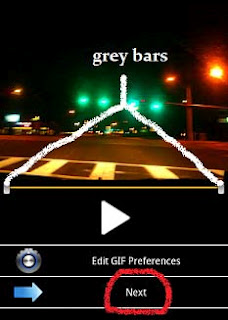
  • The section of the video you want to convert into an animated GIF can be chosen through sliding thegrey bars at the start and end. Now click the Next button present at the extreme end of the screen.
     
       
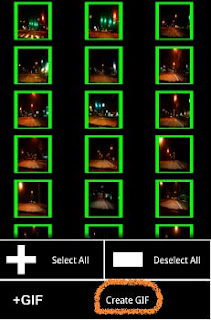
  • To reduce the size of animation through cutting out unwanted sections, select frames from the video you would like to use. Now click on the Create GIF button at the extreme right end of the screen to pin down the project.
  •  

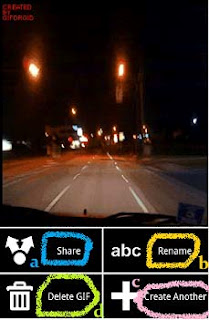
  • Preview your GIF and share by hitting the Share button (which is the second last button on the left side of the screen). 
  • You can also rename the GIF by clicking the Rename button (which is the second last button on the right side of the screen).
  • You can make another GIF by tapping the Create another button from the extreme right end of the screen.
  • You can even delete the one you just made by pressing the Delete GIF button from the extreme left end of the screen.


    Now its Done…


    Enjoy Guys! and don’t forget to post your comments. � MyTricksTime.com