HOW TO TRACE A MOBILE NUMBER, KNOW ITS OPERATOR, KNOW THE BALANCE, ACTIVATE V.A.S & MUCH MORE !!


HOW TO TRACE A MOBILE NUMBER,
KNOW ITS OPERATOR, KNOW THE BALANCE,
ACTIVATE V.A.S & MUCH MORE !!

Call from a Unknown Number is common but some calls are mysterious and Criminal in nature. So In this post; I will Explain in Detail to you about How to teach such callers a lesson which they will never-ever forget…..
When you Get a call from a unknown number first important thing to do is to note down the number

!! After you note down the number follow these steps carefully:

~~~:: STEPS ::~~~
1. The first step is to Find the unknown number’s Operator. For that you can take the help of Mobile number Tracing sites. Here are some usefull Links:

Indiatrace.com – Mobile Number Location Trace

BharatiyaMobile.com – Trace Indian Mobile Location & Operator

Go to any of the above links; Type the Unknown number and note down the Results. The result will be the “Operator Name” and “State”.

Suppose your Unknown number is 9876547892 : After Tracing we Get the Result : “Punjab” & “Airtel”.

2. Now starts the Trick: Search for the Ten Digit customer care Number of the Unknown number; Every state has a different customer care number; so be careful.
[NOTE: Search for 10 Digit customer care Number]

In my case I should search for Punjab – Airtel’s 10 digit customer care number.

3. After you find the 10 digit customer care number – Call the customer care from a different Operator (Different from the Unknown Numbers Operator)
Suppose the Unknown Number uses Airtel; You should call from other Operators SIM like BSNL, Reliance, Docomo, Idea or Vodafone

4. When connected the customer care opt you for Languge selection.

5. After Language selection they will ask you: Are you a current User of xxxxx operator??
So Press “YES” or say “YES”
In my case they will ask me Are you a current User of Airtel?? So i will say “Yes”

6. Now they will ask you to enter the 10 digit Mobile Number (UNKNOWN NUMBER)
In my case I will enter 9876547892

7. Now they will ask you to enter a password. So enter:- 1234
[1234 is the default password of sim card; Most of us do not change SIM Password so there is 95% success rate of 1234]

8. After you successfully enter the Password – Now its your turn to seek Revenge.

* You can Know the Balance and Validity
* Activate Caller tune services
* Activate other Packs or subscribe V.A.S
* And many other things.

~~: : : : IMPORTANT NOTE : : : : ~~
Don’t use against INNOCENT people

==CUSTOMER CARE NUMBERS==

Maharashtra & Goa
Airtel � Rest of Maharashtra
98900-12345
Airtel � Mumbai 98920-12345
BPL � Mumbai 98210-99800
BSNL � Rest of Maharashtra
94000-24365
Idea � Mumbai 97020-12345
Idea � Rest of Maharashtra
98220-12345
MTNL � Mumbai 98690-12345
Reliance � Rest of Maharashtra
3033-3333
Reliance � Mumbai 3033-3333
Tata Indicom � Rest of Maharashtra
92250-08282
Tata Indicom � Mumbai
92200-08282
Tata Docomo- 90280-00121
Vodafone � Rest of Maharashtra
98230-98230
Vodafone � Mumbai 98200-98200
MTS � 9146125125 or 125125

Delhi
Airtel 98100-12345
MTNL 98681-12345
Idea 98910-12345
Reliance 3033-3333
Tata Indicom 92100-08282
Vodafone 98110-98110
Tata Docomo- 90320-12345
Videocon 121

Andaman & Nicobar
Airtel 99330-12345
BSNL 94000-24365
Reliance 3033-3333

Andhra Pradesh
Airtel 98490-12345
BSNL 94000-24365
Idea 98480-12345
Reliance 3033-3333
Tata Indicom 92460-08282
Vodafone 98850-98850

Assam
Airtel 99540-12345
Aircel 98540-12345
BSNL 94000-24365
Reliance (GSM) 98640-98640
Stel � 9127012345 or 1212

Bihar/Jharkhand
Airtel 99340-12345
Aircel 98520-12345
BSNL 94000-24365
Reliance (GSM) 98350-98350
Reliance 3033-3333
Tata Indicom 92340-08282
Tata Docomo- 90310-12345
Stel � 9128012345 or 1212

Gujarat
Airtel 98980-12345
BSNL 94000-24365
Idea 98240-12345
Reliance 3033-3333
Tata Indicom 92270-08282
Vodafone 98250-98250
Tata Docomo- 90330-12345

Haryana
Airtel 98960-12345
BSNL 94000-24365
Idea 98120-12345
Reliance 3033-3333
Tata Indicom 92540-08282
Vodafone 98130-98130
Tata Docomo- 90340-12345
Videocon 9068012345

Himachal Pradesh
Airtel 98160-12345
Aircel 98570-12345
BSNL 94000-24365
Idea 98820-12345
Reliance (GSM) 98170-98170
Reliance 3033-3333
Tata Indicom 92180-08282
Tata Docomo- 90350-12345
Stel � 9129012345 or 1212

Jammu & Kashmir
Airtel 99060-12345
Aircel 98580-12345
BSNL 94000-24365
Reliance 3033-3333
Stel � 9130012345 or 1212

Karnataka
Airtel 98450-12345
BSNL 94000-24365
Reliance 3033-3333
Tata Indicom 92430-08282
Spice 98440-98440
Vodafone 98860-98860
Tata Docomo- 90360-12345
Uninor- 90600-90600

Kerala
Airtel (1800) 98950-12345
BSNL 94000-24365
Idea 98470-12345
Reliance 3033-3333
Tata Indicom 92490-08282
Vodafone (BPL) 98460-98460
Tata Docomo- 90370-12345

Madhya Pradesh & Chattisgarh
Airtel 98930-12345
& Chattisgarh BSNL 94000-24365
Idea 98260-12345
Reliance (GSM) 98270-98270
Reliance 3033-3333
Tata Indicom 92290-08282
Tata Docomo- 90390-12345

North East
Airtel 98620-12345
Aircel 98560-98560
BSNL 94000-24365
Reliance (GSM) 98630-98630
Stel � 9131012345 or 1212

Orissa
Airtel 99370-12345
Aircel 98530-12345
BSNL 94000-24365
Reliance (GSM) 98610-98610
Reliance 3033-3333
Tata Indicom 92380-08282
Vodafone 97760-97760
Tata Docomo- 90400-12345
Stel � 9132012345 or 1212

Punjab
Airtel 98150-12345
BSNL 94000-24365
Reliance 3033-3333
Tata Indicom 92170-08282
Spice 98140-12345
Vodafone 98880-98880
Tata Docomo- 90410-12345
Videocon 9653012345 and 121

Rajasthan
Airtel 98290-12345
BSNL 94000-24365
Idea 98870-12345
Reliance 3033-3333
Tata Indicom 92140-08282
Vodafone 98280-98280
Tata Docomo- 90420-12345

Tamil Nadu
Airtel � Rest of Tamil Nadu
98940-12345
Airtel � Chennai 98400-12345
Aircel � Rest of Tamil Nadu
98420-12345
Aircel � Chennai 98410-12345
BSNL � Rest of Tamil Nadu
94000-24365
BSNL � Chennai 94000-24365
Reliance � Rest of Tamil Nadu
3033-3333
Reliance � Chennai 3033-3333
Tata Indicom � Rest of Tamil Nadu
92400-08282
Tata Indicom � Chennai
92400-08282
Vodafone � Rest of Tamil Nadu
98430-98430
Videocon � 121 and 90800-12345
Tata Docomo- 90430-12345

Uttar Pradesh (E)
Airtel 99350-12345
BSNL 94000-24365
Idea 98890-12345
Reliance 3033-3333
Tata Indicom 92350-08282
Vodafone 98390-98390
Tata Docomo- 90440-12345

Uttar Pradesh (W)
Airtel 98970-12345
& Uttarkhand BSNL 94000-24365
Idea 98370-12345
Reliance 3033-3333
Tata Indicom 92190-08282
Vodafone 97190-97190
Tata Docomo- 90450-12345

West Bengal
Airtel � Kolkata 98310-12345
Airtel � Rest of Bengal 99330-12345
Aircel � Kolkata 98040-12345
Aircel � Rest of Bengal 98510-12345
BSNL � Kolkata 98830-98830
BSNL � Rest of Bengal 94000-24365
Reliance (GSM) � Kolkata
98830-98830
Reliance (GSM) � Rest of Bengal
98320-98320
Reliance 3033-3333
Tata Indicom � Kolkata
92310-08282
Tata Indicom � Rest of Bengal
92330-08282
Vodafone � Kolkata 98300-98300
Vodafone � Rest of Bengal
97320-97320
Tata Docomo- 90460-12345
( Kolkata 90380-12345 )
Hide Folders in Nokia / Java phones without software

Have you ever wanted to hide folders in your phone? If yes,there here is very interesting solution for you to hide folders in your phone without the need of any software.This trick can be used for phone from Nokia,Samsung,Motorola,LG or any other company.The only requirement is that your phone should support java which almost all mobile phones support now .
So,If your phone support java then here is the Trick Hide Folders in Nokia / Java phones without software
  1. Create any new folder or you can use any existing folder that is to be hidden.
  2. Rename the folder to any name but with the extension of .jad like if I want to hide my images folder then I will name it as images.jad
  3. Now create a new folder with the same name in the same directory but with the extension of .jar So, I would create the folder with the name images.jar
  4. And thats it!! My orignal images folder which has been renamed with .jad gets hidden and only folder with.jar extension is visible which is empty.So,my data is protected/hidden from unwanted eyes.
Now ,we have to learn how to open these hidden folders.So here is the trick to open these hidden folders in Mobile phones
To unhide the orignal folder you have to remove the .jar extension from the new folder and your orignal folder with all the files and with .jad will become visible.
AS SIMPLE AS THAT!!

How to Remove Watermark from Windows 8 Consumer Preview Desktop

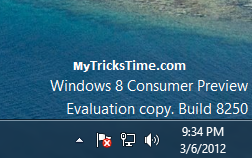
We all know that,Windows 8 Consumer Preview has been launched and is being downloaded by many of us.If you are using Windows 8 then,you will find a Watermark showing Windows build information on your Desktop.


The Watermark is not being liked by many of us.As it looks like odd,when you are showing your Computer to your friends.There are many method for removing this Watermark from your desktop.
Below is a quick and easy method to Remove Windows 8 Watermark from Desktop.


How to Remove or Hide Watermark in Windows 8

  • First of all Select your favorite Image and set it as your Desktop background.
  • Now,Press “Win+R” to open Run Dialog Box


  • Copy and Paste below text in the Run Dialog Box
  • %appdata%MicrosoftWindowsThemes

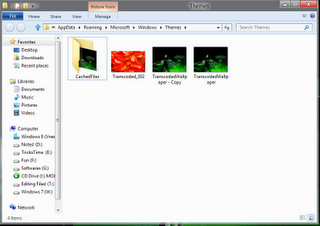
  • Now Windows Explorer will open the Theme folder.Here you will see a “CachedFiles” folder,which contains the cache file of your Desktop Background wallpaper and “TranscodedWallpaper.jpg” file which is your desktop background.
  • Now,there only make a copy of  “TranscodedWallpaper.jpg” file.Just click on the image file and press “Ctrl+C” and then press “Ctrl+V” key in the same folder to make a copy of image.


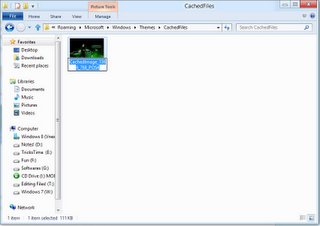
  • Now open the “CachedFiles” folder
  • Click on the image and press “F2” to rename it and copy it’s name


  • Now go back to the previous folder and then Rename the  “TranscodedWallpaper-Copy.jpg” with the name which you copied from CachedFiles folder in above step.
  • Now Cut this image file and paste it in “CachedFiles” folder.It will ask you to replace the file,simply click on “Replace the File in Destination Folder
  • Now go and refresh your desktop and see the magic

Enjoy Guys! and don’t forget to post your comments. � MyTricksTime.com

How to increase internet speed fact.


This post actually sharing some facts about  speeding up internet and gives you some tips to effectively boost your internet speed.Everyone who uses computer and internet probably have a question at least once in their working hours: How to Speed up internet ?  


Since everyone seeks to get a faster internet, there are tons of posts and even articles about boost internet speed, speed up internet and they talking about  internet optimizers and calculation of your internet speeds.however my aim is to tell you the fact that By default—INTERNET SPEED CANNOT BE INCREASED  UNTIL YOU UPGRADE YOUR CONNECTION—.this is true in most cases especially in the case of Dial up users.(because i am a dial up user hihi).


keep this in mind when you downloading giant programs/software’s or spending money to speed up internet because everyone is seeking for faster internet at low cost like dial up and they looks for speed up dial up internet. But in my experience simple network registry editing programs like TCP/IP OPTIMIZER can do a fair job by optimize your network connection settings  to get boosted speed experience.
Also read this post about Speed up downloading and boost up your downloads.

Actually it reconfigures the settings that suits your connection. ur ISP has providing you the same speed before and after your work with the settings. Select your bandwidth provided by your ISP by the slider and click optimal settings. Then apply and restart.


The next step is to use a good Internet browser for browsing sites.My perception is that you must use at least two browsers instead of a single one.Because some pages in the websites can take more time that loads in the other one.First get rid of your ms internet explorer or use a latest version.I am personally recommend two net surfers – FIREFOX 3.5 or later and OPERA 10 or later.These are given the most surfing experience for me…


it is good to use a download manager like IDM.it is highly recommended for downloading big files with any type of connection because it can not only resume downloads also it uses the bandwidth without wasting,so giving you a download boost.
 
Active speed is another good one to speed up internet by the online selection of best settings but its not free..
Click to download:
1.TCP/IP optimizer


2.Internet download manager(IDM) (trial..make a hard search for..)

Tips to enlarge Laptop’s Battery Life – Cool Laptop Tips

Here are few tips for laptop’s users toenlarge Laptop’s battery life a little longer.

1). Always use the power cord and the adapter that came with your laptop or other authorized replacement, dont use any local or unauthorized product.
2). Do not leave laptop in direct sunlight, or in areas having extreme temperatures such as car trunks.
3). When you don�t use it, follow the correct maintenance for your notebook.
4). If your laptop has power management features, then select powersaver power plan, system will run at lower processor speeds when enabling it and it will go into sleep mode faster when inactive, it saves lot of power.
5). Discharged and recharged your battery fully in every 2-3 weeks.