
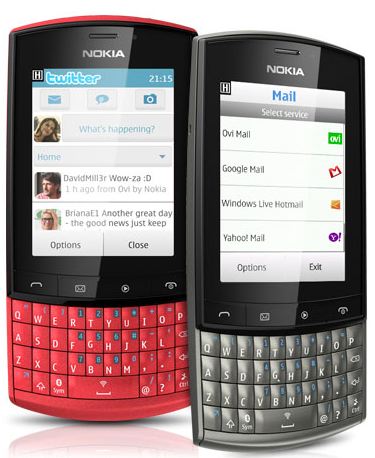
Review of Nokia Asha 303 Main Specs Low Cost Phones

NETWORK CONNECTIVITY

2G : GSM 850 / 900 / 1800 / 1900
3G : HSDPA 850 / 900 / 1700 / 1900 / 2100

BODY

Dimensions  : 116.5 x 55.7 x 13.9 mm, 72 cc
Weight : 99 g
Keyboard : Qwerty.

SOUND

Loudspeaker : Yes
3.5mm Headphone jack : yes
Ringtones : Polyphonic, MP3, WAV

BATTERY

Li � Ion 1300 mAh standard battery.
Standby [ 2G ] : upto 720 hours
Standby [ 3G ] : 840 hours

CAMERA

Front Camera : 3.2 MP
Resolution : 2048 x 1536 pixels.
Fixed Focus : Yes
Secondary camera : No

CPU : 1 GHz.

MESSAGING

SMS
MMS
E-mail
IM
Push E-mail

CONNECTIVITY

GPRS : Class 33
EDGE : class 32
Speed : HSDPA, 10.2 Mbps; HSUPA, 2 Mbps
WLAN : Wi-Fi 802.11 b/g/n
Bluetooth : v2.1 with A2DP, EDR
USB : microUSB v2.0, USB On-the-go support


RADIO : Sterio FM with RDS

GPS : NO
JAVA : MIDP 2.1

In Built SOFTWARE’S

SNS Integration, MP4/H.264/H.263/WMV player, MP3/WAV/WMA/AAC player, Organizer, Voice memo and Predictive text input.
Enjoy Guys! and don’t forget to post your comments. � MyTricksTime.com


BSNL 3G Speed On 2G Connection


Hello Friends,

Now i am again here to take a Latest BSNL Internet Trick for you.

it is only a simple trick. I don’t know how this works. But this trick had worked to me.

First of all your cell phone must be a 3G enabled smartphone.

You have to do the following steps :

  1. Activate GPRS 13 booster [ for 2G ]. It has a validity of 3 days and size of 200 mb.

  1. Now You have to enable any 3G pack (which you want) on the day when the 3G pack expires.
  2. You have to enable a 2G pack [within 2 days after the expiry of 3G pack ].
  3. Now, you have 3G speed in 2G connection.


This happens because our mobile phone starts acquiring 3G signals when we enable a 3G pack on our cell phone. After that, we will get 3g signals on our phone if we are enabling a 2G pack.

It really worked in My Cell Phone. If it doesn’t works on your phone, please let me know…
Enjoy Guys! and don’t forget to post your comments. � MyTricksTime.com

Protect Your Android From Virus

Android is very amazing, billion apps can be downloaded for free in android market. Anyone can publish their apps on android market. Android market is free market less supervision, so many apps contain malware or trojan-horse. Virus is likely to steal important data from your android gadget. For avoiding virus on your android gadgetfollow this tips.
Avoiding virus on android gadget tips :
1. Install Antivirus on your android gadget
You can use lookout, i think this is very usefully for avoiding virus on your android gadget. Or you can use another antivirus which you buy in android market, but be carefully if you choose antivirus on android market, maybe that app containing viruses. Buy anti-viruses which have a lot of ratings.
2. Before download app, read the Review
Before you download app on your android gadget in android market you must read the review, be careful with fake review, you have to track it down. Note that there are complaints in the review.
3. Note the permission before download app
Before thee app installed on your android gadget you must request permission list. If your app want to access without a clear connection you must be careful. avoiding access to contact, and history on your browser. Delete your application if sending automatic SMS.
4. trace of awkwardness when it
If you thing that your apps have many problem you can search it on google with keyword “(app name) malware?” if you find that app have many problem you can use another apps, android market have a lot of stock.
5. Be careful with fake name
Maybe criminal person using the same name with popular app, you can use appstore for android from amazon which must need permission process for app for get away.
okay i hope this 5 tips can helps you protect your android from virus.

Unique way To Get More Friends and Requests on Facebook

Do you have a dream to promote your business or website using the social networking site like Facebook? Definitely you may have! To do so, you must have good amount of Friends, Community and Groups. If you are willing to add more friends and get more friends request, this unique trick will help you a lot.


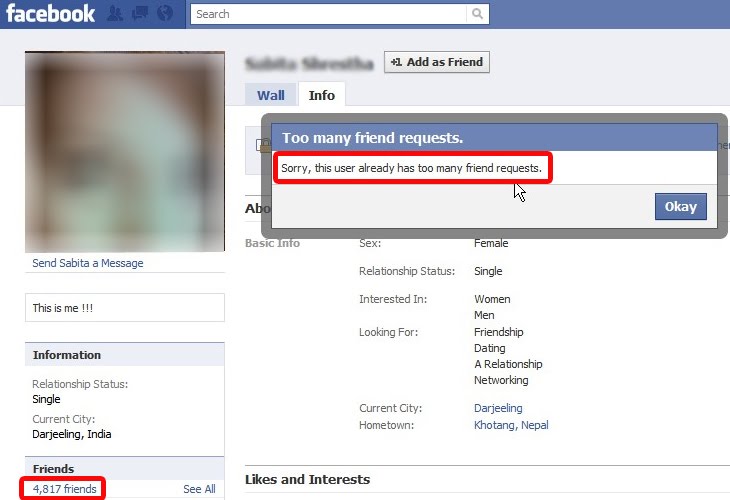
You can get lots of new friends and the new friends request within 5 minutes! Before getting started let me show you one amazing example,
look at the following image:


The image is blurred because I don’t want to violet Facebook’s policy but I can tell one thing that, this picture consists of one beautiful girl. Look at the highlighted areas, she has more than 4000 friends. I also tried to add her with my Facebook account but I got the message something like this, “Sorry, this user already has too many friend request“. Amazing! She has so many other friend request even she have already more than 4000 friends!

Now, you must know what is the secret!

Does it matter weather that is her own photo? Of course no! So, Change your picture which is more attractive ever. Definitely all of the people may looks for outlooks. You’ll get huge friend request more than you expected. You do not have to search for the friends that are interested in your niche. At least, you can get friend request without wasting the time.

You must consider your name as well. People view your personal identity and they think to add you or not. Let’s hope this trick is helpful to you.
Enjoy Guys! and don’t forget to post your comments. � MyTricksTime.com
Tricks To Reset Memory card Password In Nokia

If you have a symbian phone and you have forgotten your memory card then you can easily get your password by using this simple trick.This trick works only on nokia symbian phones not on the java phones.Before starting the tutorial on �Tricks To Reset Memory card Password In Nokia� Here are the the requirements
  • X-plore application (You can easily find its trial version for Free)
  • Nokia symbian mobile phone.
The X-plore application is used to view the data files of the phone.
Here Is the step by step tutorial For resetting the password.
1.       Install the X-plore application in your nokia phone.
2.       Now start your X-plore application and press 0(zero) button and select � show the system files �.This will make the X-plore application to show your system files.
3.       After completing the above step goto C:/Sys/Data/MmcStore

By- www.hack-room.blogspot.com

4.       Now press 3 button from your keypad and you will see options.Now click on the Hex-viewer option.This will make your phone to show files in hexadecimal.
5.       Look at the 3rd Column On the screen you will see a code like ! TMSD02G (c??�?x???6?2?6?2?6)  .Note down the numbers present between the ?.This is your memory card password.Like in this example the password is 62626.

By- www.hack-room.blogspot.com

6.       Now you can enter the password and view your memory card files or you can reset  your memory card password to a more memorable password.

Remember you can gain access to C:/Sys/Data/ if and only if you have set a password on your memory card,