How to Post HTML,CSS,JavaScript,� Codes As Plain Text In Blogger 1

1.First install Greasemonkey script for your Firefox browser.
2.Now click here to install ‘Blogger – HTML encode on post edit‘ to blogger.
This adds a new button at the bottom of your new post area.It encodes the selected text so it can be posted as plain text in Blogger.It will look like this.
When you want to encode some code select it and cick on ‘HTML ENCODE SELECTION‘ button.


Your code will look like this after being encoded:


Now publish your post and see the result

View Applications In Full Screen Mode In Nokia s60v5 Touch Phones (5800, 5230, 5233, etc)

Sometime back, i wrote a post on steps for signing unsigned applications on Nokia devices. In the comments section of that post, one reader asked me, �i have 5230 n wen i instll full touch screen games of 5800. they r not full touch screen in my cell�. And i therefore decided to write a post explaining steps to make the
application, games and other softwares to run in full screen mode on Nokia 5230, Nokia 5233, Nokia 5800 and other Nokia touch (s60v5) based mobile phones.

The reason for applications running in half screen is that touch phones (most of them) do not have keys and some applications, games, softwares, etc require keys to work with. So, for this reason, Nokia phones provides on screen keypad for in compatible games, softwares, applications, etc. However, there are at times situations when the keypad is shown even if the application, software, game, etc is capable of running in touch screen mode.
In order to get rid of the keypad (on Nokia phones), just follow the below mentioned steps:
  1. Open Menu.
  2. Select �Settings�.
  3. Select �Application Manager�.
  4. Select �Installed apps�.
  5. Highlight the application, game or any other software which you wish to run in full screen mode.
  6. Select �Options�.
  7. Select �Suite Settings�.
  8. Select �On-Screen Keyboard�.
  9. From the various options given (Game and navig. keys, Navig. keys only), select �Off�.
  10. Select �OK�.
  11. Press back and exit the application manager.
Thats It! Now open the application (for which you changed the settings) and enjoy it in full screen mode!

NOTE: The above mentioned procedure will work for any Nokia touch based mobile phone (S60v5). In case you find any difficulty in following the steps then do let me know via comments section and i will surely help you :)

How to remove Virus Manually in Windows XP


Now i am here to take a new tricks for you..

just checkout in this post you’ll get that How to remove Virus Manually in Windows XP


IT is very simple

know how read this full post, its very nice.
IT is very simple


Go to run >cmd and give enter
type attrib /s /d

should give every colon
ex:
c: attrib /s /d
d: attrib /s /d
g: attrib /s /d

note any SHR attribute and Queer name like amvo.exe,r6r.exe,autorun.inf etc

delete above named files
ex; c:>del /f /s /a <filename with extension>

after removing this type of files and using ccleaner software
and remove the unused registry files.now restart your system. again use ccleaner

Enjoy Guys! and don’t forget to post your comments. � MyTricksTime.com

How to Speed up Nokia Phone Modem


Many of you may use Nokia Phone to connect yourself to internet. Which uses 2G or 3G.
This trick will help you in boosting the Internet speed of your Nokia Phone Modem by 100%.


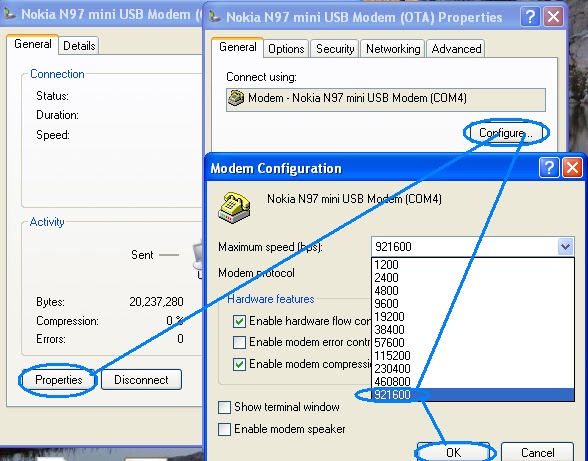
  • Connect your Nokia Phone modem to your PC and connect it to internet by using One Touch Access of Nokia PC suit.
  • OTA status of the Nokia modem will be opened. Click on the Properties.
  • Select Configure option from the Properties window.
  • This will open up the Modem Configuration window.
  • Select the Maximum speed available in the Maximum speed option.
  • And press OK to save the settings.
  • Now Disconnect the Internet connection and Reconnect it to avail more speed.

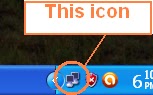
Click on the computer activity icon which is similar to my-computer icon and will be blinking off and on. and will be placed on your task-bar.

Enjoy Guys! and don’t forget to post your comments. � MyTricksTime.com

How to unlock Password Protect PC and Delete Admin Password

Hello Friends, Today we come with a new computer tricks for you, so lets talk about it. Ok now let me know, What will you do if you forgot your Computer Admin password? don’t worry we will teach you how you can solve this problem. You can reset the admin password by many ways, SO here we are going to tell you Trick to reset the admin password. Resetting an admin password is so easy by this trick just that you need to follow process showing below.

How to unlock Password Protect PC and Delete Admin Password

  • First of all remove Hard disk from your computer/laptop
  • Connect Hard disk to any other Working PC
  • Now navigate to c:\Windows\System32\config
  • After reach on that folder showing in above like,
  • Find�SAM�&�SAM.logfiles and Delete them
  • Now Put your Hard disk to your PC and access as admin by empty password
  • Enjoy !

Note- Try on your own risk we will not responsible for any loss.

Enjoy Guys! and don’t forget to post your comments. � MyTricksTime.com