

How to create a folder without any name

Hello Dear Friends now i am again here with a new Trick for you, to day yo will know aboutHow to create a folder without any name:
At first select a folder or create a new folder. Now remove the name by rename option. Or Simply click F2 and then press backspace to remove the name. (Hold on that position and look if your Numlock in On. If it is off make it on because you have to type a code only by Numpad. In many laptop
 there is no numpad, the numpad is mixed with the
keyboard so e careful about it. )


Now in that position press ALT button and type a code 0160 by the help of your number pad and press Enter. you will see there is no name on it.


Important thing to notice: You should type the code 0160 by holding the Alt button. You must Hold down the ALT button. You must type the code by using the number pads. In some laptops the number pads are hidden and difficult to use. First turn on the number lock by using Fn+Nmlk and then type the code from the right hand side pad of your laptop. Do not use the horizontal number keys.

Here is a Video we have uploaded for clear instruction:


Hope you will love it 😀

Enjoy Guys! and don’t forget to post your comments. � MyTricksTime.com
Unlock Memory Card Password Trick

If you protect your memory card with password and forgot that after few day then step easy method How to unlock Memory card without software.

  1. Hacking or finding memory card password.
  2. Formatting corrupted memory card(but no guaranteed).

There are many methods to find memory card password.

  • Install and launch MMCPWD application. it will display some special characters including your password.(MMCPwd.sis)
  • Locate mmcstore file. install and launch System Explorer or FExplorer application. go to c:system and open (using unicode/hex editor) the mmcstore file. it will display your password.
  • NOTE: you can also copy the mmcstore file to any folder of your phone memory, rename it to mmcstore.txt and open it without using any unicode/hex editor). 

Instructions: 

  • open up fe explorer thingy.
  • Go to C:system folder and locate a file called mmcStore. Scroll down till you find it.
  • Copy it to C:nokiaothers
  • Highlight it
  • click options
  • FILE>RENAME
  • IT should turn blue: right click then write �.txt� (should look like �MMCSTORE.txt�
  • try to open it, (that should be your password, if nothing happens then go to 9.)
  • connect phone to pc
  • Open the file from C:NOKIAOTHERSMMCSTORE
  • copy the file to your desktop
  • open with Windows notepadmicrosoft word
  • that should be your password

Hope these work for you if still need software than you reply me i will provide as soon as possible.Enjoy Guys! and don’t forget to post your comments. � MyTricksTime.com

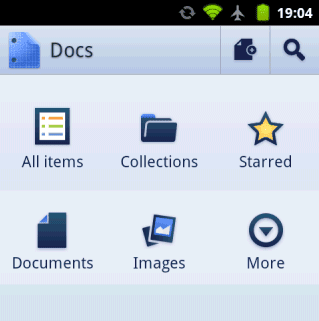
Google Docs for Android Lets Users Add Photos to Documents

Google (NASDAQ:GOOG) enhanced its native Google Docs for Android application, adding the ability to drop photos users take from their Android smartphone right into a Google document.

The search engine in April launched the Google Docs application for Android with a nifty feature that lets users turn photos with text into documents that may be edited from smartphones.

Users simply tap a button to create a new document from a photo or select the camera icon from the widget.

The document will then appear in the documents list after the phone user snaps the picture. Users may also convert existing photos from their Android phone by sharing them with the Google Docs app.

With the Docs for Android bump, users can now tap the camera icon from the Docs widget icon on their Android phone, shoot a photo, and then select “send to Web Clipboard” and press “OK.”

Then users can open any Google document from their computer, click the Web Clipboard icon and pick the item to paste into their document.

Google also improved the app so that users can open documents with any compatible viewer application or send a document as an attachment through email or another app on their phone.

The idea is that not only can users create, edit and access documents from their mobile phone, but they can augment the documents with photos, then save them in Google’s cloud computing system for later access on desktop computers and laptops.

Such mobile workflow capabilities are important at a time when corporate professionals are increasingly tasked to complete their projects while traveling.

While the initial Docs app was available only in English, the improved Docs app is available in 45 additional languages.

Opera Mini Hidden Secret Config Setting


Opera mini is the No 1 web browser for Mobile phones. Almost everybody use Opera Mini as their Default web browser for their Phones. But many of you do not know how to access the �Secret settings� in Opera mini. This is like �God mode� in windows OS.
To get access to this Hidden configuration settings in your Opera mini. Enter the following keywords in the address bar of your Opera mini browser. (i.e. Where you enter all website URLs)
Keywords
: �Opera:config� or �config:�


A page will open after you key in these in the Opera mini address bar. which facilitate you to change the following settings.

*Large placeholders for images- yes/no
*Fit text to screen- yes/no
*Loading timeout- Time out in seconds
*Site patches- yes/no
*Show feed index- yes/no
*Phone number detection- Minimum phone number length
*Use bitmap fonts- yes/no
To know more about the keywords CLICK HERE . If you are using Opera mobile , you will get lot of options including these. CLICK HERE to check them.

Enjoy Guys! and don’t forget to post your comments. � MyTricksTime.com

Recharge Your Phone Battery Without Charger

Yes that�s true you can recharge your mobile phone battery without charger for a limited time.

It is really annoying when you are away from home and your phone battery goes empty.
If you are not carrying the charger the situation is more worse. What will you do if you have to make a call from your phone.
There is an easy way without having to recharge the batteries

charged. Although it did not last long as in the case, but for such cases we can call to simply provide some important news.
You do this by removing the battery from the phone 
and then rub and rub with hands or to a shirt or your pants for 3-5 minutes.

After a bit of heat, insert the battery into the phone and make an important phone call immediately because the battery life is usually only lasted two minute.The fact behind this is that when the battery is kept in a cool place the faster the battery capacity will be reduced.
If you do this in a rather cold battery condition, battery life time will usually be much longer. May be useful.

Enjoy Guys! and don’t forget to post your comments. � MyTricksTime.com