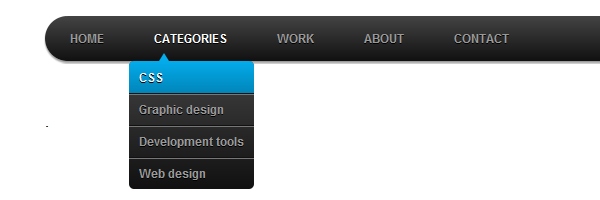
How to Add Beautiful Drop-Down Menu to Blogger/Blog

I was recently asked by some of this blog loyal reader that I should make a post on how they can add a beautiful drop-down menu to their blogger blog.  


Presently, there are many ways to add a drop-down menu to blogger blogs but most of these methods are sometime complicated or wrong. So today, a simple and easy method will be explained here on how a beautiful drop-down menu can be added to blogger blogs and how you can easily customize it to your taste.

1. Go to Blogger Dashboard  ==>Template ==> Edit HTML

2. Now search for ]]></b:skin> in your template. This can be easily searched for by usingCTRL + F.

3. Paste the code below above the code stated in the 2nd step. 


.menu{
border: 2px solid black;
margin:0px;
padding:0px;
font: 67.5% �Century Gothic�, �Bitstream Vera Sans�, �Trebuchet Unicode MS�, �Lucida Grande�, Verdana, Helvetica, sans-serif;
font-size:15px;
font-weight:bold;
}
.menu ul{
background: pink;
height:35px;
list-style:none;
margin:0;
padding:0;
}
.menu li{
float:left;
padding:0px;
}
.menu li a{
background: pink;
color: black;
display:block;
font-weight: normal;
line-height:35px;
margin:0px;
padding:0px 25px;
text-align:center;
text-decoration:none;
}
.menu li a:hover, .menu ul li:hover a{
background: black;
color: lightblue;
text-decoration:none;
}
.menu li ul{
background: pink;
display: none;
height:auto;
padding:0px;
margin:0px;
border:0px;
position:absolute;
width:225px;
z-index:200;
/*top:1em;
/*left:0;*/
}
.menu li:hover ul{
display:block;

}
.menu li li {
background: ;
display:block;
float:none;
margin:0px;
padding:0px;
width:225px;
}
.menu li:hover li a{
background: ;

}
.menu li ul a{
display:block;
height:35px;
font-size:12px;
font-style:normal;
margin:0px;
padding:0px 10px 0px 15px;
text-align:left;
}
.menu li ul a:hover, .menu li ul li:hover a{
background: lightblue;
border: 0px solid black;
color: black;
text-decoration:none;
}
.menu p{
clear:left;
}  

4.Now save your template then go back to �Layout� and add an �HTML/JavaScript� widget. Then copy and paste the code below into the �HTML/Javascript Widget� box:

    <!DOCTYPE html PUBLIC �-//W3C//DTD XHTML 1.0 Strict//EN�
    �http://www.w3.org/TR/xhtml1/DTD/xhtml1-strict.dtd�>
    <html xmlns=�http://www.w3.org/1999/xhtml� xml:lang=�en� lang=�en�>
    <head>
    <meta http-equiv=�content-type� content=�text/html; charset=utf-8? />
    <title></title>
    <link rel=�stylesheet� href=�menu_style.css� type=�text/css� />
    </head>
    <body>
    <br>
    <br>
    <div class=�menu�>
    <ul>
    <li><a href=�#� >Home</a></li>
    <li><a href=�#� >About Us</a></li>
    <li><a href=�#�>Recipes</a>
    <ul>
    <li><a href=�#�>Breakfast</a></li>
    <li><a href=�#�>Lunch</a></li>
    <li><a href=�#�>Dinner</a></li>
    <li><a href=�#�>Dessert</a></li>
    </ul>
    </li>
    <li><a href=�#�>Photography<br />
    </a>
    <ul>
    <li><a href=�#�>Babies</a></li>
    <li><a href=�#�>Families</a></li>
    <li><a href=�#�>Seniors</a></li>
    </ul>
    </li>
    <li><a href=�#�>Crafts</a>
    <ul>
    <li><a href=�#�>Scrapbooking</a></li>
    <li><a href=�#�>Kids Crafts</a></li>
    </ul>
    </li>
    <li><a href=�#�>Contact</a></li>
    </ul>
    </div>

    </body>
    </html> 

5. Finally, drag the widget to the area where you want it to show. 


Enjoy Guys! and don’t forget to post your comments. � MyTricksTime.com

SmartDrive – AIRTEL LAUNCHES NEW APPS FOR ITS SUBSCRIBERS

Now, drive smart as Airtel brings to you a new app that enables the users to view their location on a map and plan their route from one place to another. It is assisted by a voice based turn by turn navigation and more importantly, give real time information on traffic situation on roads around them. What�s more, it even suggests an alternate route from place A to place B if there is heavy traffic on the normal route.  

Airtel is the first operator in the country to bring such a product to its customers which gives real time traffic flow information along with other valuable information.  

SmartDrive is a complete navigation application giving the below features 
a) Search Maps for POI (Points of Interests) 
b) Turn by turn Voice navigation 
c) Live traffic information 


Search for POI  

With SmartDrive you can easily search and get the exact positions for your destinations. Point of Interests (PoIs) are grouped into categories like restaurants, theatres, shopping malls etc. Once the application is downloaded this feature can be used absolutely free of cost. 


Voice Navigation 

SmartDrive will guide you to reach the place of your choice by giving you turn by turn directions. What�s more you can choose the fastest way you want to take as SmartDrive will also give approximate time the journey will take basis the traffic on the various routes.  


Live Traffic information 


Traffic is calculated basis the number of GPS devices being used on the particular road and their average speed and historical trends of traffic. Currently, it is live in Delhi &NCR, Mumbai and Bangalore cities and will be live in Hyderabad, Chennai and Pune by December. The app gives traffic status on major roads in a colour coded format as described below – 
  
Red – implying heavy traffic 
Yellow – Medium and  

Green – Free flow of traffic 


The application also has features like 
a) Share the app with a friend  
b) Trip recorder – to record all trips you make when using voice navigation for later reference 
c) Wikipedia information of places for which information is available. 
d) Add frequently visited locations to favorites so that you don�t have to search again and again 
e) Weather information about the place  

How to get the application 
Go to www.airtel.in/smartdrive from your mobile and then download the application.
or SMS smart to 54321 and then click on the link in the message.  While it is available on multiple platforms including Android, Symbian, BlackBerry and Windows, it will soon be available on IOS. 

Charges 
Search and map viewer are absolutely free 

Navigation –  
Daily pack – Rs/10 per day 
Monthly pack – Rs. 99 per month 

Live traffic 
Daily pack – Rs.3/day 
Monthly pack – Rs.49 per month 

Data charges 
Data browsing is absolutely free till 30th November, post which normal data usage charges will apply as per the data pack availed by the customer. 

Enjoy Guys! and don’t forget to post your comments. � MyTricksTime.com
samsung galaxy s-2 plus and galaxy note 2,

Apple may have just released news of the iPhone 5 and the tech world is certainly abuzz but there is a new competitor on the block and its name is Samsung. Samsung is releasing the Galaxy Note 2 as well as the Samsung Galaxy SII plus. Both of these phones pack some heavy punches and adds something special to the cellular market. If you are interested in how they stack up read on!
The Galaxy Note 2
When the Samsung Galaxy Note was released the cellular world held its breath. Samsung came out with a desire to blend the world of tablets and cell phones and they did just that. Now the Note 2 is on the horizon and it is making sure people stand up and notice.

The phone comes with a 5�5inch screen; the biggest on the market, as well as a stylus for ease of use. The phone will be operating the new Jelly Bean operating system from Android and will do all of that with a quad-core processor. The phone�s 12mp camera makes it a top of the line media behemoth.

The Galaxy SII plus
Samsung has been really great about offering phones in a variety of different price ranges to meet a wide demographic. The Galaxy SII plus is a device born out of a desire to provide people with a smartphone who simply don�t want to pony up hundreds of dollars. The phone has a brilliant 4�5 inch touch screen that will certainly get the job done for most media projects and web surfing. The camera is average and the processor is a respectable 1.5GHz. The phone will be shipping with the Ice Cream Sandwich operating system. For those who don�t remember ICS from Android is one of the most widely talked about operating systems. It is a stable option and works extremely well on these slight watered-down phones.
How the Stack Up Against One Another
Samsung has done something brilliant with the creation of these two phones, and the rest of their line-up, actually. The manufacturer has taken the smartphone industry by storm by creating a line-up packed with phones in every price range and for every type of use. The SII plus is definitively the �poorman�s smartphone�. It offers up all the wonderful features everyone needs, plus a a large screen, at a price point that most people will be able to afford. The corners cut here are in the processor, but it is more than adequate and will work flawlessly for people planning on doing basic social media and the like on their phones.
The Galaxy Note 2, on the other hand, is a phone that is packed to the brim with a wide range of features for the �heavy� phone user. It is a phone that blends the line between a tablet�s functionality and a cell phones portability. The massive screen and quad-core processor makes just about anything possible on this phone, but it isn�t for everyone. The large screen makes the phone unwieldy for those with smaller hands and it is simply �too much phone� for some people. But it speaks to a specific demographic and that is what Samsung is quickly showing themselves to be an expert in.
Author�s bio � Anthony Allen with all his dexterity in writing articles related to Latest communication technologies is an author for the company Homesecurity.org. source: 


Enjoy Guys! and don’t forget to post your comments. � MyTricksTime.com

How to Query Google Results Via Sms

SMS�s are one of the most preferred mode of communication among people.Usually people believe that Internet is the only way to get google results.Recently Google has launched a new service that gives you  access to Movie show times ,Locations of local businesses ,Word meanings ,weather forecast ,Product prices and much more.
So, if you don�t have a data plan (although they are cheap these days) you can still get answers for your queries by Google. At present this service is only available in India and USA.
India users can send their queries at  : 9773300000
USA users can send their queries at : 466453

Here are few Sample Queries

To Get the Meaning of a Word:

Define Apple

T0 Get Sports News

Score red sox

To Get Movies Shows

Movies new york

To Get Stock Updates

Stock tgt

To Get Web Snippets

Web hubble
All networks are supported by Google Query SMS service.

Note:-This service is free from Google but message & data rates may apply.
Enjoy Guys! and don’t forget to post your comments. � MyTricksTime.com

Airtel Free 3G GPRS Front Query Trick September 2012

Hello my freebies friends,
here I am giving a working trick for airtel free gprs with front query trick.

This trick is working in some state only where any of the free home page were working. This trick is working in southern state like Kerala, Karnataka and some state like Bihar, Zharkhand etc. You need to modify proxy settings to
100.001.200.099
enjoy Airtel Free GPRS Front Query Trick September 2012. 
Follow my procedure and enjoy free front query 3G net getting trick in airtel. This trick is confirmed working as on 9 10 11 12 13 14 15 16 17 18 19 20th September 2012

Enjoy Guys! and don’t forget to post your comments. � MyTricksTime.com