How to surf Internet Tricks and Tips Indosat Month for November 2012 – further information will discuss about how to trick the way freesurf Operator Indosat. The need for internet is already in the weir can not anymore, because all the work has had to adapt to the internet its name.
Here’s a Good trick to surf Internet with Indosat Operator of the Month November 2012 the latest.
Setting Mobile.
APN: indosatgprs
Proxy: 82,145,208,100
Port: 80
Setting Opera Mini.
HTTP Server: http://blog.liputan6.co.id.opera-mini.net:80/
Socket Server: socket :/ / kamseupay.djuzz.com.opera–mini.net: 1080
Remove port: Tick
Proxy Type: HTTP
Proxy Server: m.facebook.com, mobile.twitter.com, gateway.mig33.com
So first a little trick and super sniper that I can share to the reader as well. I say good luck and thank you for reading this article Free Internet Tricks Indosat November 2012, Thanks!
Enjoy Guys! and don’t forget to post your comments. � MyTricksTime.com

Rahul Gaur
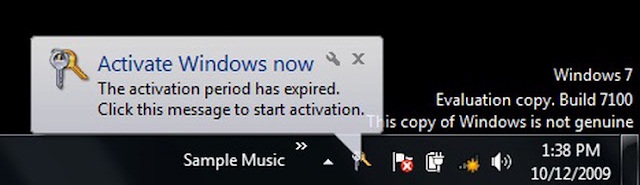
How To Remove Windows 7 Genuine Notifications Completly
So guys first you download this software known as removewat
Important Steps
1. After Downloading This Software . extract it to your computer and open removewat.exe
by the way if your antivirus prompt you the file as virus then don’t worry . just ignore it .
2. After click on removewat.exe and you wait just few minutes . because after sometime it’s totally done.
3. After Restart Your system . you can see that windows 7 Genuine Notification is removed.
So guys i hope you find this tips and tricks very helpful for you .
if any one guy have any problem then ask me via comments
Enjoy Guys! and don’t forget to post your comments. � MyTricksTime.com
Trick To View Facebook Photos in Full Screen Mode
One Month Ago Facebook Came Up With Photo Viewer . In Revamped Photo Viewer , All Comments , Likes , Tags Were in The Right Side Bar And Photo Was in Left Side . Now Facebook Has Published Out New Photo Viewer . Which Allows Users to View Facebook Photos in Full Screen Mode .
There Is One Easy Way To View Facebook Photos IN Full Screen Mode .
1. First You Click on Options Button
2. And Now Choose Full Screen Option For View Facebook Photos in Full Screen Mode
That’s It
And Now Use ESC Key For Exit Full Screen Mode
Read also : Make Invisible Folder In Windows
NOTE – New Full Screen Photo Viewer is Works only on Latest Version Of Google Chrome And Mozilla Firefox
Enjoy Guys! and don’t forget to post your comments. � MyTricksTime.com
Go Offline for Selected Friends on Facebook
As we know that Logging In to our Facebook Account set our Default Status to Online. But what if we want to set our Status Offline even if we are Logged In to Our Facebook Account ?
So for that there is the Trick on How to Go Offline for Selected Friends on Facebook
So to use this Trick just follow these Simple Steps:
- Log In to your Facebook Account.
- Open the Chat Box of the Friend to which you want to Go Offline.
- Click on the Star Button from the Top of the Box and Select ” Go Offline to ” Option.
- Now it is done. Your Friend would no Longer be able to Chat with you Online.
- If you want to Revert it back, i.e. Go Online for that Friend then Select ” Go Online to ” Option from Chat Box.
- You will be again able to Chat with your Friend Online.
- Now if you want to Go Offline to all your Online Friends then Click on Star Button on Chat Bar and Select ” Go Offline “.
Enjoy Guys! and don’t forget to post your comments. � MyTricksTime.com
[solved] How To Find If Someone Is Using Your Facebook Account
- Have you ever suspected that someone else is accessing your Facebook account?
- Have you found any suspicious activity on your Facebook profile?
- Want to sign out from your Facebook account remotely?
- Forgot to log out from Facebook?
Where can I find these setting on Facebook?
- Log in to your Facebook account>>Account>>Account settings>>Security>> Active sessions.
Now you can see the computer/mobile devices you have logged into your Facebook account and the date of your last access to Facebook.
For more safety to your Facebook account we requested to activate mobile sms alerts and email notifications. If someone else tries to log in to your Facebook you will receive notification via email and sms instantly, and if it was an unauthorized access you can take further steps to end that session using the above method.
Enjoy Guys! and don’t forget to post your comments. � MyTricksTime.com

.jpg)