7 Killer SEO Steps to Optimize Your Website in SERP

SEO optimize your blog or make it appear on top Search Engine Results to enhance the traffic on your site.
Basically, the thing matters here, is to figure out the keywords on which you want the visitors to reach your site through Search Engine Results Page (SERP).
If you are new to blogging and SEO in particular, you should be aware of some basic SEO tips to improve your site�s ranking in the SERPs.

7 Killer SEO Steps to Optimize Your Website in SERP

1. Keywords in Title Tag

Title Tag is one of the most significant elements to position your webpage higher in your chosen keyword. This tag gets visible in the clickable link on the SERPs. It�s better to start your title with a long-tail keyword having less competition. Try to use your Keyword within the range of 65 characters, as search engine don�t consider anything after 65 character limit. Don�t repeat your Keyword in your title; otherwise your site could be penalized.

2. Use Keywords in Header Tags

Header tags are one of the most imperative On-page search engine optimization factors. Use the similar keywords in all heading tags. This way, you can easily bring focus of the page on a sole keyword while getting superiority in the Search Engines. You should better utilize your main keyword in first heading tag while trying to keep the Keyword at first.

3. Use Keywords in Image Alt tag

Images can express many words but SE Spiders don�t translate images, they only read the alt tag to understand the image with textual description. Therefore, it is vital to provide a significant description of an image with using keywords. It will optimize the images used in your content and rank them higher in image searches.

4. The Power of Internal Linking

One significant factor of SEO that is often ignored is Internal Linking. The better approach is to reactivate and revitalize the old posts in archive, as compared to link them in your fresh posts. Don�t miscalculate the authority of internal linking in the distribution of page rank.

5. Links from Directories

Planting in directories, such as Yahoo, DMOZ and other article and content listings can be quite helpful to achieve positive ranking overall. Some people believe that it�s not possible to list your content on DMOZ, especially if you don�t have much credible data, but if you could, it may bring you positive results.

6. Use Meta Description

Though Google is now giving less importance to meta-tags, there are two meta-tags that still matter in SEO, But, Meta description Tag still has importance from a human and search engine perspective. Description meta-tag is what you use to illustrate your website. In fact, this description is what the visitors see when your site appears on the search results.

7. Use Keywords Meta Tag

Fill your Keyword tags with relevant keywords while avoiding replicas and Keyword stuffing. The Keywords you mention in the keyword tag should be relevant to the context of your page. Keywords used in meta-keywords-tag must somehow appear somewhere within the body of text. Otherwise, your webpage can be penalized for irrelevant content.

Enjoy Guys! and don’t forget to post your comments. � MyTricksTime.com

Microsoft Office Coming On Android And IOS

Microsoft Office On Android And IOS

Microsoft Office for iPad images leaked few months ago suggesting that Microsoft Office for iPad could launch soon. The Daily published this information at that time, but Microsoft denied the report but The Daily stood by the report.

Now BGR is reporting that Microsoft is working on both Android and iOS versions of the Office suite. According to BGR Microsoft Office for Android and iOS might launch by November. Office suite hugely popular on the desktops is almost absent on the tablets and smartphones. Apple dominates the tablet market with iPad and it is natural to think that Microsoft doesn�t want to miss this opportunity to put Office on iOS devices. Office has been a cash cow for Microsoft. 


BGR�s source has reportedly seen the iOS version of the Office suite and is identical to the leaked image we have seen before. The loading screen in the app clearly said �Office for iOS� instead of Office for iPad, that means Office for iPhone and iPod devices will also be available along with Office for iPad.

Read Also : 

How to create a folder without any name


Microsoft might think to promote its Office suite on Windows 8 tablets and Windowsphone devices, but Windows 8 tablets are not yet in the market and Windows phone is not a success so far compared to Android and iOS. Android and iOS rule the smartphone and tablet market, so it makes perfect sense that Microsoft might want to release Office for both these platforms.

If at all released Microsoft Office for Android and iOS would be welcome, and coupled with SkyDrive you could access and edit office files on your smartphone and desktop PC and keep them in sync.

Enjoy Guys! and don’t forget to post your comments. � MyTricksTime.com

How To Get Maximum Benefit From Your Guest Post

Getting more and more traffic is a dream of all bloggers. This dream comes true only when you do hard work properly. Blogging is not an easy job to do. Well it�s not so hard when you do it properly. Guest posting is really a superb way to get maximum traffic to your blog. But if you don�t know how to guest post and where to guest post than your guest post will not generate a good number of traffic to you. There are some secret tips and some guidelines which you have to follow and you will absolutely get a good number of traffic towards your blog.

1. Choose A Right Blog

This is most important part to get maximum benefit from your guest post. The blog must have PR (Google PageRank) Must be 3 or greater. Alexa rank must be less than 1 lack. This blog (ComLuv) is a heaven of guest blogger and you will get a huge lot of traffic from here so this is a highly recommended blog for guest posting. If you choose a worst blog which have no traffic then definitely you are not getting even a single visitor to your blog from it so be safe that the blog you choosen for guest post is right and it will bring you a good traffic.

2. Content Is King

I think you heard this sentence at least 20 times before you started blogging and now again. Why it�s so important? It�s because readers read the blog for getting knowledge not for wasting their time. Why the content of a guest post must be quality? It�s because you have to get approval for the post to be live on that blog. Its not the only reason but there is a more. If you will write superb content then the post will be popular on that blog for sure. It will be in light and more people will attract to it. They will read your post and will be impressed from it. They would like to read more posts by you and your blog have them so readers will go to your blog.

3. Building Backlinks

Backlinks give you help in two ways. They attract new readers to your blog and they also help in Search Engine Optimization. To rank first in search engines, High PR backlinks are necessary to have and they are also hard to build. So choose a blog which gives you minimum 2 backlinks in author bio and 1 in article.

4. Author Bio

First impression is last impression.� Your bio must be spectacular and your blog�s link must be there. If people like your post then they will surely like to know more about you and connect with you and your blog to get such unique articles daily so try to make an author bio which attracts people use catchy words in it. You are about to get maximum so you also have to do maximum. Make the author bio blossom so people will surely like to visit your blog.

My Final Words

In every job you have to work hard and in blogging you also have to do so. No one can lead success without hard work. Do as more as you can for your blog and one day you will be in top. Yes, never lose hope. �Try and try but don�t cry.� Here is another small tip that before you put your post for review, Do read it as a visitor of a blog not like you who wrote the post. Check the post as someone else written it and you are reading it. Do change where you think its need to be changed and that�s it. So now do the guest post and get maximum benefit from it.
Enjoy Guys! and don’t forget to post your comments. � MyTricksTime.com

CSS3 Thread Out Social Sharing Widget for Blogger

When it comes to attracting attention to yourself on the internet, nothing does a better job than share buttons.
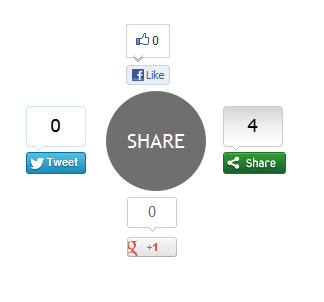
Whether its twitter or google plus, social media probably has a huge impact on your traffic. I set out to create an attention grabbing way to display buttons, and came up with this: a circle that expands revealing a bunch of Social Sharing Widget on hover.
This widget is created using Pure CSS3 and ShareThis social sharing plugin. This widget have 4 buttons: Facebook Like

button, Google +1 button, Tweet button and main ShareThis button for more social sharing links.

Note: This Blogger Social Sharing widget animated zoom out feature will only work on latest Browsers and won�t work with Internet Explorer ( not tested with IE 10 ).

Live Demo

Add CSS3 Thread Out Social Sharing Widget In Blogger

1. Login to Blogger Dashboard > Design tab > Edit Html
2. Click on Expand Template widgets check box
3. Search for <div class=�post-footer-line post-footer-line-1?> HTML tag
4. And Put Below Code immediately after it
<b:if cond='data:blog.pageType == &quot;item&quot;'>
<style type="text/css">
.ringMenu {
width: 100px;
margin: 150px auto;
}
.ringMenu ul {
list-style: none;
position: relative;
width: 100px;
color: white;
}
.ringMenu ul a {
color: white;
}
.ringMenu ul li {
-webkit-transition: all 0.3s ease-in-out;
-moz-transition: all 0.3s ease-in-out;
-o-transition: all 0.3s ease-in-out;
-ms-transition: all 0.3s ease-in-out;
transition: all 0.3s ease-in-out;
}
.ringMenu ul li a {
display: block;
width: 100px;
height: 100px;
background: rgba(50,50,50,0.7);
text-align: center;
line-height: 100px;
-webkit-border-radius: 50px;
border-radius: 50px;
font-size: 20px;
}
.ringMenu ul li a:hover {
background: rgba(230,150,20,0.7);
text-decoration: none;
}

.ringMenu ul li:not(.main) {
-webkit-transform: rotate(-180deg) scale(0);
-moz-transform: rotate(-180deg) scale(0);
-o-transform: rotate(-180deg) scale(0);
transform: rotate(-180deg) scale(0);
opacity: 0;
}
.ringMenu:hover ul li {
-webkit-transform: rotate(0) scale(1);
-moz-transform: rotate(0) scale(1);
-o-transform: rotate(0) scale(1);
transform: rotate(0) scale(1);
opacity: 1;
}
.ringMenu ul li.top {
-webkit-transform-origin: 50% 152px;
-moz-transform-origin: 50% 152px;
-o-transform-origin: 50% 152px;
transform-origin: 50% 152px;
position: absolute;
top: -70px;
left: 50px;
}
.ringMenu ul li.bottom {
-webkit-transform-origin: 50% -52px;
-moz-transform-origin: 50% -52px;
-o-transform-origin: 50% -52px;
transform-origin: 50% -52px;
position: absolute;
bottom: -70px;
left: 50px;
}
.ringMenu ul li.right {
-webkit-transform-origin: -52px 50%;
-moz-transform-origin: -52px 50%;
-o-transform-origin: -52px 50%;
transform-origin: -52px 50%;
position: absolute;
top: 10px;
right: -50px;
}
.ringMenu ul li.left {
-webkit-transform-origin: 152px 50%;
-moz-transform-origin: 152px 50%;
-o-transform-origin: 152px 50%;
transform-origin: 152px 50%;
position: absolute;
top: 10px;
left: -50px;
}
</style>
<div class="ringMenu">
<script type="text/javascript">var switchTo5x=false;</script>
<script type="text/javascript" src="http://w.sharethis.com/button/buttons.js"></script>
<script type="text/javascript">stLight.options({publisher: "ur-e9856caa-8f3b-40a6-82af-461e390fe167"});</script>
<ul>
<li class="main"><a href="#main">SHARE</a></li>
<li class="top"><span class='st_fblike_vcount' displayText='Like'></span></li>
<li class="right"><span class='st_sharethis_vcount' displayText='Share'></span></li>
<li class="bottom"><span class='st_plusone_vcount' displayText='+1'></span></li>
<li class="left"><span class='st_twitter_vcount' displayText='Tweet'></span></li>
</ul>
</div>
</b:if>
4. Save your Template and Done!
Related Widget  : No 1. A Colorful jquery digital clock

Customization

The demo and post codes are same. You have to adjust this widget with your blog design ( how do I know your blog design look like.  No more customization needed for this CSS3 Thread Out Social Sharing Widget CSS3 Thread Out Social Sharing Widget for Blogger for Blogger, but if you want you can replace Share This script with your registered Share This account script.
Once you�ve done that, save everything and check it out! Thanks for reading, and if you liked this little tutorial and socal sharing widget don�t forget to share. It really helps. Click here for more stylish widgets

Enjoy Guys! and don’t forget to post your comments. � MyTricksTime.com
How to Add FaceBook Page Like Box to your Blog

Having a Facebook Page for our blog is a great way to promote it. Facebook Pages give you a more dynamic relationship with the public figures and organizations you are interested in. In simple words, it helps us to share blog updates to the interested facebook users who become a �fan� of our blog.
This post gives you a simple tutorial on how to add a Facebook Like Box widget to your blogs. If you haven�t created a facebook page yet, you can do it from here.

How to Add FaceBook Like Box to self-hosted WordPress:

You can do this simply by installing Facebook Like Box Widget to your wordpress. It allows you to enable Facebook Page Like Box through a widget. Refer the Installationand Screenshots sections for more help.

How to Add FaceBook Like Box to Blogger (blogspot):

  1. Go to FaceBook Plugins page HERE.
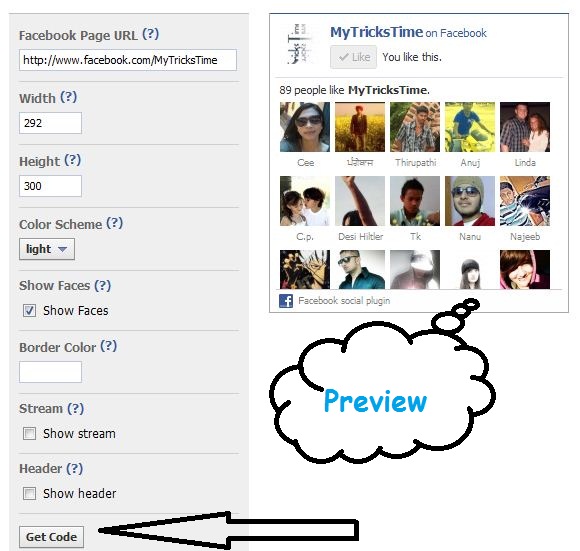
  2. Fill your Facebook Page URL or ID and customize the widget properties according to your requirements.
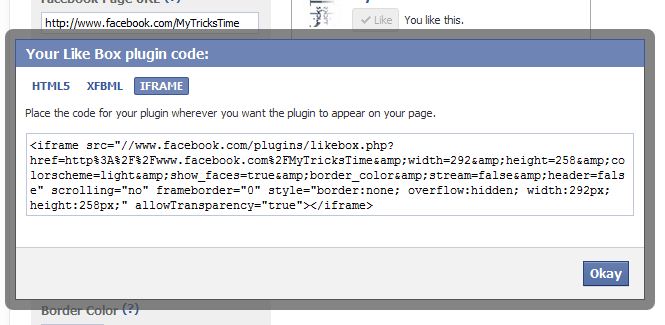
  3. After customizing the widget, click Get Code. Then copy the iframe widget code as shown below:

  4. Go to Blogger Dashboard � Layout/Design � Add a Gadget �HTML/Javascript � then paste that widget iframe code and Save.

Hope it worked fine. Don�t forget to Like MyTricksTime on facebook! 

Enjoy Guys!and don’t forget to post your comments. � MyTricksTime.com