Free 5 Way To Send Online Large Files via Email


Would you like to send out big files via an e-mail? Mailing big data files or archives  via email is actually hard challenge that lots of people suffer from. The email service usually permits us to send out files as attachments however the maximum size allowed is usually fairly small.like we all  know most famous email service aroud us such like gmail and yahoo.these both  are allows us to send files 25 mb file each time.its means we can  not send more than 25mb file by gmail or yahoo. but Imagin if you need to send large files as large as 400MB via email?
currently My goal is to explain to you how you can send lage file via email. here i am i am listed  Best 5 service which allowe you send more than 25 mb
via email.

1.Dropsend


dropsend proposes to send files at least 2 gb via email without cost They permit basically 5 file transfers each month, but its also provied you 250MB of forever online storage space.if you want to use this service than Registration is needed, they will ask you your full name, email and chose a username and password for Registration.you find an estimate for any remaining amount of time in 
min�s.

2.Pando Email


One more free service for send free large file via email pando allowe you to Send and receive big files upto 1GB for Absolutely free.You merely upload your own file via Pando, afterward Pando sends to friends and family a url to download the file through email,you know you also use that link for share on Twitter,facebook You are able to send from inside Hotmail, AOL Mail,Yahoo Mail, Gmail or Microsoft Outlook .The particular file remains alive on Pando�s servers for 1 week.so you can use this link until 7 days.


3.Zeta Uploader

This is a free program which makes it simple for anyone to send a file by around 500MB.you can send  files to numerous email addresses as same time ,if you want to protect your file via password than also you can use  password protect the files if required. Plus, you can even set the program to inform you once the files have been downloaded by the individuals.

4.TransferBigFiles


Allows you send large files of size 1 GB each by email. Any data files can easily be password covered and also you can insert a individual message to the email you send to the recipients. Whenever your recipients download that file, you will get e-mail notices .You can send the uploaded file to several email recipients using one single click.


5.File Dropper


This similar site like Pando Email but This site allows you to send files upto  5 GB in space. You are able to transfer videos,data file photos,movies, and quite possibly any kind of file with this service. The only real problem using File Dropper is that you are not able to add numerous files at one time. As soon as the upload is finish,you will get one url link copy that you can e-mail that link to your recipients so your  recipients  can download that file. Generally there are no sign ups or registration  involved with File dropper. But, registrations provide you  advantages because you will be able to keep track of your files, protect your file via password and label data files as personal and also you can remove files afterwards.

Guest Post By :
Mr. Ankit Varma
You want to download all Games like : HD Games, Latest Games   CLICK HERE

5 Cool Numbered Page Navigation Widgets For Blogger

Page Navigation Widgets For Blogger

It�s been a long time, I�ve posted here. I was very very busy (since I�m a student, I have weekend tests, home-works etc..!), hope you understand! Well, in this post I�m gonna show you 7 different Numbered Page Navigations Widget. I�ve posted some Numbered Page Navigations before, please check them too.

Step 1 –

Go to Awesome Numbered Page Navigaiton Widget and follow all the steps except adding the CSS code. After adding the JavaScript and HTML codes then add any of the below CSS and click Save Template

Style 1

Page Navigation Widgets For Blogger

Add the below code above </b:skin>

.pagenavi span, .pagenavi a {
display
: inline-block;
padding
: 0px 9px;
margin
-right: 4px;
border
-radius: 3px;
border
: solid 1px #c0c0c0;
background
: #e9e9e9;
box
-shadow: inset 0px 1px 0px rgba(255,255,255, .8), 0px 1px 3px rgba(0,0,0, .1);
font
-size: .875em;
font
-weight: bold;
text
-decoration: none;
color
: #717171;
text
-shadow: 0px 1px 0px rgba(255,255,255, 1);
}
.pagenavi span:hover,.pagenavi a:hover {
background
: #fefefe;
background
: -webkit-gradient(linear, 0% 0%, 0% 100%, from(#FEFEFE), to(#f0f0f0));
background
: -moz-linear-gradient(0% 0% 270deg,#FEFEFE, #f0f0f0);
}
.pagenavi a.current {
border
: none;
background
: #616161;
box
-shadow: inset 0px 0px 8px rgba(0,0,0, .5), 0px 1px 0px rgba(255,255,255, .8);
color
: #f0f0f0;
text
-shadow: 0px 0px 3px rgba(0,0,0, .5);
}


Style 2

Numbered Page Navigation Widgets For Blogger

Add the below code above </b:skin>
.pagenavi span, .pagenavi a {
display
: inline-block;
padding
: 0px 9px;
margin
-right: 4px;
border
-radius: 3px;
border
: solid 1px #32373b;
background
: #3e4347;
box
-shadow: inset 0px 1px 1px rgba(255,255,255, .1), 0px 1px 3px rgba(0,0,0, .1);
font
-size: .875em;
font
-weight: bold;
text
-decoration: none;
color
: #feffff;
text
-shadow: 0px 1px 0px rgba(0,0,0, .5);
}
.pagenavi span:hover,.pagenavi a:hover {
background
: #3d4f5d;
background
: -webkit-gradient(linear, 0% 0%, 0% 100%, from(#547085), to(#3d4f5d));
background
: -moz-linear-gradient(0% 0% 270deg,#547085, #3d4f5d);
}
.pagenavi a.current {
border
: none;
background
: #616161;
box
-shadow: inset 0px 0px 8px rgba(0,0,0, .5), 0px 1px 0px rgba(255,255,255, .8);
color
: #f0f0f0;
text
-shadow: 0px 0px 3px rgba(0,0,0, .5);
}

Style 3

Numbered Page Navigation Widgets For Blogger

Add the below code above </b:skin>
.pagenavi {
width
:300px;
margin
: 50px auto;
}
.pagenavi span, .pagenavi a {
background
: #f7f7f7;
background
: -webkit-linear-gradient(top, #f7f7f7 0%,#f5f5f5 52%,#ebebeb 100%);
background
: -moz-linear-gradient(top, #f7f7f7 0%,#f5f5f5 52%,#ebebeb 100%);
background
: -o-linear-gradient(top, #f7f7f7 0%,#f5f5f5 52%,#ebebeb 100%);
background
: -ms-linear-gradient(top, #f7f7f7 0%,#f5f5f5 52%,#ebebeb 100%);
background
: linear-gradient(top, #f7f7f7 0%,#f5f5f5 52%,#ebebeb 100%);
padding
: 5px 10px;
text
-decoration: none;
color
: #7e7e7e;
border
: 1px solid #c6c6c6;
-webkit-box-shadow: inset 0 4px 3px rgba(255,255,255,0.6), 0 1px 3px rgba(0,0,0,.2);
-moz-box-shadow: inset 0 4px 3px rgba(255,255,255,0.6), 0 1px 3px rgba(0,0,0,.2);
box
-shadow: inset 0 4px 3px rgba(255,255,255,0.6), 0 1px 3px rgba(0,0,0,.2);
font
-weight: bold;
border
-radius:3px;
}
.pagenavi span:hover,.pagenavi a:hover, .pagenavi a.current {
background
: #9ad6fb;
background
: -webkit-linear-gradient(top, #9ad6fb 0%,#77c4fc 100%);
background
: -moz-linear-gradient(top, #9ad6fb 0%,#77c4fc 100%);
background
: -o-linear-gradient(top, #9ad6fb 0%,#77c4fc 100%);
background
: -ms-linear-gradient(top, #9ad6fb 0%,#77c4fc 100%);
background
: linear-gradient(top, #9ad6fb 0%,#77c4fc 100%);
border
: 1px solid #72ade4;
color
: #4879a6;
-webkit-box-shadow: inset 0 1px 4px rgba(255,255,255,0.75), 0 1px 3px rgba(79,126,167,.5);
-moz-box-shadow: inset 0 1px 4px rgba(255,255,255,0.75), 0 1px 3px rgba(79,126,167,.5);
box
-shadow: inset 0 1px 4px rgba(255,255,255,0.75), 0 1px 3px rgba(79,126,167,.5);
-webkit-transition: all 0.25s ease 0s;
-moz-transition: all 0.25s ease 0s;
-o-transition: all 0.25s ease 0s;
transition
: all 0.25s ease 0s;
}
.pagenavi { border:none; }

Style 4

numbered Page Navigation Widgets For Blogger

Add the below code above </b:skin>
.pagenavi {
width
:300px;
margin
: 50px auto;
}
.pagenavi span, .pagenavi a {
display
: block;
text
-decoration: none;
color
: #717171;
font
: bold 11px Arial, sans-serif;
text
-shadow: 0px 1px white;
padding
: 5px 8px;
-webkit-border-radius: 3px;
-moz-border-radius: 3px;
border
-radius: 3px;
-webkit-box-shadow: 0px 1px 3px 0px rgba(0,0,0,0.35);
-moz-box-shadow: 0px 1px 3px 0px rgba(0,0,0,0.35);
box
-shadow: 0px 1px 3px 0px rgba(0,0,0,0.35);
background
: #f9f9f9;
background
: -webkit-linear-gradient(top, #f9f9f9 0%, #e8e8e8 100%);
background
: -moz-linear-gradient(top, #f9f9f9 0%, #e8e8e8 100%);
background
: -o-linear-gradient(top, #f9f9f9 0%, #e8e8e8 100%);
background
: -ms-linear-gradient(top, #f9f9f9 0%, #e8e8e8 100%);
background
: linear-gradient(top, #f9f9f9 0%, #e8e8e8 100%);
filter
: progid:DXImageTransform.Microsoft.gradient( startColorstr='#f9f9f9', endColorstr='#e8e8e8',GradientType=0 );
}
.pagenavi span:hover,.pagenavi a:hover {
-webkit-box-shadow: 0px 1px 3px 0px rgba(0,0,0,0.55);
-moz-box-shadow: 0px 1px 3px 0px rgba(0,0,0,0.55);
box
-shadow: 0px 1px 3px 0px rgba(0,0,0,0.55);
background
: #fff;
background
: -webkit-linear-gradient(top, #fff 0%, #e8e8e8 100%);
background
: -moz-linear-gradient(top, #fff 0%, #e8e8e8 100%);
background
: -o-linear-gradient(top, #fff 0%, #e8e8e8 100%);
background
: -ms-linear-gradient(top, #fff 0%, #e8e8e8 100%);
background
: linear-gradient(top, #fff 0%, #e8e8e8 100%);
filter
: progid:DXImageTransform.Microsoft.gradient( startColorstr='#fff', endColorstr='#e8e8e8',GradientType=0 );
border
:none;
color
:#575757;
}
.pagenavi a.current {
color
: white;
text
-shadow: 0px 1px #3f789f;
-webkit-box-shadow: 0px 1px 2px 0px rgba(0,0,0,0.8);
-moz-box-shadow: 0px 1px 2px 0px rgba(0,0,0,0.8);
box
-shadow: 0px 1px 2px 0px rgba(0,0,0,0.8);
background
: #7cb9e5;
background
: -webkit-linear-gradient(top, #7cb9e5 0%, #57a1d8 100%);
background
: -moz-linear-gradient(top, #7cb9e5 0%, #57a1d8 100%);
background
: -o-linear-gradient(top, #7cb9e5 0%, #57a1d8 100%);
background
: -ms-linear-gradient(top, #7cb9e5 0%, #57a1d8 100%);
background
: linear-gradient(top, #7cb9e5 0%, #57a1d8 100%);
filter
: progid:DXImageTransform.Microsoft.gradient( startColorstr='#7cb9e5', endColorstr='#57a1d8',GradientType=0 );
}
.pagenavi a.current:hover {
-webkit-box-shadow: 0px 1px 2px 0px rgba(0,0,0,0.9);
-moz-box-shadow: 0px 1px 2px 0px rgba(0,0,0,0.9);
box
-shadow: 0px 1px 2px 0px rgba(0,0,0,0.9);
background
: #99cefc;
background
: -webkit-linear-gradient(top, #99cefc 0%, #57a1d8 100%);
background
: -moz-linear-gradient(top, #99cefc 0%, #57a1d8 100%);
background
: -o-linear-gradient(top, #99cefc 0%, #57a1d8 100%);
background
: -ms-linear-gradient(top, #99cefc 0%, #57a1d8 100%);
background
: linear-gradient(top, #99cefc 0%, #57a1d8 100%);
filter
: progid:DXImageTransform.Microsoft.gradient( startColorstr='#99cefc', endColorstr='#57a1d8',GradientType=0 );

}
.pagenavi a.current:active {
-webkit-box-shadow: inset 0px 1px 3px 0px rgba(0,0,0,0.5), 0px 1px 1px 0px rgba(255,255,255,1) !important;
-moz-box-shadow: inset 0px 1px 3px 0px rgba(0,0,0,0.5), 0px 1px 1px 0px rgba(255,255,255,1) !important;
box
-shadow: inset 0px 1px 3px 0px rgba(0,0,0,0.5), 0px 1px 1px 0px rgba(255,255,255,1) !important;
}

Style 5

Add the below code above </b:skin>
.pagenavi span, .pagenavi a {
display
: block;
text
-decoration: none;
color
: #717171;
font
: bold 11px Arial, sans-serif;
text
-shadow: 0px 1px white;
padding
: 5px 8px;
-webkit-border-radius: 3px;
-moz-border-radius: 3px;
border
-radius: 3px;
-webkit-box-shadow: 0px 1px 3px 0px rgba(0,0,0,0.35);
-moz-box-shadow: 0px 1px 3px 0px rgba(0,0,0,0.35);
box
-shadow: 0px 1px 3px 0px rgba(0,0,0,0.35);
background
: #f9f9f9;
background
: -webkit-linear-gradient(top, #f9f9f9 0%, #e8e8e8 100%);
background
: -moz-linear-gradient(top, #f9f9f9 0%, #e8e8e8 100%);
background
: -o-linear-gradient(top, #f9f9f9 0%, #e8e8e8 100%);
background
: -ms-linear-gradient(top, #f9f9f9 0%, #e8e8e8 100%);
background
: linear-gradient(top, #f9f9f9 0%, #e8e8e8 100%);
filter
: progid:DXImageTransform.Microsoft.gradient( startColorstr='#f9f9f9', endColorstr='#e8e8e8',GradientType=0 );
}
.pagenavi span:hover,.pagenavi a:hover {
-webkit-box-shadow: 0px 1px 3px 0px rgba(0,0,0,0.55);
-moz-box-shadow: 0px 1px 3px 0px rgba(0,0,0,0.55);
box
-shadow: 0px 1px 3px 0px rgba(0,0,0,0.55);
background
: #fff;
background
: -webkit-linear-gradient(top, #fff 0%, #e8e8e8 100%);
background
: -moz-linear-gradient(top, #fff 0%, #e8e8e8 100%);
background
: -o-linear-gradient(top, #fff 0%, #e8e8e8 100%);
background
: -ms-linear-gradient(top, #fff 0%, #e8e8e8 100%);
background
: linear-gradient(top, #fff 0%, #e8e8e8 100%);
filter
: progid:DXImageTransform.Microsoft.gradient( startColorstr='#fff', endColorstr='#e8e8e8',GradientType=0 );
}
.pagenavi span:active,.pagenavi a:active, .pagenavi a.current:hover {
-webkit-box-shadow: inset 0px 1px 3px 0px rgba(0,0,0,0.5), 0px 1px 1px 0px rgba(255,255,255,1) !important;
-moz-box-shadow: inset 0px 1px 3px 0px rgba(0,0,0,0.5), 0px 1px 1px 0px rgba(255,255,255,1) !important;
box
-shadow: inset 0px 1px 3px 0px rgba(0,0,0,0.5), 0px 1px 1px 0px rgba(255,255,255,1) !important;
}
.pagenavi a.current {
color
: white;
text
-shadow: 0px 1px #3f789f;
-webkit-box-shadow: 0px 1px 2px 0px rgba(0,0,0,0.8);
-moz-box-shadow: 0px 1px 2px 0px rgba(0,0,0,0.8);
box
-shadow: 0px 1px 2px 0px rgba(0,0,0,0.8);
background
: #7cb9e5;
background
: -webkit-linear-gradient(top, #7cb9e5 0%, #57a1d8 100%);
background
: -moz-linear-gradient(top, #7cb9e5 0%, #57a1d8 100%);
background
: -o-linear-gradient(top, #7cb9e5 0%, #57a1d8 100%);
background
: -ms-linear-gradient(top, #7cb9e5 0%, #57a1d8 100%);
background
: linear-gradient(top, #7cb9e5 0%, #57a1d8 100%);
filter
: progid:DXImageTransform.Microsoft.gradient( startColorstr='#7cb9e5', endColorstr='#57a1d8',GradientType=0 );
}
.pagenavi a.current:hover {
-webkit-box-shadow: 0px 1px 2px 0px rgba(0,0,0,0.9);
-moz-box-shadow: 0px 1px 2px 0px rgba(0,0,0,0.9);
box
-shadow: 0px 1px 2px 0px rgba(0,0,0,0.9);
background
: #99cefc;
background
: -webkit-linear-gradient(top, #99cefc 0%, #57a1d8 100%);
background
: -moz-linear-gradient(top, #99cefc 0%, #57a1d8 100%);
background
: -o-linear-gradient(top, #99cefc 0%, #57a1d8 100%);
background
: -ms-linear-gradient(top, #99cefc 0%, #57a1d8 100%);
background
: linear-gradient(top, #99cefc 0%, #57a1d8 100%);
filter
: progid:DXImageTransform.Microsoft.gradient( startColorstr='#99cefc', endColorstr='#57a1d8',GradientType=0 );
}

Enjoy Guys! and don’t forget to post your comments. � MyTricksTime.com

Pure CSS3 Expanding Vertical Navigation Menu For Blogger

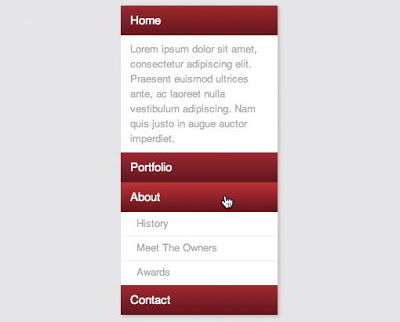
This time around we�re going to build a super useful expanding vertical navigation menu. It�s a great way to hide a lot of links in a fairly small space and the animations will add a nice touch to your site. Even if you�re a complete beginner, you should be able to pull this off.

DEMO


As you can see ( in demo ), the sections on the bottom are closed by default and slide open when you over over them. However, to add some nice variation we�ll also include a section that stays open all of the time. In the main section that is always open we�ll include a brief welcome message and in the sections that slide open will be sub-sections of navigation links.

Read also : 
Red Down Full Mobile Movie

Now that we have a good idea of where we�re going, Let�s get started!

The HTML

The first thing we�re going to do is toss in some nice HTML5 codes to wrap the menu in.

<nav>
    <div class=”menu-item alpha”>
      <h4><a href=”http://www.abushaleh.net/”>Home</a></h4>
      <p>Lorem ipsum dolor sit…</p>
    </div>
    <div class=”menu-item”>
      <h4><a href=”#”>Portfolio</a></h4>
      <ul>
        <li><a href=”#”>Web</a></li>
        <li><a href=”#”>Print</a></li>
        <li><a href=”#”>Other</a></li>
      </ul>
    </div>
    <div class=”menu-item”>
      <h4><a href=”#”>About</a></h4>
      <ul>
        <li><a href=”#”>History</a></li>
        <li><a href=”#”>Meet The Owners</a></li>
        <li><a href=”#”>Awards</a></li>
      </ul>
    </div>
    <div class=”menu-item”>
      <h4><a href=”#”>Contact</a></h4>
      <ul>
        <li><a href=”#”>Phone</a></li>
        <li><a href=”#”>Email</a></li>
        <li><a href=”#”>Location</a></li>
      </ul>
    </div>
</nav>


Though it�s not styled at all, the live preview perfectly showcases the hierarchy of our navigation menu.

The CSS

We�re already finished with the HTML. Now time to start with css styles.

* {
  margin: 0px;
  padding: 0px;
}
nav {
  font-family: Helvetica, Arial, sans-serif;
  line-height: 1.5;
  margin: 50px auto; /*for display only*/
  width: 200px;
  -webkit-box-shadow: 2px 2px 5px rgba(0,0,0,0.2);
     -moz-box-shadow: 2px 2px 5px rgba(0,0,0,0.2);
          box-shadow: 2px 2px 5px rgba(0,0,0,0.2);
}
.menu-item {
  background: #fff;
  width: 200px;
}
/*Menu Header Styles 1*/
.menu-item h4 {
  color: #fff;
  font-size: 15px;
  font-weight: 500;
  padding: 7px 12px;
  background: #a90329;
}
.menu-item h4 a {
  color: white;
  display: block;
  text-decoration: none;
  width: 200px;
}
/*Menu Header Styles 2*/
.menu-item h4 {
  border-bottom: 1px solid rgba(0,0,0,0.3);
  border-top: 1px solid rgba(255,255,255,0.2);
  color: #fff;
  font-size: 15px;
  font-weight: 500;
  padding: 7px 12px;
  background: #a90329; /* Old browsers */
  background: -moz-linear-gradient(top, #a90329 0%, #8f0222 44%, #6d0019 100%); /* FF3.6+ */
  background: -webkit-gradient(linear, left top, left bottom, color-stop(0%,#a90329), color-stop(44%,#8f0222), color-stop(100%,#6d0019)); /* Chrome,Safari4+ */
  background: -webkit-linear-gradient(top, #a90329 0%,#8f0222 44%,#6d0019 100%); /* Chrome10+,Safari5.1+ */
  background: -o-linear-gradient(top, #a90329 0%,#8f0222 44%,#6d0019 100%); /* Opera 11.10+ */
  background: -ms-linear-gradient(top, #a90329 0%,#8f0222 44%,#6d0019 100%); /* IE10+ */
  background: linear-gradient(top, #a90329 0%,#8f0222 44%,#6d0019 100%); /* W3C */
  filter: progid:DXImageTransform.Microsoft.gradient( startColorstr=’#a90329′, endColorstr=’#6d0019′,GradientType=0 ); /* IE6-9 */
}
.menu-item h4:hover {
  background: #cc002c; /* Old browsers */
  background: -moz-linear-gradient(top,  #cc002c 0%, #6d0019 100%); /* FF3.6+ */
  background: -webkit-gradient(linear, left top, left bottom, color-stop(0%,#cc002c), color-stop(100%,#6d0019)); /* Chrome,Safari4+ */
  background: -webkit-linear-gradient(top,  #cc002c 0%,#6d0019 100%); /* Chrome10+,Safari5.1+ */
  background: -o-linear-gradient(top,  #cc002c 0%,#6d0019 100%); /* Opera 11.10+ */
  background: -ms-linear-gradient(top,  #cc002c 0%,#6d0019 100%); /* IE10+ */
  background: linear-gradient(top,  #cc002c 0%,#6d0019 100%); /* W3C */
  filter: progid:DXImageTransform.Microsoft.gradient( startColorstr=’#cc002c’, endColorstr=’#6d0019′,GradientType=0 ); /* IE6-9 */
}
.alpha p {
  font-size: 13px;
  padding: 8px 12px;
  color: #aaa;
}
/*ul Styles*/
.menu-item ul {
  background: #fff;
  font-size: 13px;
  line-height: 30px;
  list-style-type: none;
  overflow: hidden;
  padding: 0px;
}
.menu-item ul a {
  margin-left: 20px;
  text-decoration: none;
  color: #aaa;
  display: block;
  width: 200px;
}
/*li Styles*/
.menu-item li {
  border-bottom: 1px solid #eee;
}
.menu-item li:hover {
  background: #eee;
}
/*ul Styles*/
.menu-item ul {
  background: #fff;
  font-size: 13px;
  line-height: 30px;
  height: 0px; /*Collapses the menu*/
  list-style-type: none;
  overflow: hidden;
  padding: 0px;
}
/*ul Styles*/
.menu-item ul {
  background: #fff;
  font-size: 13px;
  line-height: 30px;
  height: 0px;
  list-style-type: none;
  overflow: hidden;
  padding: 0px;
  /*Animation*/
  -webkit-transition: height 1s ease;
     -moz-transition: height 1s ease;
       -o-transition: height 1s ease;
      -ms-transition: height 1s ease;
          transition: height 1s ease;
}
.menu-item:hover ul {
  height: 115px;
}


The menu is Done!

Customizations

One important thing to note here is that we can�t just set the height to auto ( in css section bolded italic red ) because for some reason this disables the animation. If you don�t want the animation, a height of auto is much more flexible and allows you to vary the number of sub-menu items. If you want to do this with the animation, you�ll have to target the height for each individually.

To add more Menu Item Section, just customize and add below codes:

    <div class=”menu-item”>
      <h4><a href=”link-here“>menu-title</a></h4>
      <ul>
        <li><a href=”link-here“>sub-menu-title</a></li>
        <li><a href=”link-here“>sub-menu-title</a></li>
        <li><a href=”link-here“>sub-menu-title</a></li>
      </ul>
    </div>


One Step Installation For Blogger/Blogspot Blogs

This step for Beginner Bloggers and Blogger/blogspot users. Not every one have compatibility with coding.

To add this Menu to your blogger blog follow below steps:

1. Go to Blogger Dashboard > Layout
2. Add a HTML/Javascript widget and paste the below codes:

<style type=”text/css”>
* {
  margin: 0px;
  padding: 0px;
}
nav {
  font-family: Helvetica, Arial, sans-serif;
  line-height: 1.5;
  margin: 50px auto; /*for display only*/
  width: 200px;
  -webkit-box-shadow: 2px 2px 5px rgba(0,0,0,0.2);
     -moz-box-shadow: 2px 2px 5px rgba(0,0,0,0.2);
          box-shadow: 2px 2px 5px rgba(0,0,0,0.2);
}
.menu-item {
  background: #fff;
  width: 200px;
}
/*Menu Header Styles 1*/
.menu-item h4 {
  color: #fff;
  font-size: 15px;
  font-weight: 500;
  padding: 7px 12px;
  background: #a90329;
}
.menu-item h4 a {
  color: white;
  display: block;
  text-decoration: none;
  width: 200px;
}
/*Menu Header Styles 2*/
.menu-item h4 {
  border-bottom: 1px solid rgba(0,0,0,0.3);
  border-top: 1px solid rgba(255,255,255,0.2);
  color: #fff;
  font-size: 15px;
  font-weight: 500;
  padding: 7px 12px;
  background: #a90329; /* Old browsers */
  background: -moz-linear-gradient(top, #a90329 0%, #8f0222 44%, #6d0019 100%); /* FF3.6+ */
  background: -webkit-gradient(linear, left top, left bottom, color-stop(0%,#a90329), color-stop(44%,#8f0222), color-stop(100%,#6d0019)); /* Chrome,Safari4+ */
  background: -webkit-linear-gradient(top, #a90329 0%,#8f0222 44%,#6d0019 100%); /* Chrome10+,Safari5.1+ */
  background: -o-linear-gradient(top, #a90329 0%,#8f0222 44%,#6d0019 100%); /* Opera 11.10+ */
  background: -ms-linear-gradient(top, #a90329 0%,#8f0222 44%,#6d0019 100%); /* IE10+ */
  background: linear-gradient(top, #a90329 0%,#8f0222 44%,#6d0019 100%); /* W3C */
  filter: progid:DXImageTransform.Microsoft.gradient( startColorstr=’#a90329′, endColorstr=’#6d0019′,GradientType=0 ); /* IE6-9 */
}
.menu-item h4:hover {
  background: #cc002c; /* Old browsers */
  background: -moz-linear-gradient(top,  #cc002c 0%, #6d0019 100%); /* FF3.6+ */
  background: -webkit-gradient(linear, left top, left bottom, color-stop(0%,#cc002c), color-stop(100%,#6d0019)); /* Chrome,Safari4+ */
  background: -webkit-linear-gradient(top,  #cc002c 0%,#6d0019 100%); /* Chrome10+,Safari5.1+ */
  background: -o-linear-gradient(top,  #cc002c 0%,#6d0019 100%); /* Opera 11.10+ */
  background: -ms-linear-gradient(top,  #cc002c 0%,#6d0019 100%); /* IE10+ */
  background: linear-gradient(top,  #cc002c 0%,#6d0019 100%); /* W3C */
  filter: progid:DXImageTransform.Microsoft.gradient( startColorstr=’#cc002c’, endColorstr=’#6d0019′,GradientType=0 ); /* IE6-9 */
}
.alpha p {
  font-size: 13px;
  padding: 8px 12px;
  color: #aaa;
}
/*ul Styles*/
.menu-item ul {
  background: #fff;
  font-size: 13px;
  line-height: 30px;
  list-style-type: none;
  overflow: hidden;
  padding: 0px;
}
.menu-item ul a {
  margin-left: 20px;
  text-decoration: none;
  color: #aaa;
  display: block;
  width: 200px;
}
/*li Styles*/
.menu-item li {
  border-bottom: 1px solid #eee;
}
.menu-item li:hover {
  background: #eee;
}
/*ul Styles*/
.menu-item ul {
  background: #fff;
  font-size: 13px;
  line-height: 30px;
  height: 0px; /*Collapses the menu*/
  list-style-type: none;
  overflow: hidden;
  padding: 0px;
}
/*ul Styles*/
.menu-item ul {
  background: #fff;
  font-size: 13px;
  line-height: 30px;
  height: 0px;
  list-style-type: none;
  overflow: hidden;
  padding: 0px;
  /*Animation*/
  -webkit-transition: height 1s ease;
     -moz-transition: height 1s ease;
       -o-transition: height 1s ease;
      -ms-transition: height 1s ease;
          transition: height 1s ease;
}
.menu-item:hover ul {
  height: 115px;
}
</style>
<nav>
    <div class=”menu-item alpha”>
      <h4><a href=”http://www.abushaleh.net/”>Home</a></h4>
      <p>Lorem ipsum dolor sit…</p>
    </div>
    <div class=”menu-item”>
      <h4><a href=”#”>Portfolio</a></h4>
      <ul>
        <li><a href=”#”>Web</a></li>
        <li><a href=”#”>Print</a></li>
        <li><a href=”#”>Other</a></li>
      </ul>
    </div>
    <div class=”menu-item”>
      <h4><a href=”#”>About</a></h4>
      <ul>
        <li><a href=”#”>History</a></li>
        <li><a href=”#”>Meet The Owners</a></li>
        <li><a href=”#”>Awards</a></li>
      </ul>
    </div>
    <div class=”menu-item”>
      <h4><a href=”#”>Contact</a></h4>
      <ul>
        <li><a href=”#”>Phone</a></li>
        <li><a href=”#”>Email</a></li>
        <li><a href=”#”>Location</a></li>
      </ul>
    </div>
</nav>


3. Save and Drag it in your sidebar. Done 🙂

I hope you enjoyed this walkthrough of building an animated vertical navigation menu. If you can spot any Bug or you face any problem please let us know.

Enjoy Guys! and don’t forget to post your comments. � MyTricksTime.com

Microsoft Sold 40 Million Windows 8 In A Month

It�s been a month since the launch of Windows 8 on October 26. The reaction has been mixed, some users praising the new UI, while others think it�s the worst thing to ever happen to personal computing. Despite all of that, Windows 8 seems to be doing pretty well for itself.

Tami Reller, CFO for MIcrosoft�s Windows division, announced today at the Credit Suisse 2012 Annual Technology Conference that the company has sold 40 million Windows 8 licenses in just a month. Reller also said that Windows 8 is outpacing Windows 7 in regards to upgrades.

Read also : Windows 8 downloads | Direct link


Beyond that, the company said that the Windows Store has seen some success thus far. Without citing specific numbers, the company reported that a number of apps have earned more than $25,000 in revenue since launching on the Windows Store. In a bid to get more developers on board, Microsoft also reminded everybody that developers get to keep 80 percent of all app revenue over its lifetime.

Windows 8 is doing pretty well, but Microsoft is remaining mum on other Windows 8 devices like the Surface and Windows Phone 8. A recent report says that the Nokia Lumia 920 is doing well, but there�s been no word on how well HTC or Samsung�s Windows Phone 8 devices are performing. The Surface, however, is where the worry starts to seep in. Despite selling out of pre-orders for the base model, Microsoft has remained silent on just how well it�s doing beyond Microsoft CEO Steve Ballmer saying sales were �modest.�

Read also :  Whats new in windows 8


Microsoft�s newest OS may be off to a decent start, but it�s the future that most are worried about. The recent departure of Windows boss Steven Sinofsky did not look good despite MIcrosoft�s attempts at making it seem like an amicable split.

It�s looking pretty good for now, but Microsoft shouldn�t slow down. It needs to continue building out the Windows Store and attracting developers to the platform. The shared kernel between Windows 8 devices, including PCs, phones and tablets, is the best thing Microsoft has going for it at the moment.

Enjoy Guys! and don’t forget to post your comments. � MyTricksTime.com

IPhone 5 VS IPhone 4: Comparison

Progress is always developing. Old models are displaced by new technologies. New models are improved, they have new possibilities. Comparing iPhone 4 and iPhone 5 we will better understand development of progress.


Advantages Of IPhone 5 In Comparison With IPhone 4:

1. The iPhone 5 is more comfortable in using. It is thinner than iPhone 4(9.3 mm VS 7.6mm). You even don�t feel it in your pocket.
Read also:  The Samsung Galaxy S III : Review

2. Both of them have Retina displays. But display�s surface is better. Color saturation has increased to 40%.

3. The iPhone 5 is longer than his predecessor. More space for photos, videos, apps, and websites.

4. This new model is vastly lighter versus iPhone 4(137g). His weight is 112 g.

5. The iPhone 5 work faster. The iPhone 4 has A4 chip, which performs four times slower in compare with A6. In speed new iPhone has cracked a record to the smartphone.

6. The iPhone 5 doubles 512 MB of random-access memory (RAM) in iPhone 4. New model�s RAM is 1 GB.

7. The iPhone 4 offers only one variant of flash memory-8 GB. The iPhone 5 give you possibility to choose flash memory, which you need- 16/32/64 GB.

8. New model has 4G LTE (Long Term Evolution). LTE download speed ranges from 8Mbps to 40Mbps. The iPhone 4 has only 3G speeds.

9. Battery life of iPhone 4 is 7 hours. With iPhone 5 you can talk an hour more. It is really achievement, because of LTE.

10. The camera in iPhone 5 is fine and spiky. Your video and photos (720p video to 1080p video), video calls will be more qualitative, because of improvement of the front-facing (Face Time) camera (from VGA to 1.2 MP front).

Progress will never stand. During the time, people�s demands change and, as a result, new models become old. Today the iPhone 5 is significantly more perfect and improved in comparison with iPhone 4. Tomorrow iPhone 5 will be less advanced because of appearing iPhone 6.

Enjoy Guys! and don’t forget to post your comments. � MyTricksTime.com